
Check who did what in the activity log
For OwnersChecked against the app on October 5, 2026
Settings → Activity is your organization's log: who did what, and when. Each line is written as it happens, with the names as they were then. Use it to find out who changed an agent, released a number or exported leads.
Before you start
- You're an Owner or Admin. Builders and Analysts see Activity in Settings, but the page says For owners and admins and shows nothing.
- Your plan includes The activity log. Where it doesn't, the page says On <plan> and up, such as On Growth and up, whatever your role. The log is still recorded, so it's all there when you move up.
- Settings is in the account menu at the foot of the sidebar.
What's recorded
Only what a person did. What HiloVoice does on its own, such as a campaign finishing, isn't someone's action, and isn't in the log. The What filter groups the lines like this:
| What | Recorded |
|---|---|
| Agents | An agent created, edited, published, renamed, paused, resumed, archived, restored or deleted; a draft discarded; an earlier version brought back |
| Phone numbers | A number bought, added, released, given to an agent or taken off it, connected or disconnected |
| Campaigns | A campaign created, launched or scheduled, paused, resumed, rescheduled, cancelled or deleted; a person taken off its list |
| Leads | A lead archived, restored or deleted; leads exported |
| Integrations | A connection made or removed |
| Transfer destinations | A destination added or changed, or transfers to it switched on or off |
| Transfer list | A number added to the transfer list or taken off it |
| Blocked numbers | A number blocked or unblocked |
| Organization | The organization's settings changed, call limits changed, Download everything used, the organization closed or reopened, the plan changed. Also what HiloVoice did to it: a trial given, calls paused or turned back on, HiloVoice viewing the organization to help you |
| People | Someone invited, joining, a role changed, ownership handed over, someone removed or leaving. Also HiloVoice turning a person's sign-in off or on, or sending them a password reset |
| API keys | A key made or revoked |
Note: A run of edits to one agent by one person is one line with a count, such as Edited Front desk · 14 times since 9:02. A new line starts after 30 minutes without an edit.
The log
Each line shows When, Who and What, newest first. On a phone, When and Who sit under the line.
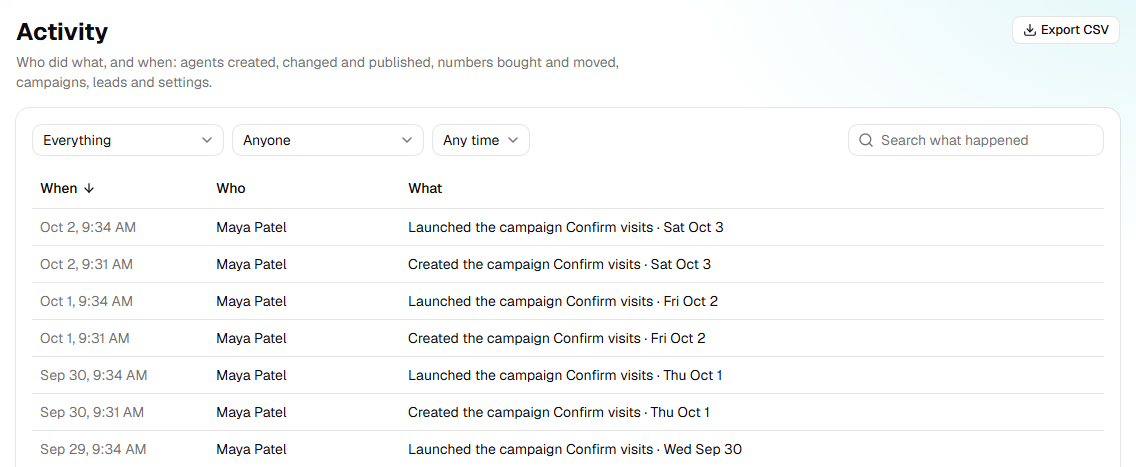
- When reads such as Today, 9:40 AM. Hover over it for the full date and time.
- Who is the person's name. HiloVoice means HiloVoice's own people, or HiloVoice itself, such as a plan change from a payment. Someone no longer here means a person who has since deleted their account.
- Click the When heading to read oldest first.
Steps
Find something in the log
Open Settings → Activity.
In the first box, choose what to show: Everything, or one kind, such as Agents.
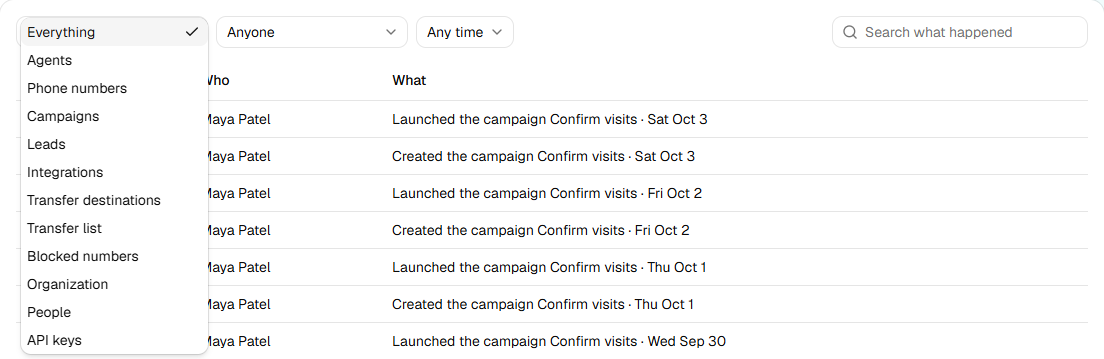
In the second box, choose Anyone, or one person on the team.
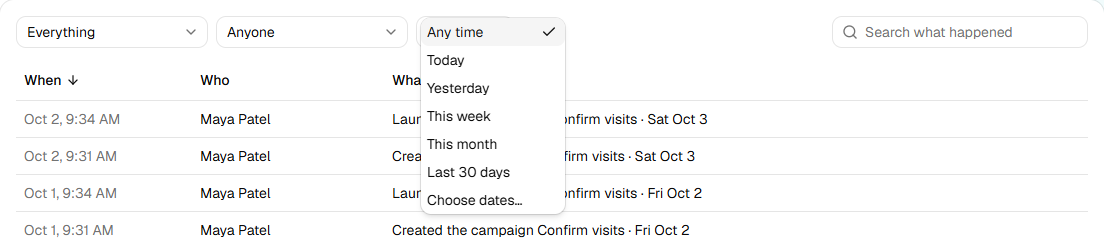
In the period box, choose Any time, Today, Yesterday, This week, This month, Last 30 days, or Choose dates… and pick a start and an end on the calendar.
To look for a word, type it in Search what happened, such as the agent's name or a number.
If nothing fits, the page says Nothing matches. Click Clear filters to see everything again.
Export the log
- Set the filters and search for what you want in the file.
- Click Export CSV. A file named
activity-<date>.csvdownloads.
The file holds the lines the page shows: the What, Who and period filters and the search all apply. It has a row for each line, with When (UTC), Who, What, Kind, Times and First (UTC). Kind uses the words the What filter shows, such as Phone numbers. Times are in UTC, not your time zone.
One file holds at most 10,000 lines, the newest. When there are more, the page says The file has the newest 10,000 lines; narrow the filters for the rest. Export a period at a time to get them all.
What happens next
- The log keeps everything. There's no way to change or delete a line.
- A person who leaves or is removed keeps their name on their lines. They're no longer in the Who box, which lists the people on the team now.
If it does not work
| You see | Why | What to do |
|---|---|---|
| For owners and admins | Your role is Builder or Analyst, on a plan with the activity log | Ask an owner if you need something from the log. |
| On <plan> and up | Your plan doesn't include the activity log | An owner can change the plan under Settings → Billing. What happened meanwhile is there when you do. |
| Nothing yet | Nothing has been done since the log started | Lines appear as people make changes. |
| Nothing matches | No line fits the filters | Click Clear filters, or widen the period. |
| Couldn't export the activity. | The file couldn't be made | Try again. |
| The file has the newest 10,000 lines; narrow the filters for the rest. | More lines fit the filters than one file holds | Export a shorter period, or one kind or person, at a time. |
Read next
- Manage members and roles — the changes listed under People
- Plans, minutes and limits — which plans include the activity log
- Make and revoke API keys — the keys listed under API keys