
Join the HiloVoice affiliate program
For OwnersChecked against the app on October 5, 2026
As a HiloVoice affiliate, you share your own link. Businesses that sign up through it are credited to you, and you earn a commission when they pay for a plan. You apply with a HiloVoice account, and you don't need to use HiloVoice for your own business.
Before you start
- You need a HiloVoice account. If you don't have one, the application page helps you make one.
- The program must be taking applications. If it isn't, the page says Applications are paused.
- Read the Affiliate Program Terms. You accept them to apply, and they set the commission, how long it lasts and when it's paid.
Steps
Apply
Open the application page, from Become an affiliate on the HiloVoice website.
If you're signed out, click Create an account or Log in. You come straight back to the application.
Fill in First name, Last name, Country, How you'll mainly promote HiloVoice and How do you plan to promote HiloVoice?. Company is optional. Website or profile is needed when you promote somewhere with an address, such as a blog, a channel or social media.
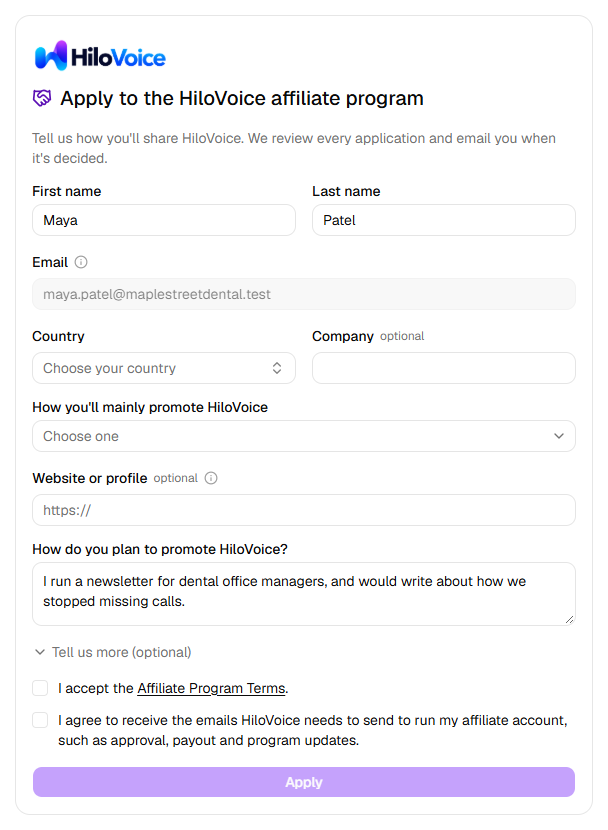
To say more, click Tell us more (optional): Audience size, Primary audience, Other websites or profiles and Notes.
Tick I accept the Affiliate Program Terms. and the box agreeing to the program's emails.
Click Apply.
Email is your account's email, and can't be changed here. Change it under Settings → Profile.
While your application is checked
The page says Application received and We'll let you know when your affiliate account is approved. The sidebar shows Affiliate program, which opens it again.
When it's approved, you get an email, You're a HiloVoice affiliate, and the sidebar shows Affiliate. If it isn't approved, you're emailed, and the page says Your application wasn't approved, with Get in touch.
Note: Some programs approve every application at once. Then the page says You'll get your link as soon as you apply., and Apply takes you straight to your dashboard.
Share your link
In the sidebar, click Affiliate.
Under Your link, click Copy link. The button says Copied.
Share the link where your audience will see it.
Set up payouts
- On Affiliate, under Payouts, click Set up payouts. Stripe's own pages open.
- Give Stripe the details it asks for, including your bank account.
- When you finish, Stripe sends you back to Affiliate, and Payouts shows where your account stands.
Note: Stripe collects your details and bank account on its own pages. HiloVoice never sees or stores them.
Leave the program
- At the foot of Affiliate, click Leave the affiliate program.
- Under Why are you leaving? (optional), say why, if you like.
- Click Leave the program. A message says You've left the affiliate program.
Your links stop crediting new sign-ups to you. Referrals already credited stay yours, and commissions you've earned are paid as the terms say. To rejoin, get in touch.
Your dashboard
Affiliate shows, top to bottom:
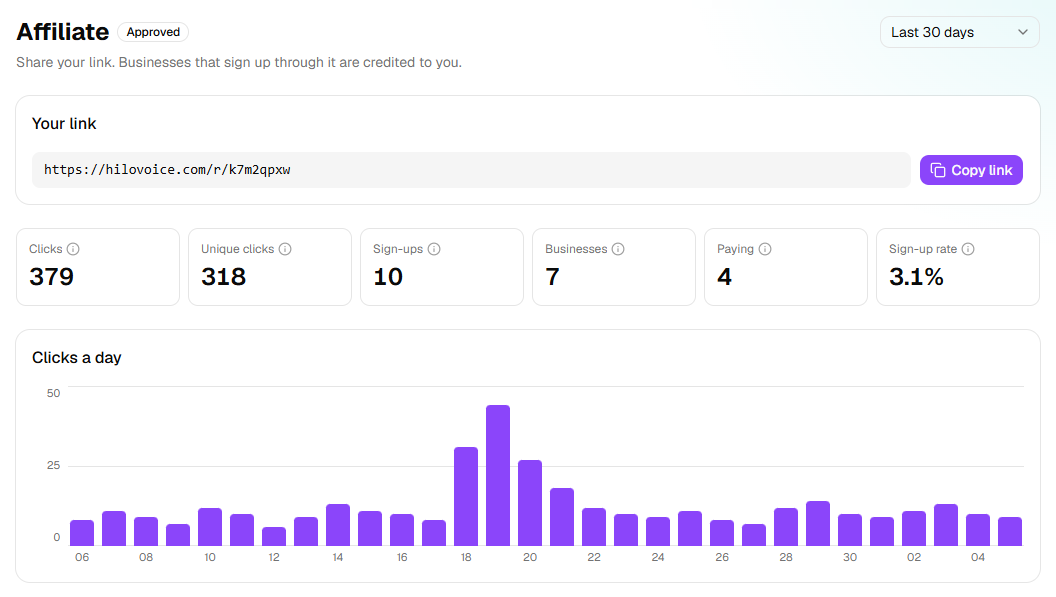
- Approved, or Suspended, beside the title, and a period box: Last 7 days, Last 30 days, Last 90 days, Last year or All time.
- Your link, with Copy link.
- Clicks, Unique clicks, Sign-ups, Businesses, Paying and Sign-up rate for the period. The info icon beside each says what it counts. Bots and link previews aren't counted.
- Clicks a day: a chart of the period.
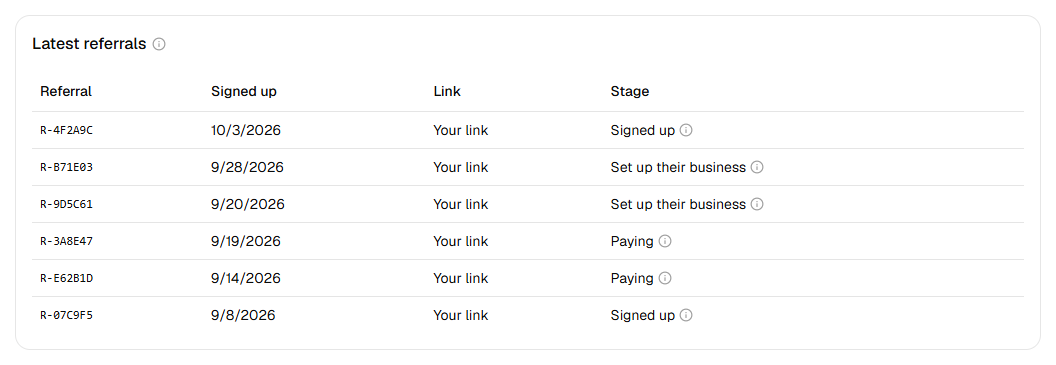
- Latest referrals: each business you referred, newest first, by a reference, with when it signed up, the link it came through and its Stage. To keep their details private, you never see the business's name.
- Commissions and Payouts, described below.
- Leave the affiliate program, at the foot.
| Stage | What it means |
|---|---|
| Signed up | Made a HiloVoice account through your link. |
| Set up their business | Set up their business on HiloVoice, but isn't on a paid plan yet. |
| Paying | On a paid plan now. |
Commissions
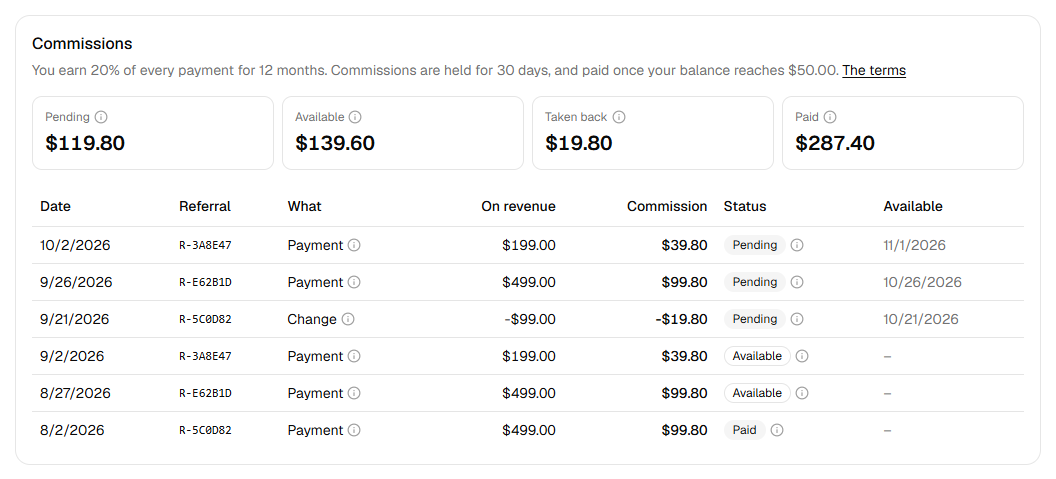
The card says what you earn, how long commissions are held and the balance a payout needs, such as You earn 20% of every payment for 12 months. Commissions are held for 30 days, and paid once your balance reaches $50.00. The terms opens the Affiliate Program Terms.
- Pending: earned, and in the holding period, so refunds and chargebacks land first.
- Available: past the hold, toward your next payout, with anything taken back already off it.
- Taken back: for refunds and chargebacks on your referrals' payments, all time.
- Paid: paid out to you, all time.
When some of your commissions are on hold, the card also says so, such as $40.00 is on hold while HiloVoice reviews it.
Below, each line shows its Date, Referral, What, On revenue, Commission, Status, and when a pending one becomes Available. What is Payment, Change (a refund or chargeback, for example), No commission or Adjustment; its info icon says why.
| Status | What it means |
|---|---|
| Pending | In the holding period. It becomes available on the date shown. |
| Available | Counts toward your next payout. A negative one is taken off it. |
| On hold | Held while HiloVoice reviews something about it. You'll hear why when HiloVoice can say. |
| Voided | Cancelled, and counts for nothing: for a breach of the terms or suspected fraud. |
| Paid | Included in a payout that was paid. |
Payouts
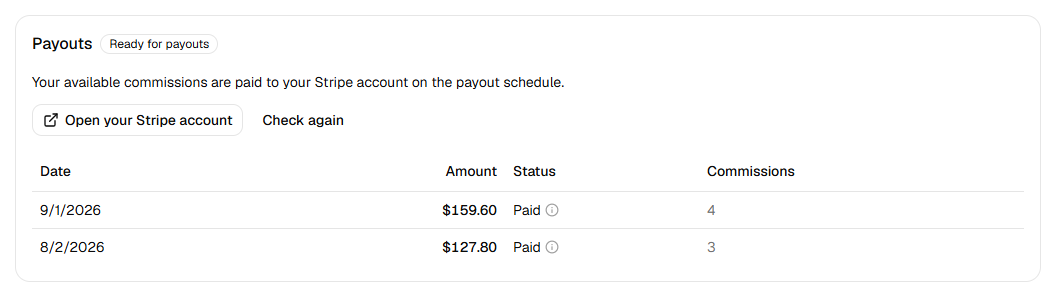
Beside Payouts, a badge says where your Stripe account stands:
| Badge | What it means | What you can click |
|---|---|---|
| Not set up | Payouts aren't set up yet. | Set up payouts |
| Information needed | Stripe needs a few more details before it can pay you. | Continue with Stripe |
| Under review | Stripe is checking your details. This usually takes a day or two. | Open your Stripe account |
| Ready for payouts | Your available commissions are paid to your Stripe account on the payout schedule. | Open your Stripe account |
| Restricted | Stripe has restricted your account. | Continue with Stripe, Open your Stripe account |
Once you've started, Check again reads your account from Stripe again.
Each payout is listed with its Date, Amount, Status and the Commissions it pays.
| Status | What it means |
|---|---|
| Scheduled | Proposed on the payout schedule, and sent once HiloVoice approves it. |
| Sending | On its way to your Stripe account. |
| Paid | In your Stripe account, which pays it out to your bank on Stripe's schedule. |
| Delayed | It couldn't be sent this time. HiloVoice is looking at it and will send it again. |
| Cancelled | Not sent. Its commissions go into your next payout. |
What happens next
- A payout is made on the program's payout schedule, once your available balance reaches the minimum. Below it, the balance carries over to the next one.
- Outside the US, payouts are sent in US dollars, and Stripe converts them to your currency as it pays your bank.
- On hold beside Payouts means HiloVoice is reviewing your account, and payouts wait until it's done.
- If your account is suspended, the dashboard says Your affiliate account is suspended. Your link still leads to the website, but new sign-ups aren't credited to you.
If it does not work
| You see | Why | What to do |
|---|---|---|
| Applications are paused | The program isn't taking applications right now | Click Get in touch, and HiloVoice lets you know when it opens. |
| Choose your country. | No country is chosen | Choose your country. |
| Choose how you'll mainly promote HiloVoice. | No way of promoting is chosen | Choose one. |
| Add the website, channel or profile you'll promote HiloVoice on. | The way you chose needs an address | Fill in Website or profile. |
| The website or profile address should start with https:// or http://. | The address is incomplete | Type it in full, such as https://example.com. |
| The Affiliate Program Terms changed while this page was open. Reload it, read them again and accept them. | The terms changed | Reload the page, read the terms and apply again. |
| Your application wasn't approved | HiloVoice turned it down, and emailed you why | Click Get in touch if you'd like it looked at again. |
| You've left the affiliate program | You left | Click Get in touch to rejoin. |
| Payouts aren't available in <country> yet. We pay affiliates in <countries>. | Payouts aren't offered in your country yet | Your commissions are kept. Get in touch. |
| Payouts aren't set up yet. We'll let you know when you can set yours up. | HiloVoice isn't making payouts yet | Wait to hear from HiloVoice. |
| Stripe couldn't be reached just now. Try again in a minute. | Stripe didn't answer | Try again in a minute. |
Read next
- Manage members and roles — your own team, which the program doesn't change
- Plans, minutes and limits — the plans the businesses you refer pay for