
Follow up on open quotes
For BuildersChecked against the app on October 1, 2026
A Follow-ups agent works on one unfinished job over as many calls as it takes, each call starting where the last one left off. This playbook builds one for Maple Street Dental, from an organization with no agents, and gives it the practice's open quotes: patients quoted for bigger treatment, such as Invisalign or a crown, who haven't said yes or no. The agent calls each one, finds out where they've got to, and calls again on a schedule until they decide, need your team, or ask it to stop. The choices that matter here are what counts as done, what the agent may offer, when your team takes over, and how each quote is described to it.
Before you start
- You're an Owner, Admin or Builder.
- The agent needs a number to call from. If your organization has none, an Owner or Admin gets one on the agent's Caller ID step.
- Your plan includes Follow-up agents and campaigns. If it doesn't, the Follow-ups card can't be chosen and names the plan that has them.
- The open quotes as a spreadsheet (CSV, XLSX or XLS): one row per patient, with their phone number, first name, and what was quoted and when.
Warning: Repeated calls, calling hours and requests to stop are regulated in many places. HiloVoice never calls back someone who asks not to be called again, but what's allowed where your patients are is yours to check. You're responsible for your own compliance; see Your responsibilities on calls.
Steps
Create the agent
- In the menu, open Agents and click Create my first agent (New agent, once you have one).
- Under What kind of business is this?, choose Dental practice.
- Under What should it handle?, choose Follow-ups. Under What should we call it?, type
Quote follow-ups. - Click Create my agent. The builder opens with a card that says <name> is ready to call for Maple Street Dental.
- Close the card, and click Goal in the step rail.
Set the goal
The goal is the agent's job on every call, and the test for done. Set a follow-up's goal has every choice.
- Under The goal, replace the starting point's goal:
The patient goes ahead with the treatment they were quoted for. - Under How HiloVoice knows it succeeded, choose They confirm it's done. In the box under
the choices, type
they want to go ahead. - Under If they can't complete it now, write what the agent may offer:
Our monthly payment plan, or a call from our treatment coordinator. - Under When a team member takes over, write
They want to negotiate the price, or ask what their insurance covers. - Under Attempts, keep Attempts per person at 4, Time between attempts on A day, then two, then three, and Voicemail on Leave a short message.
"I'll think about it" isn't done: it's progress, and the next call picks up from it. A "no" ends the patient's calls.
Tip: If a yes only counts once it's booked, choose An appointment is booked instead, and set up Appointment Booking, under Optional, so the agent can book the first visit.
Brief it, then go live
- Click Opening. Under Opening line, write
Hi, may I speak with {{first_name}}? This is Rosa from Maple Street Dental, about a follow-up item.It says what the call is about only once it has the right person. - Click Knowledge Base. Under When callers hesitate, click Add a hesitation, type
It's too expensive, write what's true about paying monthly, and choose Have someone call them back under Then offer. - Click Calling Hours and set when patients may be called.
- Click Caller ID, then Call from this beside the number patients know.
- Click Try it, make up a patient in the boxes, and click Have it call me. Answer as a patient who's still thinking.
- Click Review & Go Live, fix anything under Is it ready?, and click Go live.
Going live calls nobody. Calls go out only when a campaign that uses the agent starts.
Start calling
Make the campaign once the agent is live: it starts with the attempts and spacing on the Goal step. Import a campaign's recipients covers the file.
In the menu, open Campaigns and click New campaign.
Under Agent, choose the agent. Under Name, type
Open quotes, October, and click Create. The campaign opens on Add people.Click Download this example. For a Follow-ups agent, the file has
goal,current_statusanddue_datecolumns after the person's own, such asphoneandfirst_name.In your list, put each quote in
current_status:Quoted $4,800 for Invisalign on 12 September; asked about payment plans.The agent reads it before every call as where things stand. Agoalcolumn gives one patient a goal of their own.Click Choose a file, pick the list, and check what each column is.
Click Add <n> rows.
Open Launch, read the Ready line, and click Launch. Choose Start now, then click Launch.
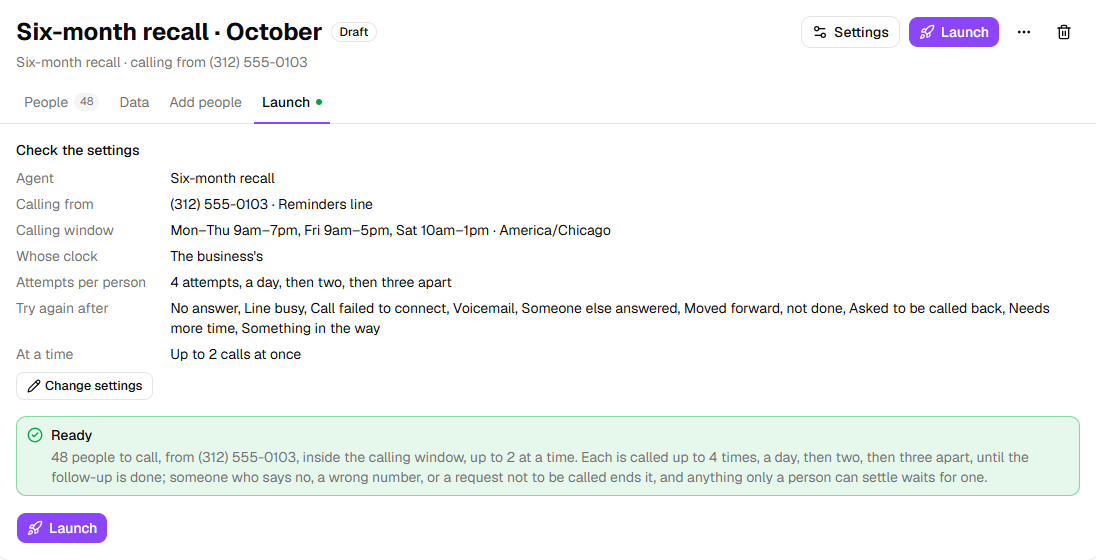
The Ready line says how it will go: Each is called up to 4 times, a day, then two, then three apart, until the follow-up is done; someone who says no, a wrong number, or a request not to be called ends it, and anything only a person can settle waits for one.
Important: Launching calls real people, inside the calling window, a few at a time. You can pause the campaign at any point.
Work the open quotes
Over the following days, each patient's row says where their quote stands. Read a follow-up's progress covers it in full.
On People, read What happened: how the last call ended, such as Moved forward or Call back requested, with Next: and In the way: under it.
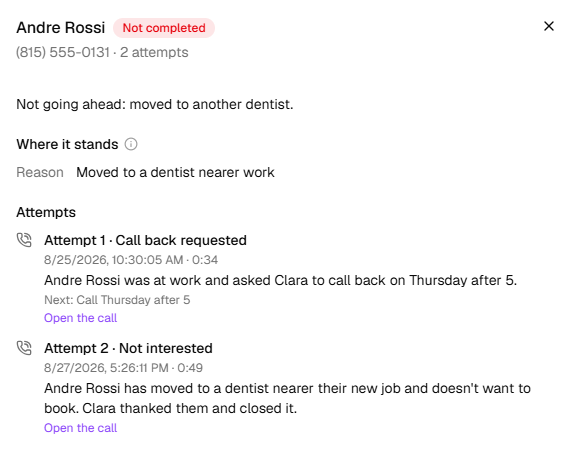
On a row's ⋯ menu, click See every attempt. Where it stands has the quote as your list described it and what the calls have established; Attempts has each call.
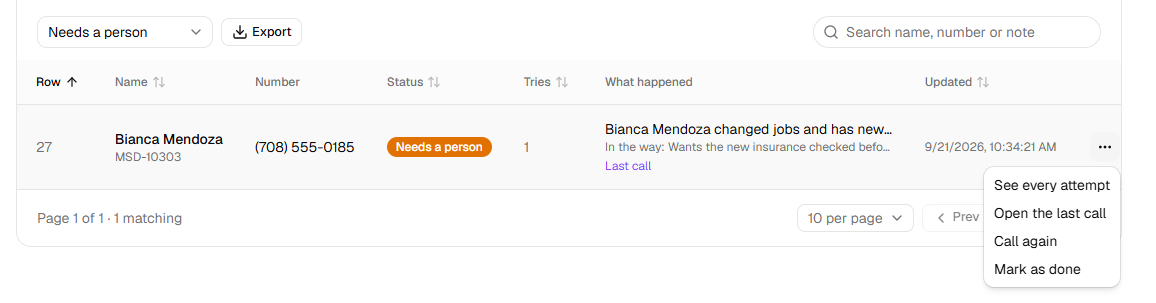
In the list that says Everyone, choose Needs a person to see who's waiting for your team.
Once someone has dealt with one, open its ⋯ menu and click Mark as done, or Call again to hand it back to the agent.
What happens next
- The figures above the list count people, not calls: Completed, Reached, Calls to complete and Not going ahead.
- A patient who asks to be called at a particular time is called then, if it's inside the calling window.
- Someone who says no, a wrong number, or someone who asks not to be called again isn't called back. A request not to be called puts the number on your block list.
- When the agent calls from your Receptionist's number, a patient who rings it back reaches the Receptionist, which carries the quote on from where the calls left it. Attempts shows that call as They called back.
- New quotes go on a new campaign, or on this one while it's paused. A caller your Receptionist took as a lead can go on too: on Leads, tick them and click Add to a follow-up campaign….
If it does not work
| You see | Why | What to do |
|---|---|---|
| The Follow-ups card can't be chosen, and says <plan> and up | Follow-up agents aren't on your plan | An owner can change the plan under Settings → Billing. |
| The buttons that write the boxes on Goal are greyed out | There's no goal yet | Write the goal first. |
| On Review & Go Live: Say what HiloVoice should help complete — the goal on the Goal step. | The goal is empty | Write one under The goal. |
| The agent also expects Goal (goal), Current status (current_status), Due date (due_date) — no column gives them, so they will be blank on the call. | Your list has none of the job's own columns | They're optional: a patient with no goal gets the one on the Goal step. Add current_status to brief the agent on each quote. |
| A row says Needs a person | The agent handed the quote to your team | Deal with it, then click Mark as done or Call again. |
| Paused: The agent is paused. | Someone paused the agent while the campaign ran | Click Resume this agent in the agent's ⋯ menu, then Resume on the campaign. |
Read next
- Set a follow-up's goal — every way of knowing a job is done
- Read a follow-up's progress — facts, blockers and next steps
- Work the Needs a person queue — the people waiting for your team
- Campaigns and recipients — attempts, callbacks and retries