
Connect Slack
For OwnersChecked against the app on October 1, 2026
Connect a Slack channel, and HiloVoice posts there when a call needs someone: a qualified caller, a caller who asked for a person, a call flagged for review, and the other situations you tick. Each message says who called, which agent took it and how it ended, with a button into HiloVoice. It never carries the transcript.
Before you start
- You're an Owner, Admin or Builder.
- You can add an app to your Slack workspace.
Steps
In Slack's app settings (api.slack.com/apps), choose Create New App, then From scratch. Name it
HiloVoiceand pick your workspace.Under Features, open Incoming Webhooks and switch it on.
Choose Add New Webhook to Workspace, pick the channel, and click Allow.
Copy the Webhook URL. It starts with
https://hooks.slack.com/services/.In HiloVoice, open Settings → Integrations, click Slack, and paste the URL under Incoming webhook URL. Under Channel, type the channel's name, such as
#front-desk: it's only a label on this page.Under Post when, tick each situation worth a message (see the table below).
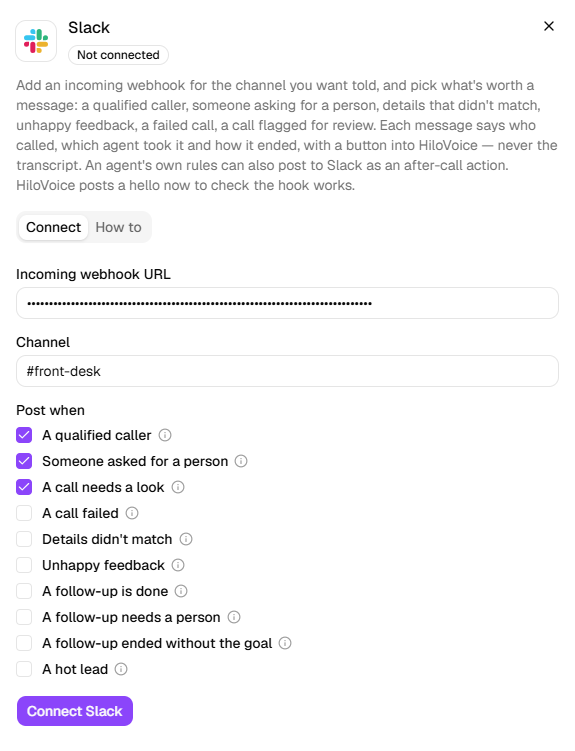
Click Connect Slack. HiloVoice posts HiloVoice is connected to the channel straight away, to prove the webhook works.
| Post when | A message when |
|---|---|
| A qualified caller | An intake call passed your rules. Ticked to start. |
| Someone asked for a person | The agent handed the call over, or was asked to. Ticked to start. |
| A call needs a look | A rule or the agent flagged the call for review. Ticked to start. |
| A call failed | It never connected, or it dropped before it got going. |
| Details didn't match | A detail-check call captured a correction. |
| Unhappy feedback | A feedback call got a low rating. |
| A follow-up is done | A follow-up call reached its goal. |
| A follow-up needs a person | The agent stopped for someone on the team to take over. |
| A follow-up ended without the goal | Not interested, a wrong number, or asked not to be called. |
| A hot lead | A lead scored Hot for the first time, with what made it hot. |
What happens next
- Each message is headed with the situation, such as New qualified caller or 🔥 A hot lead. It shows the Caller, the Agent, the Outcome and When (in your organization's time zone), any appointment the call Booked, Moved or Cancelled, then the call's summary, or why it was handed over or failed, and Open in HiloVoice.
- A call that is two situations at once gets a message for each.
- Test calls from Try it, and calls from blocked numbers, are never posted for Post when.
- Test connection posts HiloVoice is connected again.
Post from one agent's calls
An agent's own Post to Slack action posts after its calls, whatever is ticked under Post when. Add it with Add an action on Caller Handling, or on an outbound agent's After the Call step. Its message is headed Call handled by <agent>, and it runs on test calls too. See Send messages after a call.
Change what's posted
Click Slack. Under Notify on, the boxes show what's ticked now: change them and click Save. The webhook URL isn't asked for again.
Warning: A message carries the caller's name, the outcome and a summary of the call. Post to a channel only the people who should see that can read. You're responsible for your own compliance.
If it does not work
| You see | Why | What to do |
|---|---|---|
| That isn't a Slack incoming webhook URL — it starts with https://hooks.slack.com/. | What's pasted isn't an incoming webhook's URL | Copy the Webhook URL from Incoming Webhooks in Slack. |
| Slack no longer accepts this webhook (…). Create a new incoming webhook and connect it again. | The webhook was removed, or the app uninstalled | Add a new webhook in Slack, and paste it under Replace credentials. |
| Could not reach Slack: … | Slack didn't answer | Try again in a moment. |
| On a call's After the call tab: Slack isn't connected. Connect it under Settings → Integrations. | An agent has Post to Slack, and Slack isn't connected | Connect Slack, or remove the action. |
| Nothing is posted after a call | The call matched nothing ticked under Post when, or it was a test call | Tick more situations, or make a real call. |
Read next
- Send messages after a call — Post to Slack and the other after-call actions
- Connect Zapier — the same situations, sent to a Zap
- What you can connect — how a connection is checked and stored