
Put a Receptionist on the web
For BuildersChecked against the app on October 1, 2026
A live Receptionist has a page of its own, at a link such as hilovoice.com/maple-street-dental.
Anyone who opens it can talk to the agent from their browser, with no phone and no number to ring.
Share the link, or put the same page on your own website. Every conversation lands on your Calls
page, like a phone call.
Before you start
- The agent is a Receptionist, and it's live. The Website button appears once it goes live. Outbound agents don't have a page.
- To change the link, you're an Owner, Admin or Builder.
- To put the page on your website, you, or whoever looks after the site, can add an HTML block to one of its pages.
Steps
Share the link
Open Agents and click the Receptionist.
Click Website at the top of the page, beside Try it. Put <name> on the web opens.
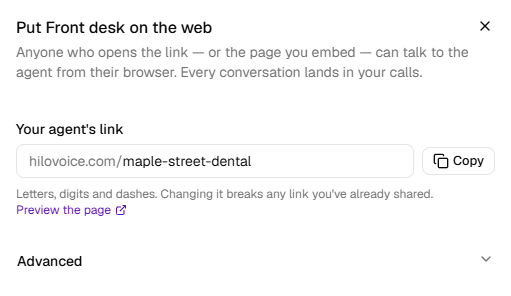
Under Your agent's link, check the name after the address. HiloVoice made it from the agent's name when it first went live.
To change it, type a new name, such as
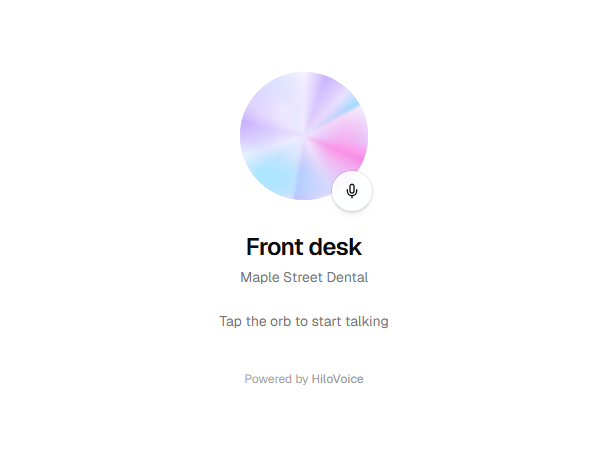
maple-street-dental, and click Save. Use letters, digits and dashes. A message says Link updated.Click Preview the page to see what visitors see.
Click Copy, and share the link: in your email signature, on social media, in a text.
Important: Changing the link breaks any link you've already shared. Choose the name before you hand it out.
Put it on your website
In the same panel, open Advanced.
Under Put it on your website, click the copy button beside the code.
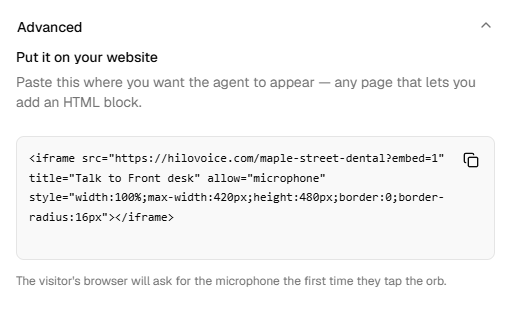
On your website, add an HTML block where you want the agent to appear, and paste the code in.
The code shows the page in a box up to 420 pixels wide and 480 tall. A visitor's browser asks for the microphone the first time they tap.
What visitors see
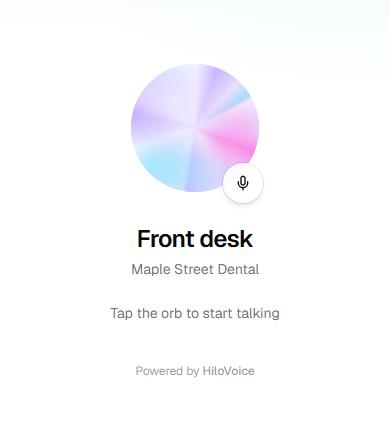
- The agent's name as it appears in your list of agents, with your organization's name under it. To show visitors a different name, change it with Rename, in the … menu next to the agent's name. The link stays the same.
- A round button, with Tap the orb to start talking under it. Tapping it starts the call; tapping it again hangs up.
- While they talk, Listening… or Speaking…, and the conversation line by line.
- When the call ends, Thanks — that's everything., and Talk again.
- Powered by HiloVoice at the foot of the page. The copy on your website leaves it out.
Warning: Visitors are recorded the way callers are. The page plays the agent's recording notice only while Say the call is recorded is on, on the agent's Conversation Style step. You're responsible for telling people their call is recorded where the law needs it.
What happens next
- Each conversation is a real call to the published agent, not a test. It shows on Calls without a number: Who says Unknown number, unless the agent learns the visitor's name.
- It counts towards your minutes like a phone call, and its after-call actions run as they would on one. A text goes out only if the visitor gives a number.
- The agent says on the page what it says on the phone. Changes reach the page when you publish them.
- While the agent is paused or archived, the page takes no calls.
- To limit how often one visitor can call, set Browser calls from one visitor per day under Call limits, on Settings → Blocked numbers. Visitors who share an office's internet connection count as one visitor.
If it does not work
| You see | Why | What to do |
|---|---|---|
| There's no Website button | The agent isn't a Receptionist, or isn't live yet | Go live on Review & Go Live. Outbound agents have no page. |
| A link name is 3–40 lower-case letters, digits and dashes, and can't be a name HiloVoice already uses. | The name is too short, too long, or one HiloVoice keeps for itself | Choose another name. |
| The link name "<name>" is already taken. Try another. | Another agent has that link | Add something of your own, such as your town: maple-street-dental-austin. |
| Couldn't copy — select it and copy by hand. | Your browser blocked the clipboard | Select the link or the code, and copy it yourself. |
| Your role here is Analyst: you can look at everything, but not change it. An owner or admin can make you a builder. | Analysts can't change the link | Ask an owner or admin. |
| Visitors see There's no agent at this link and It may have moved, or it isn't taking calls right now. | The link was changed, or the agent is paused, archived or not live | Share the current link, or resume the agent. |
| Visitors see This needs your microphone. Allow it in your browser, then tap again. | Their browser blocked the microphone | They allow it in the browser's address bar. On your website, check the pasted code still has allow="microphone" in it. |
| Visitors see That's as many calls as this page takes from one visitor in a day. Please try again tomorrow. | They've reached Browser calls from one visitor per day | Raise the limit, or set it to No limit. |
| Visitors see We couldn't start the call just now — please try again. or Couldn't connect. Check your connection and try again. | The call couldn't start this time | They try again in a moment. |
Read next
- Test an agent with Try it — hear the agent before visitors do
- Shape how a call sounds — the greeting and the recording notice
- Your responsibilities on calls — recording, and saying it's automated
- Block a number — the call limits, and numbers that are refused