
Import a campaign's recipients
For BuildersChecked against the app on October 1, 2026
The people a campaign calls come from a spreadsheet: one row per person, with a phone number in each. The other columns are what the agent is told about the person before it calls, such as their first name or the time of their appointment. You add the file on the campaign's Add people tab and say what each column is. HiloVoice then reads it row by row, and every row ends up either on the list or in a report that says why not.
Before you start
- You're an Owner, Admin or Builder.
- The campaign is a draft, scheduled or paused. A running campaign has no Add people tab: pause it first.
- The agent knows which details it reads from the list. Each detail on its Details step (Questions on Feedback and Follow-ups) set to We already know it needs a column. See Choose what the agent asks.
- The file is a CSV, XLSX or XLS, with the column names in its first row and no more than 50,000 rows. Your plan may allow fewer in one upload.
Warning: You're responsible for having permission to call everyone on your list. HiloVoice checks your own block list, not any national do-not-call registry: if one applies to you, check the file against it before you import it. See Your responsibilities on calls.
Steps
Open the campaign and click Add people. Until you choose a file, the tab shows an example: the columns this agent needs, filled in for two made-up people.
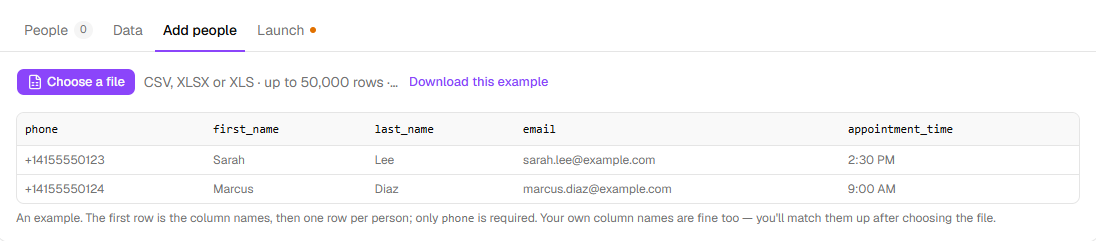
To start from that example, click Download this example and fill in
people-example.csv. Its column names already match the agent's details. Onlyphonehas to be filled in.Click Choose a file and pick your file. If a workbook has more than one sheet, choose the one with the people on it.
HiloVoice says how many rows it found and lists your columns, each with a value from the file. Beside each column, check what it is: Phone number, First name, Last name, Email, Your reference / ID, Time zone, Something the agent can use or Ignore this column. One column, and only one, is the Phone number.
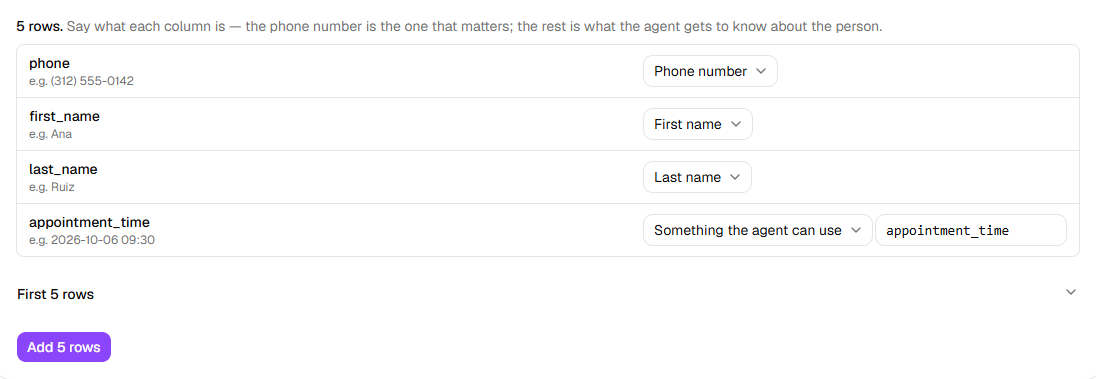
For each column set to Something the agent can use, the box beside it holds the name the agent reads it under. A column named like one of the agent's details is matched for you; for any other, pick the detail's name from the suggestions in the box, such as
appointment_time.Read the line under the list, if there is one: The agent also expects … — no column gives it, so it will be blank on the call. Map a column to that detail, or add the column to your file and choose the file again.
Click Add … rows. HiloVoice reads the file (every row becomes a recipient or a line in the report), then opens People, with everyone it added marked Waiting.
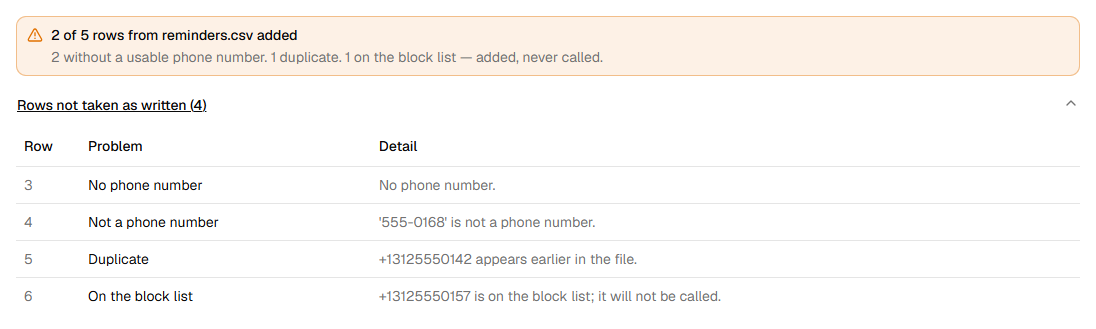
To read the report, click Add people again. It says … of … rows from … added, and Rows not taken as written lists each row that wasn't taken as it was written, with why.
Columns for each kind of agent
The example on Add people is made from your agent, so it always shows the columns that agent
reads. It starts with the person's own: phone, first_name, last_name and email. Then:
| Agent | Its own columns |
|---|---|
| Confirmations | What it reads back to confirm: each We already know it detail on Details, such as appointment_time |
| Detail checks | The record it checks: each We already know it detail on Details, such as the address you hold |
| Feedback | Often none: it asks its questions on the call. Add a column for anything on Questions set to We already know it, such as the date of the visit |
| Follow-ups | goal, current_status and due_date, each optional, then anything on Questions set to We already know it |
On a Follow-ups campaign, goal gives a person their own goal: Return the signed service agreement. Anyone without one is worked toward the goal on the agent's Goal step.
current_status says where things stand (Agreement sent 9/12), and due_date when it's due.
Two more columns are worth having. Your reference / ID shows under the person's name on
People, so you can match them to your own records. Time zone, such as America/Chicago,
lets the campaign call each person on their own clock: see Set a campaign's calling hours and
retries.
Tip: Write dates as
2026-10-06 09:30. The agent says them the way a person would, weekday and all: Tuesday, October 6, 2026 at 9:30 in the morning. Dates written your country's way work too, read in your organization's day and month order.
What a bad row looks like
Maple Street Dental's reminder calls read each patient's appointment time. This file,
reminders.csv, has five rows of people, and (312) 555-0157 is on the practice's block list:
phone,first_name,last_name,appointment_time
(312) 555-0142,Ana,Ruiz,2026-10-06 09:30
,Tom,Becker,2026-10-06 10:00
555-0168,Lena,Ortiz,2026-10-06 11:15
312-555-0142,Ana,Ruiz,2026-10-06 09:30
(312) 555-0157,Raj,Mehta,2026-10-06 14:00
The report says 2 of 5 rows from reminders.csv added, and lists, counting the header as row 1:
| Row | Problem | Detail |
|---|---|---|
| 3 | No phone number | No phone number. |
| 4 | Not a phone number | '555-0168' is not a phone number. |
| 5 | Duplicate | +13125550142 appears earlier in the file. |
| 6 | On the block list | +13125550157 is on the block list; it will not be called. |
Lena's number, on row 4, has no area code. Row 5 is Ana again, written another way; the first row for her is kept. Raj, on row 6, is added but never called: he's on the list as Skipped. A row with a time zone HiloVoice doesn't know is added too, listed as Unknown time zone, and called on your business's clock.
A phone number can be written the local way, such as (312) 555-0142 or 312.555.0142; it's read
as a number in your organization's country, set under Settings → Organization. Write a number
from another country with a + and its country code. A number already on the campaign, from an
earlier file, is a Duplicate too.
What happens next
- People are called in the order of the file. Everyone on it is added to Contacts, or their contact is brought up to date from the file.
- The block list is checked again before every call, so a number blocked after the import is skipped too.
- You can add another file while the campaign is a draft, scheduled or paused. A number already on the campaign isn't added twice.
- A row can't be taken off a campaign once it's added. Once the campaign is launched, Skip this person in a row's … menu stops someone being called.
- To put someone on a campaign that's already running, such as a caller whose details didn't get finished, use Add to a follow-up campaign… on the Leads page, a lead, or a call.
If it does not work
| You see | Why | What to do |
|---|---|---|
| Pick the column with the phone number., and Add … rows is greyed out | No column is set to Phone number | Set the column with the numbers to Phone number. |
| Variable names are lowercase letters, digits and underscores, starting with a letter. | A name under Something the agent can use has a space, a capital or a symbol in it | Change it, such as appointment_time. |
"full_name" is a name HiloVoice fills in itself on every call. Call the "<column>" column something else. (or phone, first_name and the like), and Add … rows is greyed out | HiloVoice fills that name in itself on every call, so a column can't use it | Give the column another name, or set it to Ignore this column. Set a whole name to Full name (split into first and last). |
| Two columns are both called "<name>". Give one of them another name. | Two columns under Something the agent can use have the same name | Rename one of them. |
| The file has no header row., Every column in the header row needs a name. or Two columns in the header row have the same name. | The first row isn't a set of different column names | Put one name over each column in the first row. |
| The file has a header row and nothing under it. | There are no people in it | Choose the file with the people in it. |
| That file has more than 50,000 rows. Imports are limited to 50,000 rows for now. | The file is too big | Split it, and add the parts one after another. |
| Your plan takes up to … contacts in one upload, and this file has …. Split it into smaller files, or choose a bigger plan under Settings → Billing. | Your plan limits one upload | Split the file, or an owner changes the plan. |
| The import didn't go through, with the reason, and Try again | The file couldn't be read as mapped | Put right what the reason says, click Try again, and choose the file again. |
Read next
- Set a campaign's calling hours and retries — when the people on the list are called
- Create a campaign — from the list to launch
- Monitor a running campaign — what happened with each person
- Choose what the agent asks — the details an outbound agent reads from the list
- CSV columns — every column a campaign's file can have