
What you can connect
For OwnersChecked against the app on October 1, 2026
HiloVoice works on its own: it gets your numbers, sends texts and emails, and keeps your calls and leads. Integrations connect it to accounts your business already has, so an agent can book into your calendar, log calls in your CRM or tell your team in Slack. They're under Settings → Integrations: Accounts you connect to HiloVoice, which HiloVoice acts on for you and never shares with other organizations.
What connects to what
| Integration | What it does | Where you use it |
|---|---|---|
| Acuity Scheduling, Cal.com, Calendly, Google Calendar, Square Appointments, YouCanBookMe | An agent finds open times, and books, moves or cancels appointments on the call. | An agent's Appointment Booking step |
| HubSpot | Calls logged on the contact, deals opened, leads sent over, HubSpot meetings booked on the call. | Send to your CRM after a call, Send to HubSpot on a lead, Appointment Booking |
| Salesforce | Calls logged as tasks on the Contact or Lead, new callers made Leads, Opportunities opened and moved along, leads sent over. | Send to your CRM after a call, Send to Salesforce on a lead |
| SendGrid | The emails agents send go from your own address and name. | Every email an agent sends |
| Slack | A message in your channel when a call needs someone. | Slack's Post when, and Post to Slack after a call |
| Zapier | Finished calls, and scored leads, to a Zap. | Zapier's Send when, and Send to Zapier after a call |
| Lead endpoint | Leads posted to a web address of your own. | Push to endpoint on a lead, and each scored lead |
| Twilio | The numbers in your own Twilio account, for a business that already has one. | Phone numbers |
None of them is needed to start. Without a calendar, an agent offers your booking page as a link. Without SendGrid, emails go from HiloVoice's address. Without Twilio, HiloVoice gets your numbers for you.
The records an agent can check during a call are set up apart, under Settings → Lookups: a spreadsheet, your leads, your contacts or your own API. See Add a lookup source.
The Integrations page
Each integration is one row, A to Z, with the account connected and where it stands:
| Status | Meaning |
|---|---|
| Connected | HiloVoice has used the account, and it worked. |
| Needs attention | It stopped working. The row says why, in place of its description. |
| Not connected | Nothing is set up yet. |
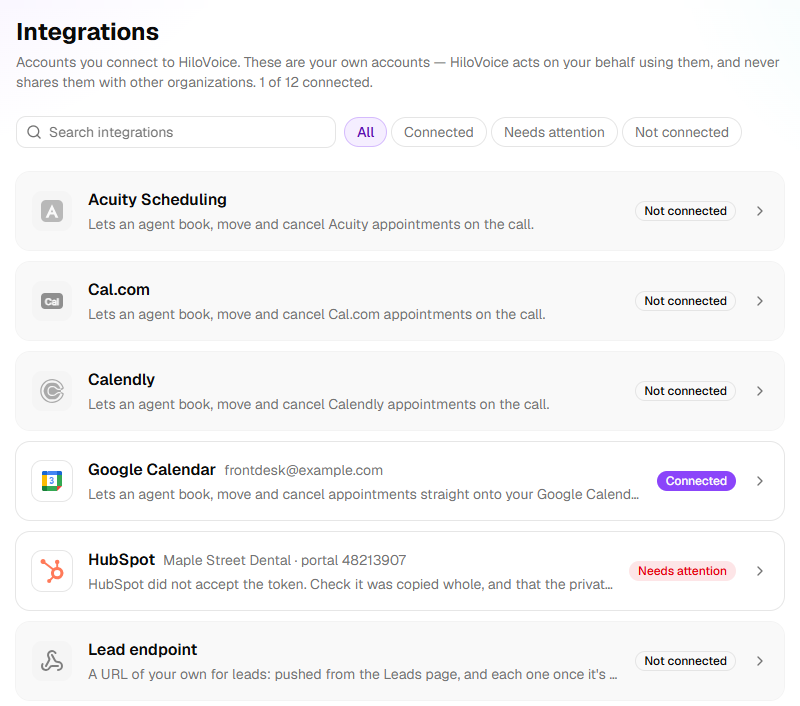
Search integrations and the filters All, Connected, Needs attention and Not connected narrow the list. Click a row to open it. On the Connect tab you paste a key, or sign in. The How to tab walks through the other service's screens, with a button that opens the first one. Once connected, the first tab is Connection: the Account, when it was Last checked, Test connection and Disconnect.
What happens to what you paste
- It's tried first. Before saving anything, HiloVoice signs in to the service with it, or, for Slack, Zapier and the Lead endpoint, sends a first message. A key the service turns down isn't kept, and the service's reason is shown. Connected means it worked with exactly what you pasted.
- It's stored encrypted and never shown again, not even masked. The row names the account instead: Account ending 4821 for Twilio, the sender's address for SendGrid, the channel for Slack.
- One of each. An organization has one account per integration. To change it, open Replace credentials (on Google Calendar, Use a different account) and paste the new one.
- Disconnect forgets it. The Disconnect dialog first says what stops working. A Google sign-in is also handed back to Google.
- Each connect, reconnect and disconnect is recorded under Settings → Activity.
When a connection stops working
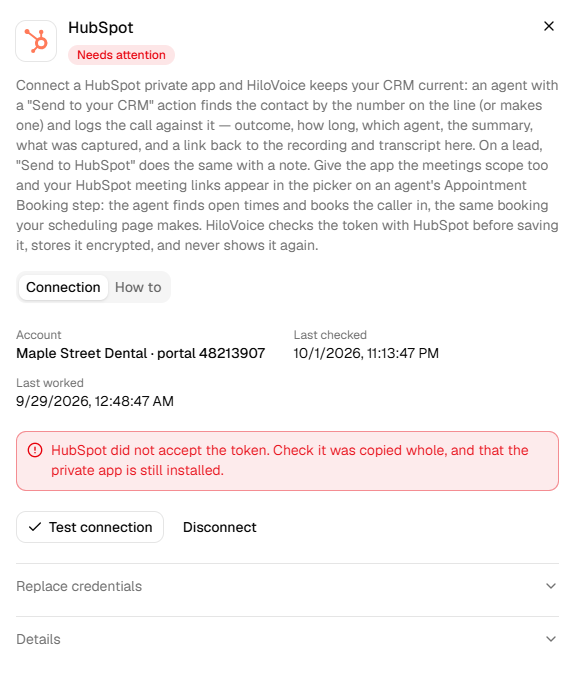
HiloVoice checks each connection again every few hours. A calendar or HubSpot is also marked as soon as it turns HiloVoice away mid-use. So a key revoked or changed on the other side shows up before a caller runs into it:
- The row says Needs attention, with the reason.
- A banner on every other page names it, such as HubSpot has stopped working, with Fix it.
- Owners, admins and builders hear A connection stopped working, on the bell and by email, unless they've chosen otherwise under Settings → Notifications.
Slack and Zapier are checked only when you click Test connection, because each check posts to your channel or runs your Zap. A message that didn't go out shows on its call instead, and owners, admins and builders are told.
To fix a connection, put it right on the other side and click Test connection, or paste a new key under Replace credentials. Meanwhile, agents do without it: an agent that can't reach the calendar takes the caller's details for someone to confirm, and emails go from HiloVoice's address.
Who can connect, and on which plans
- Owners, Admins and Builders connect and disconnect. An Analyst can open the page but not change it.
- HubSpot, Salesforce and the Lead endpoint aren't on every plan. Until they're connected, their rows show a lock with the plan they start on, such as Growth and up. The free trial includes them, and one connected before a move to a smaller plan keeps working.
- Every other integration, and every lookup source, is on every plan.
Warning: An integration sends what your agents capture (names, numbers, answers, summaries) to that service. Make sure it's somewhere you're allowed to keep that information. You're responsible for your own compliance.
Related
- Connect your calendar — booking on the call
- Send messages after a call — the actions that use Slack, Zapier and your CRM
- Add a lookup source — the records an agent checks mid-call
- Roles and permissions — what each role can change
- Plans, minutes and limits — what each plan includes