
Turn callers into leads
For BuildersChecked against the app on October 1, 2026
A Receptionist can put the people it talks to on the Leads page: one lead per person, however many times they call, with what each call captured. On the Lead Capture step you choose which kinds of caller become leads, what the Leads page shows about them, and whether HiloVoice scores each lead so the strongest are at the top. The step is on a Receptionist only, under Optional.
Before you start
- You're an Owner, Admin or Builder.
- To choose kinds of caller, switch on Treat kinds of caller differently on Caller Handling. Without it, every completed call makes a lead.
- The Leads page's columns come from what the agent asks, so set up Intake Questions first.
Steps
Choose who becomes a lead
Open the agent. In the step rail, open Optional and click Lead Capture.
Switch on Make leads from calls. With kinds of caller sorted, the kind for new enquiries (Potential new clients) is ticked to start.
Under Who becomes a lead, tick each kind of caller worth following up. Spam is never offered.
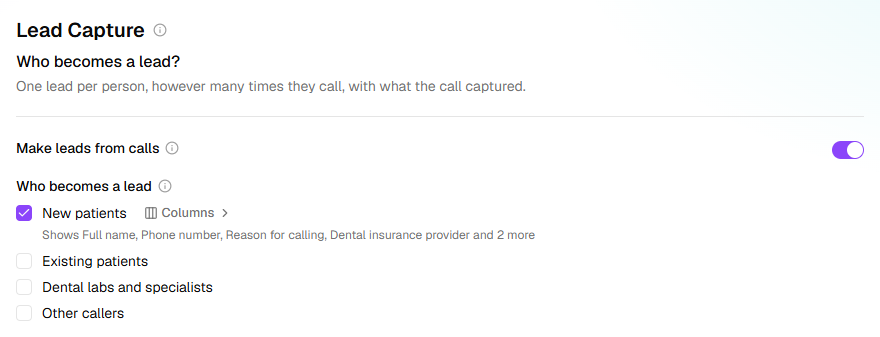
Next to a ticked kind, click Columns. Tick what the Leads page shows for these leads, up to 12: the contact details every lead holds (Full name, Phone number, Email address) and the questions this kind is asked. Put them in order with the arrows, then click Done.
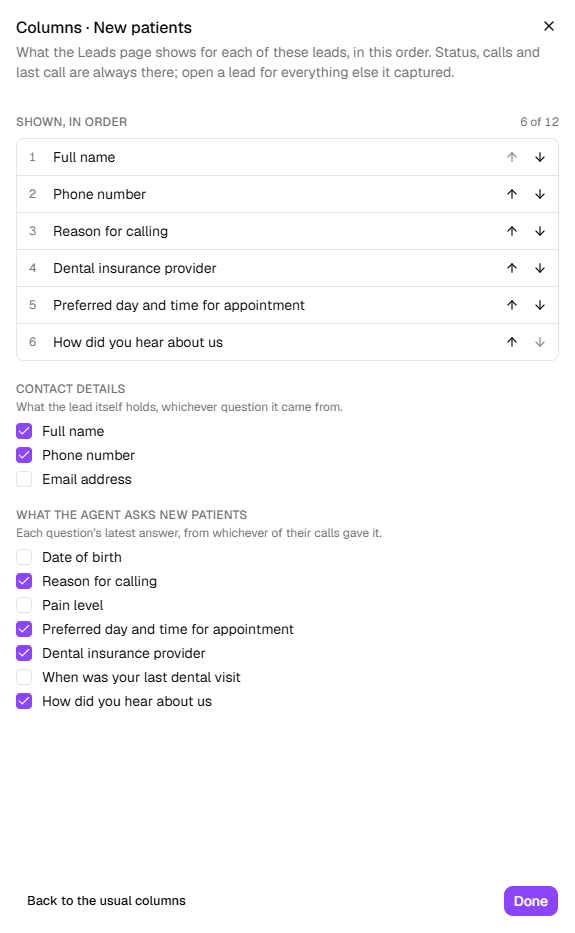
Until you choose, the line under the kind ends the usual columns: the contact details and the first few questions, six at most. Back to the usual columns returns to them. Status, calls and last call are always shown.
Score leads
On the same step, switch on Lead scoring.
Click Suggest signals for a set written for your business, or Add my own. A signal is one thing that makes a caller worth more or less to you: fit, urgency, readiness.
Open a signal and fill it in:
- Signal: a few words, as the Leads page shows them beside a lead (
Ready to start soon). - What should HiloVoice look for?: what in the call shows it, as concretely as you'd tell a
new receptionist (
The caller wants the work done within the next 30 days.). - Impact: Low (+5), Medium (+10), High (+20) or Very high (+30). The same four under Makes a lead weaker take points off. Keep Very high for what matters most.
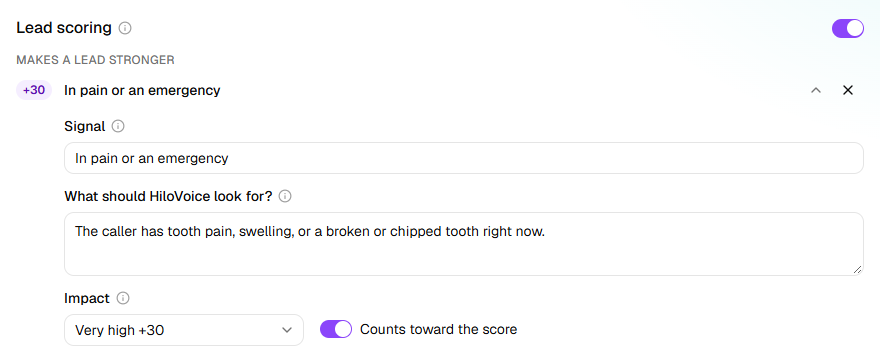
- Signal: a few words, as the Leads page shows them beside a lead (
Keep at least two signals that make a lead stronger, and no more than 12 in all. Counts toward the score switches a signal off without deleting it.
After each call that makes a lead, HiloVoice reads the call for your signals and scores the lead out of 100. A signal counts only when the caller's own words show it; one the call never got to counts neither for the lead nor against it. The agent asks no extra questions for scoring. The Leads page shows each score with its band and the signals behind it:
| Band | Score |
|---|---|
| Hot | 80 and up |
| Strong | 60 to 79 |
| Potential | 40 to 59 |
| Low priority | Under 40 |
Act on a score
Under When a lead is scored, at the foot of Lead scoring, three things a score can set going. Each is off until you switch it on.
- Follow up a hot lead with nothing booked: choose a Follow-ups campaign and the score (80, the start of Hot, to begin with). A lead that comes up to that score with no appointment booked goes onto the campaign, which calls it.
- Nurture leads in a range: choose a campaign and a range (40 to 69 to begin with). A lead that comes into the range goes onto that campaign.
- Tell the team when a lead's score drops a band: owners, admins and analysts get a bell notice when a lead falls from one band to the next, Hot to Strong, say.
A lead goes onto a campaign as it comes into the range, not again on each call while it stays there, and never twice. If the campaign has ended, the lead's history says it wasn't added. Only open Follow-ups campaigns are offered: start one on Campaigns first. Like the signals, these take effect when you publish.
What happens next
- Who becomes a lead, and how leads are scored, change when you publish on Review & Go Live. Column choices show on the Leads page straight away.
- Once someone is a lead, every later call of theirs is added to it, whatever kind of caller the agent takes them for. Spam aside.
- On the Leads page, choose the agent under Agent to see its columns. With more than one kind of caller, a second list picks the kind.
- Ticking a kind here adds Create a lead to its After the call list on Caller Handling, and the other way round.
- When a lead first scores Hot, owners, admins and analysts hear about it (A hot lead), on the bell and by email unless they've chosen otherwise under Settings → Notifications. Test calls from Try it never set this off.
- Callers turned away by Caller Screening aren't scored.
If it does not work
| You see | Why | What to do |
|---|---|---|
| Add at least 2 signals that make a lead stronger — until then leads aren't scored. | Fewer than two signals that make a lead stronger are switched on | Add one under Makes a lead stronger, or switch one back on. |
| This signal needs what to look for. | The signal is half written | Fill in Signal, and What should HiloVoice look for? in at least 10 characters. |
| Nothing asked of them yet beyond their contact details., in Columns | This kind of caller isn't asked any questions | Click Add questions →, or limit a question to them on Intake Questions. |
| Who becomes a lead shows only Every completed call | The agent doesn't sort its callers into kinds | Switch on Treat kinds of caller differently on Caller Handling. |
| A lead's score reads Too little to score | The call didn't show any of the signals that make a lead stronger, either way | Nothing is wrong. If it happens often, write signals your callers' calls can show. |
| A lead's score reads Score unavailable | The call couldn't be scored | Open the lead's Score tab and click Try again. |
Related
- Handle each kind of caller — sorting callers into kinds
- Choose what the agent asks — the questions the columns come from
- Calls, leads and contacts — what a lead is, and its statuses
- Turn away callers you can't help — why some leads are Disqualified