
Let the agent check your records
For BuildersChecked against the app on October 1, 2026
A lookup lets the agent search your records while someone is on the line: a customer by their phone number, an order by its reference, the homes for sale that match what a caller wants. Every kind of agent has Data Lookups, under Optional. The agent only ever repeats what it found.
Before you start
- A lookup searches a lookup source: a spreadsheet you upload, your leads, your contacts, or your own API. Sources are set up once, under Settings → Lookups, and any agent can use them.
- An agent can have up to five lookups.
Steps
Open Agents and click the agent.
In the step rail, click Data Lookups, under Optional. If the group is closed, click Optional first.
Click the button with the source's name. The lookup is added and its drawer opens.
Under Search by, check what the agent asks for to find a record. Each row is one value: its kind (Phone number, Email address, A person's name or Other text) and what the agent should put there. The source's other searchable columns are buttons below the rows; click one to add it. Any one value is enough to search, and a phone number can be the one the caller is ringing from.
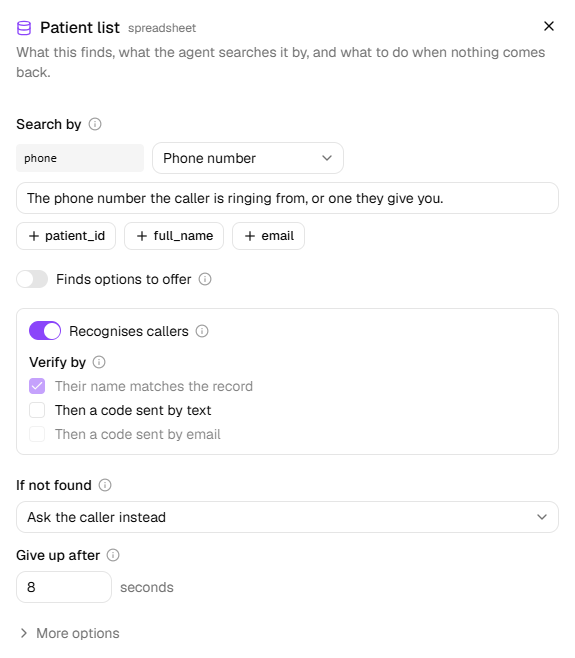
Under If not found, choose what the agent does when the lookup fails or finds nothing:
Choice What the agent does Ask the caller instead Collects the details in conversation and carries on. The default. Carry on without it Skips whatever depended on it, and never guesses. Transfer to a person Uses the transfer set up on Call Transfers; asks the caller if there's none. Flag for review Marks the call for someone to look at, then asks the caller. End the call Apologises, promises a call back, and hangs up. Under Give up after, set how many seconds the agent waits for an answer: up to 15, and 8 unless you change it. A lookup that takes longer counts as failed.
Click Done.
On a source of your leads, Only this agent's leads limits the search to leads this agent made, for lines that must not see each other's callers.
Recognise who's calling
On a Receptionist, Recognises callers checks the number someone calls from before the agent answers, and a match becomes the caller's record. The agent still asks their name and checks it, and never reads their details back. The lookup needs a Phone number row, and only one lookup can have it: the first you add with a phone number has it on.
Under Verify by, the name check always happens. Tick Then a code sent by text or Then a code sent by email to send a code to the phone or email on the record, never one the caller gives. Nothing on the account is discussed until the code is read back correctly. A code by email needs an Email address row under Search by.
Warning: A name is easy to know. If the record holds anything private, add a code.
On an outbound agent the switch is Recognises who it calls: the number the agent calls is checked before the call, and a match gives the agent what earlier calls left. The person is confirmed by name, with no search and no code.
Offer options from a list
On a spreadsheet or API source, switch on Finds options to offer when the records are things to choose from, such as homes for sale, cars in stock or menu items, rather than the caller's own record. The agent asks what they're looking for, reads out two or three, and can send what it found by text or email: up to five in the message, more as a link to a page of them all. The link works for sets how long that page opens: a day unless you change it. A lookup that offers options can't also recognise callers.
What happens next
- While a lookup runs, the caller hears a short "one moment" and a sound rather than silence, unless Hold while looking things up is off on Conversation Style (the Holds tab).
- When several records match, the agent checks with the caller which one is theirs.
- More options in the drawer holds the lookup's Name and When to use it, the line the agent reads to decide when to look something up. Both start filled in.
- Changes reach callers once you publish. On a live agent, until then, the step says Not live yet. and what the live agent does differently.
If it does not work
| You see | Why | What to do |
|---|---|---|
| Nothing to look up yet: upload a spreadsheet or connect an API under Settings → Lookups. | No lookup source is available | Click Manage sources and add one. |
| Recognises callers can't be switched on: Needs a phone-number input, so it can run from the number they're calling from. | No row under Search by is a phone number | Add the source's phone column, or set a row's kind to Phone number. |
| A lookup shows Source removed | Its source was removed under Settings → Lookups | Remove the lookup, then add one from another source. |
| This agent doesn't make leads, so it has none of its own and this lookup will never find anyone. … | Only this agent's leads is on, and the agent makes no leads | Turn Only this agent's leads off. |
| An agent can have up to 5 lookups. | The agent has five | Remove one before adding another. |
Related
- Handle each kind of caller — recognising existing clients from a record
- Turn away callers you can't help — a screening rule a source decides
- Shape how a call sounds — what the caller hears while the agent looks something up
- Calls, leads and contacts — the leads and contacts a lookup can search