
Read a follow-up's progress
For BuildersChecked against the app on October 1, 2026
A Follow-ups agent works on one job with each person over as many calls as it takes, and keeps notes as it goes: what the person has confirmed, what's in the way, the next step you agreed, and a line for each call. Before every call it reads those notes, so it picks up where the last call left off. You can read the same notes on the campaign, to see where each job stands and why the agent is waiting.
Before you start
- The campaign uses a Follow-ups agent, and has called at least one person. The other kinds of agent don't keep notes from one call to the next.
- Anyone on your team can read the notes.
Steps
Open the campaign. On People, each row's What happened gives the latest in short: Next: the step the last call agreed, In the way: what's stopping it, and Since the call: anything the person has sent since.
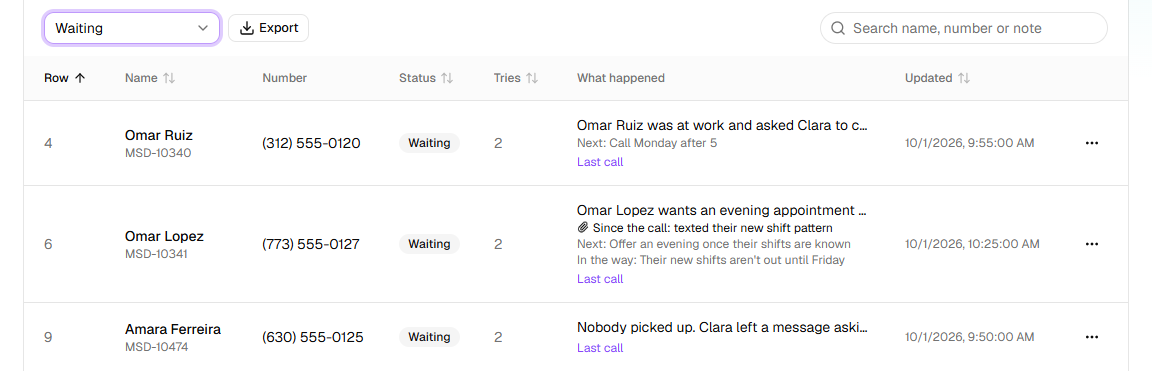
Click … at the end of a row, then See every attempt.
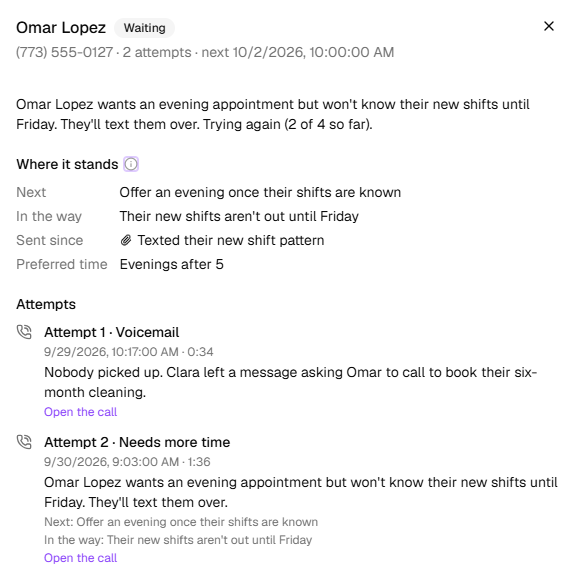
At the top, read the person's number, their attempts so far (with how many failed on the line) and when the next call is due. The row's latest note is under it.
Read Where it stands: the job, and what the calls have established (see below).
Read Attempts: every call to the person, oldest first, with how it ended and what it recorded. Click Open the call to read or hear one.
Where it stands
| Line | What it shows |
|---|---|
| Goal | This person's own goal, from the goal column of the list. Without one, the agent works to the goal on its Goal step, and the line isn't shown. |
| Was | Where things stood when the list was made, from its current_status column. |
| Next | The next step, as the last call left it, such as Email the signed agreement by Friday. |
| In the way | What's stopping it, as the calls so far have left it. |
| Call back | When the person asked to be called back, if the last call ended that way. |
| Sent since | What they texted or emailed after a call, or a form they handed in. |
| Everything after | Each thing a call established, by the name it's recorded under, such as preferred time. A later answer replaces an earlier one. |
Something they send after a call doesn't settle the job by itself. The call it followed is listed under Needs review on Calls, and the next call is told it arrived. If it's what the job needed, click Mark as done on the person's row.
Attempts
Each call has a line such as Attempt 2 · Moved forward, when it was and how long it took, a sentence or two on what was said, and the Next: and In the way: that call left. One marked needs a look was flagged for review.
| The line says | What it means |
|---|---|
| Done | The goal was reached on this call. |
| Moved forward, Call back requested, Needs more time or Blocked | The job moved, or didn't, but isn't over. Another call follows on the schedule, or at the time they asked for, while attempts remain. |
| Not interested, No longer applies, Wrong number or Asked not to be called | The job is over without the goal, and nobody calls again. Someone who asked not to be called is added to your block list. |
| Voicemail, No answer, Line busy, Someone else answered or Didn't connect | The call didn't reach them. It's one of their attempts. |
| Call failed to connect | The line failed. As a campaign starts out, that's tried again without counting as an attempt, up to twice. |
| They called back | They rang the campaign's number and a Receptionist took the call. It isn't one of their attempts. |
Across the campaign
Above the list on a Follow-ups campaign, once anyone has been called, four figures count people, not calls:
| Figure | What it counts |
|---|---|
| Completed | People whose goal was reached, of everyone called so far. A call answered doesn't count; only the goal does. |
| Reached | People at least one call got through to, whatever came of it. |
| Calls to complete | How many calls a finished job took, on average, and how many were finished on each call, such as 5 on call 1, 3 on call 2. |
| Not going ahead | Jobs over without the goal: not interested or no longer applies, asked not to be called, or a wrong number. Under it, how many need a person and how many are still in progress. |
What happens next
- The next call is briefed with these notes, so it doesn't ask again for what it already has.
- To close a job the agent can't see is done, click Mark as done in the row's … menu. To have it called again, see Call a recipient again. The notes are kept either way.
- Export, on People, puts the next step, what's in the way, the callback time and the last call's summary in columns of their own.
If it does not work
| You see | Why | What to do |
|---|---|---|
| There's no Where it stands | The campaign isn't a Follow-ups campaign, or no call has recorded anything yet and the list had no goal or current_status | On a Follow-ups campaign, it appears once a call records something. |
| Not called yet. under Attempts | The person hasn't been called | Nothing: they're Waiting for their turn. |
| Next or In the way is gone | The goal was reached, or the last call didn't leave one | Read that call's line under Attempts. |
| A call says Moved forward, but the person did what was asked | The agent records the job done only when the person confirms it the way the Goal step asks | Check the call; if it's done, click Mark as done. |
Read next
- Set a follow-up's goal — what counts as done, and when the agent hands over
- Work the Needs a person queue — the jobs handed to your team
- Call a recipient again — Call again, and Reopen and call again
- Monitor a running campaign — the whole list at a glance
- Follow-up dispositions — every way a Follow-ups call can end