
Set a follow-up's goal
For BuildersChecked against the app on October 1, 2026
A Follow-ups agent works on one unfinished job over as many calls as it takes: the quote not answered, the document not sent. The Goal step says what that job is, how HiloVoice knows it's done, and what the agent does until then. Only a Follow-ups agent has this step, and it can't go live without a goal and a way of knowing the goal is reached.
Before you start
- The agent is a Follow-ups agent.
- If the job is done by booking, by a transfer or by giving information, set that part up too: Appointment Booking, Call Transfers or Questions, under Optional in the rail.
Steps
Open Agents and click the agent.
In the step rail, click Goal.
Under The goal, write the outcome the calls are for, in your own words, such as
the quote is answered. Replace any goal the agent started with. Write it first: the buttons that draft the next three boxes stay greyed out until there's a goal.Under How HiloVoice knows it succeeded, choose the one test the agent applies before it may record the job done (see the table below). In the box under the choices, you can name the thing, such as
the signed service agreement, so the agent says that rather than "the document". It's optional: the goal often says it already.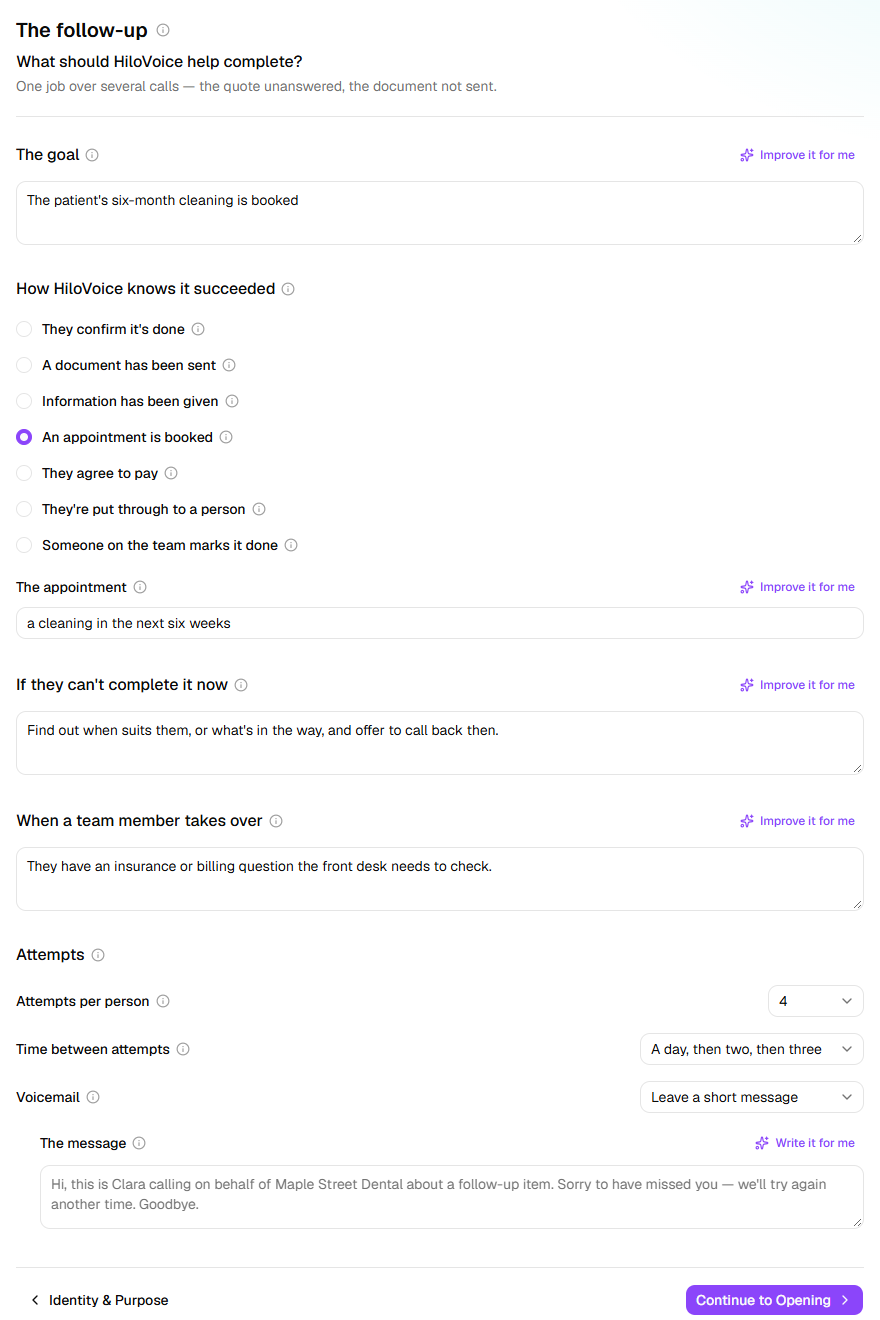
Under If they can't complete it now, say what else the agent may offer: a link, an extension, a call from a colleague. Left empty, it asks what's in the way and when it could happen, agrees the next step, and writes both down for the next call.
Under When a team member takes over, describe when the agent stops and hands the job to a person, such as
They want to negotiate the price.Under Attempts, set Attempts per person, Time between attempts and Voicemail: Leave a short message or Hang up without a message. For your own message, write it under The message, and leave the item itself out: a shared answering machine plays it to anyone.
How HiloVoice knows it succeeded
| Choice | Done when |
|---|---|
| They confirm it's done | The person says, in their own words, that it's done. Right for most follow-ups. |
| A document has been sent | They confirm they've sent or uploaded it, or the tool that receives it says it arrived. |
| Information has been given | Everything asked for is given and recorded. Add what to ask on Questions. |
| An appointment is booked | An appointment is booked or moved on the call. Needs Appointment Booking switched on. |
| They agree to pay | They confirm they'll pay and agree to the way of paying offered. The agent never takes a card number. |
| They're put through to a person | The call is transferred and the transfer connects. Set up who on Call Transfers. |
| Someone on the team marks it done | The agent never marks it done. A person does, with Mark as done on the campaign. |
A friendly call, a promise to get to it, a "yes, soon": none of these count. Anything short of the test is progress, and the next call picks up from it.
What happens next
- The goal is the agent's purpose too, so a Follow-ups agent has no Purpose box on Identity & Purpose.
- A campaign can give each person their own goal, in a
goalcolumn of its list. This goal is used for anyone without one. - A new campaign for the agent starts with these attempts and this spacing, and each campaign can change its own. Calls fall inside the Calling Hours window. A person who asks to be called at a particular time is called then, if it's inside the window.
- A voicemail counts as an attempt, whether or not the agent leaves a message, and the next call is scheduled as usual.
- When a person needs to take over, the recipient is marked Needs a person and isn't called again until someone deals with it. A complaint, someone upset, or a mention of legal action always hands over, whatever you write.
- A wrong number, someone who says no, or someone who asks not to be called again is never called back. A call that fails on the line is tried again without counting as an attempt.
- Calls work toward the new goal once you publish on Review & Go Live.
If it does not work
| You see | Why | What to do |
|---|---|---|
| Say what HiloVoice should help complete — the goal on the Goal step. on Review & Go Live | There's no goal | Write one under The goal. |
| This can't be saved yet after you clear The goal | A Follow-ups agent can't be saved without a goal | Type the goal again. The step saves on your next change. |
| The follow-up's goal is over 500 characters — shorten it. | The goal is too long to save | Shorten it to 500 characters or fewer. |
| “Your Company” is still in the voicemail message — put <business> there. on Review & Go Live | The message still has the stand-in name | Put your business name in The message. |
Related
- Write an outbound agent's opening — what the agent says when someone picks up
- Set when an outbound agent may call — the window its calls fall in
- Campaigns and recipients — attempts, progress, and Needs a person
- Hand calls to a person — for a goal that ends with a transfer