
Keep up with notifications
For OperatorsChecked against the app on October 5, 2026
HiloVoice tells you when something needs you: a call that needs a look, a connection that stopped working, a campaign that paused. Each one goes on the bell at the top of every page, and some come by email too. Notifications keeps everything the bell has told you, and Settings → Notifications decides what you hear about, and how.
Before you start
- Anyone in your organization has a bell and can choose what they hear about, Analysts included. Which kinds reach you depends on your role, and Settings → Notifications lists only those: see What you can hear about, below.
- The bell shows the notifications for the organization you're in. If you belong to more than one, switch organization to see the other's.
- Settings is in the account menu at the foot of the sidebar. Notifications is under You.
Steps
Read the bell
Click the bell at the top right of any page. The number on it is how many notifications you haven't read here; past 99 it says 99+.
The latest eight show, newest first. A dot beside one means you haven't read it. With none unread, You're all caught up shows over them.
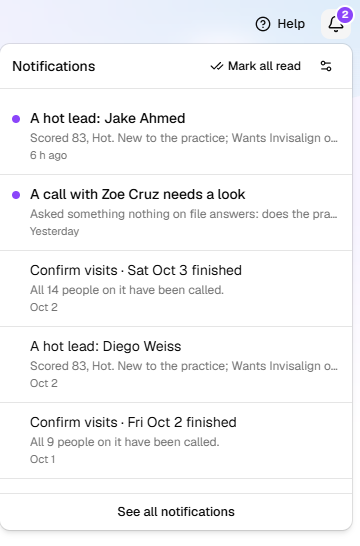
Click a notification. It's marked read, and HiloVoice opens what it's about: the call, the agent, the campaign.
To clear the number without opening each one, click Mark all read at the top of the bell. See all notifications, at the foot, opens the rest.
Find an older notification
Click the bell, then See all notifications.
Choose All, or Unread for only the ones you haven't read. Unread shows how many.
To narrow the list, click About anything and choose a group, such as Calls or Campaigns, or type words in Search notifications.
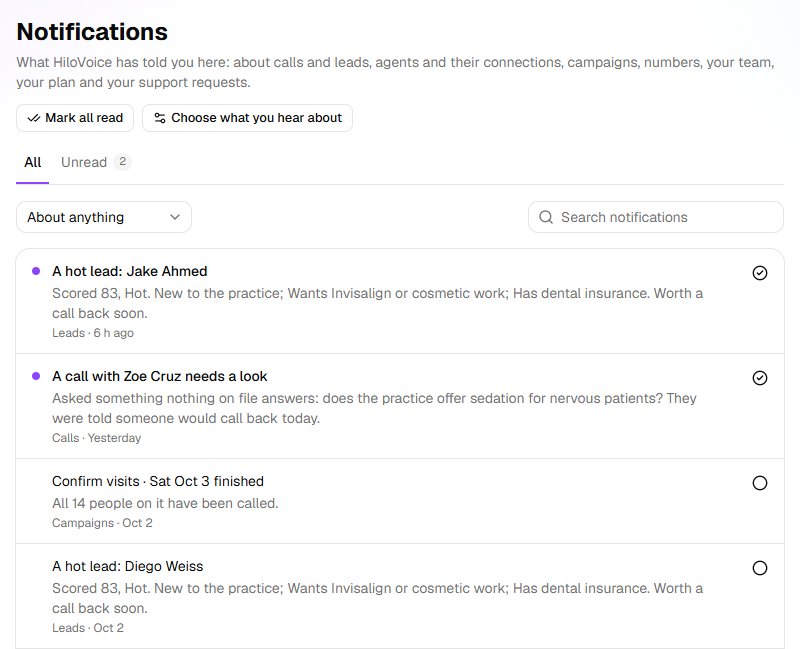
Click a notification to open what it's about. It's marked read.
Each one says its group and when it came: just now, 5 min ago, 3 h ago, Yesterday, or a date. To mark one without opening it, click the circle at its right: Mark read, or Mark unread to keep it in mind for later. Mark all read, at the top of the page, marks every one in this organization read.
Choose what you hear about
Open Settings → Notifications. From the bell, the settings icon at its top right (Choose what you hear about) opens it too, as does Choose what you hear about on the Notifications page.
Find the kind under About. They're listed in groups: Calls, Leads, Agents, Connections, Campaigns, Numbers, Team, Billing where your organization pays for HiloVoice under Settings → Billing, Support and Tips. Only the kinds your role gets are listed, so some groups may not be there.
Point at the info icon beside a kind. It says what the kind means, who it's sent to, and how you get it until you change it, such as You get it on the bell and by email unless you change it.
Switch On the bell or By email on or off. Each change is saved as you make it.
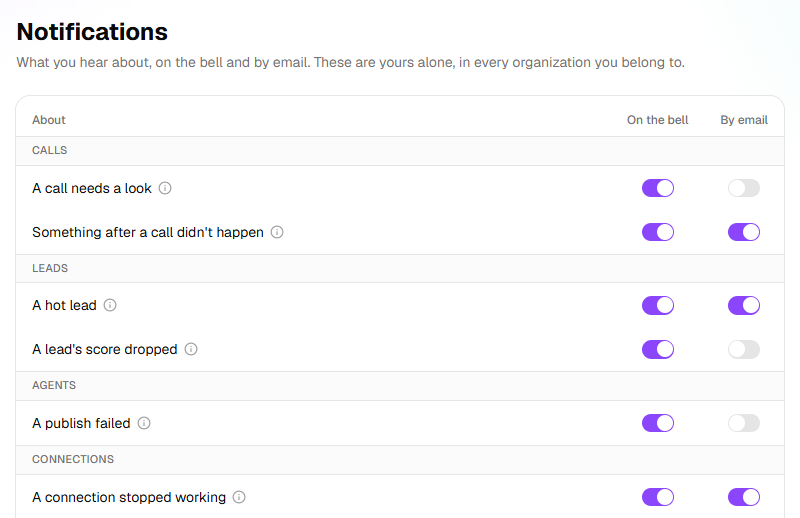
Switch both off and you don't hear about that kind at all. Support answered you is always emailed, so its By email switch stays on and greyed out; the info icon beside it says Always emailed. Only the bell is yours to choose.
Tips and reminders, under Tips, goes to Owners: emails while you set up and try HiloVoice. They're at most one a day, and each goes once:
- Your receptionist is two minutes away, two hours after sign-up if no agent is built yet.
- <agent> is ready, but isn't answering yet, a day and again three days in, while no agent is live on a number, and Want a hand getting <agent> on your phone? five days in.
- <agent> is live: here's how to check it, once an agent has been live on a number for a day with no real call.
- <agent> just took its first call, with what the caller said first.
- <agent>'s first days, three days after that: the calls it answered, its leads and bookings, and what the bookings are worth at your figure for a booking.
- Call back the leads <agent> takes, from the sixth day, while you have a receptionist but no agent that places calls.
- Turn your contact list into appointments, from the ninth day, when you have leads but no campaign.
- You've used <minutes> of your 50 free minutes, once the free trial has used 60% of them.
- Your number and setup are kept until <date>, three days after the free trial ended without a plan.
They're emails only, so there's a dash under On the bell.

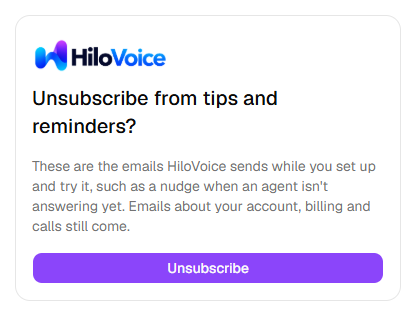
Each one also has Unsubscribe from tips and reminders at the foot. Click it, then Unsubscribe, and they stop, as if you'd switched By email off here. No sign-in is needed. Emails about your account, billing and calls still come.
Your choices are yours alone, and the same in every organization you belong to. Nobody else's change, and no role, changes them. The list holds the kinds any of your roles gets, in any organization you belong to: an Analyst here who is an Owner elsewhere sees an Owner's kinds too, and a choice applies wherever the kind reaches you.
Tip: If your inbox is busy, leave By email on for the kinds that can cost you calls (A phone number needs attention, A connection stopped working, A campaign paused) and read the rest on the bell.
What you can hear about
Every kind of notification a person in your organization can get, in the order Settings → Notifications lists them. The Billing kinds, listed there just before Support, have a table of their own below. Starts as is how you get it until you change it.
| Kind | What it means | Who gets it | Starts as |
|---|---|---|---|
| A call needs a look | A call broke one of the agent's rules, or the check after it found something wrong. It's waiting under Needs review on Calls. | Owners, Admins and Analysts | On the bell |
| Something after a call didn't happen | An email, text or webhook the agent sends after a call failed, so the caller or your team didn't get it. | Owners, Admins and Builders | On the bell and by email |
| A hot lead | A lead scored Hot for the first time: worth a call back soon. Only on an agent that scores leads. | Owners, Admins and Analysts | On the bell and by email |
| A lead's score dropped | A lead fell a band on a later call, Hot to Strong, say. Only on an agent with Tell the team when a lead's score drops a band on, on its Lead Capture step. | Owners, Admins and Analysts | On the bell |
| A publish failed | An agent couldn't be published, so the version before is still live. | Owners, Admins and Builders | On the bell |
| A connection stopped working | A calendar, CRM or email connection can't be reached, so what the agents do with it fails. | Owners, Admins and Builders | On the bell and by email |
| A phone number needs attention | A number's connection to its agent broke, so calls to it may not be answered. | Owners, Admins and Builders | On the bell and by email |
| A campaign paused | A campaign stopped calling before it was done, because of a problem it can't get past on its own. | Owners, Admins and Builders | On the bell and by email |
| A campaign finished | Everyone on a campaign has been called. | Owners, Admins and Builders | On the bell |
| A number was bought | Someone on your team bought a phone number. | Owners and Admins | On the bell |
| A number was released | Someone on your team let a phone number go. | Owners and Admins | On the bell |
| Someone joined the team | Someone accepted an invitation to your organization. | Owners and Admins | On the bell |
| Support answered you | HiloVoice support answered one of your requests. | Only you | On the bell, and always by email |
Where your organization pays for HiloVoice under Settings → Billing, Owners and Admins can also hear about the plan:
| Kind | What it means | Starts as |
|---|---|---|
| The free trial is ending | The free trial has 3 days or 10 minutes left. When it ends, calls pause until a plan is chosen. | On the bell and by email |
| Calls are paused | The free trial ended, there's no plan, or HiloVoice paused the organization, so the agents don't take or place calls. | On the bell and by email |
| A caller was turned away | Someone called while calls are paused. At most once an hour. | On the bell |
| Calls are back on | The agents take and place calls again, and the campaigns the pause stopped carry on. | On the bell |
| Minutes running out | This period's minutes are nearly used, or used. Calls carry on, and extra minutes are billed. | On the bell and by email |
| Receipts | A payment went through: the receipt, with a link to the invoice. | By email |
| A payment didn't go through | The card was declined, or an invoice is past its due date. Calls go on meanwhile; paying stops them pausing later. | On the bell and by email |
| The plan changed | The plan moved up or down, a move was set for the end of the period or called off, or a cancelled plan was reactivated. | On the bell and by email |
| The plan was cancelled | Someone cancelled the plan. It works until the period ends; then calls pause. | On the bell and by email |
| The plan's price changes | HiloVoice changed the plan's monthly price. You hear 30 days or more before a higher price is charged, and before the next renewal for a lower one. | On the bell and by email |
| Refunds | HiloVoice refunded part or all of a payment, to the card it was paid with. | By email |
| Phone numbers released after a plan ends | The plan or trial ended, so the numbers HiloVoice rents for you will be released: a week's warning, and again when it's done. | On the bell and by email |
What happens next
- The bell checks for new notifications every minute.
- You aren't told about what you did yourself: a number you bought or released, a publish you started, or your own joining the team.
- Most kinds are said once an hour at most about the same thing, so a connection that fails again and again is one notification, not sixty.
- Some mark themselves read once they're dealt with. A call that needs a look is marked read for everyone when someone marks the call handled. Calls are paused and A caller was turned away are marked read when calls are back on.
- Emails go to the address you sign in with, on Settings → Profile.
If it does not work
| You see | Why | What to do |
|---|---|---|
| No number on the bell, and No notifications yet when you open it | Nothing has been sent to you in this organization yet | Nothing to fix. If you belong to more than one organization, switch to the other. |
| You're all caught up over the bell's list, or on the Unread tab | You've read every notification here | Nothing to fix. |
| Nothing yet on Notifications | The same | Nothing to fix. |
| Nothing matches | No notification fits your tab, group and search | Click Show everything. |
| You weren't told about something | Your role doesn't get that kind, you switched it off, or you did it yourself | If the kind isn't on Settings → Notifications, your role doesn't get it. If it is, check its On the bell switch. |
| A kind isn't on Settings → Notifications | None of your roles gets it | Ask an Owner or Admin if you need a role that does. |
| No email for a kind | Its By email switch is off, or the email went to spam | Switch By email on, and check your spam folder for the address on Settings → Profile. |
| Couldn't save that. | The choice didn't save, and the switch went back | Try again in a moment. |
| Couldn't update the notifications. | Marking read or unread didn't save | Try again in a moment. |
| Couldn't load your notifications or Couldn't load your notification settings | The page didn't load | Click Try again. |
Read next
- Review your calls — what to do with a call that needs a look
- Manage your own account — the email your notifications go to
- Roles and permissions — which role hears about what
- Plans, minutes and limits — the plan the billing notifications are about