
Review your calls
For OperatorsChecked against the app on October 1, 2026
Every call your agents take or make is on Calls, newest first. Open one to see how it ended and how HiloVoice knows, who the caller turned out to be, what the agent took down, and what went out once the call was over. Calls that need one of your team wait under Needs review until someone marks them handled.
Before you start
- Anyone in your organization can read calls and mark a flagged call handled, Analysts included. Adding a caller to a campaign needs an Owner, Admin or Builder.
- Owners, Admins and Analysts hear about a flagged call on the bell (A call needs a look), unless they've switched it off under Settings → Notifications.
Steps
Click Calls in the left-hand menu.
Choose a tab: All, Incoming, Outgoing or Needs review.
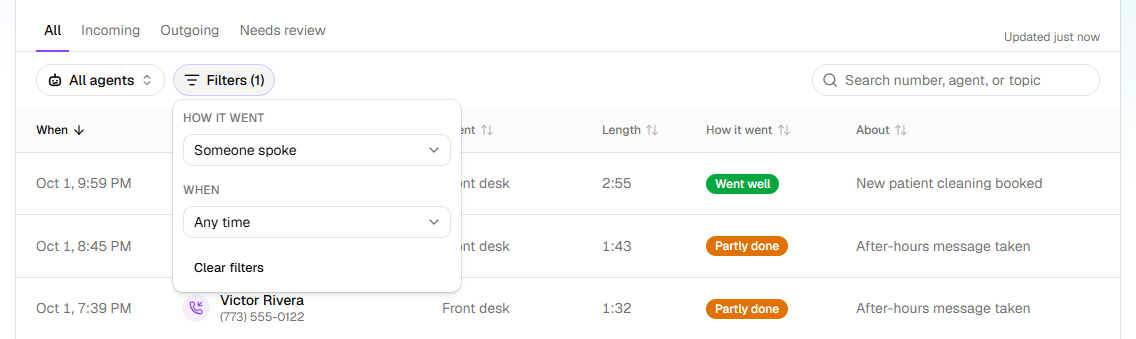
To narrow the list, type a number, an agent or a subject in Search number, agent, or topic. With more than one agent, you can also click All agents and choose one.
Click Filters to choose How it went or When. Under How it went, Someone spoke leaves out the calls nobody answered.
Click a call. It opens beside the list, on Summary.
Click Conversation to read the call line by line, or Play recording, under the call's title, to hear it.
What the list tells you
How it went says whether a call did its job: Went well, Partly done, Didn't go well, or Handed off to a person. Ended is a call with no clear result; In progress is happening now. A call that never connected says why: No answer, Busy, Cancelled or Failed. Call statuses and outcomes lists every value, with what to do.
A label beside the caller adds more:
| Label | Means |
|---|---|
| Needs review | Flagged for one of your team, and nobody has marked it handled. |
| Straight to <name> | The caller is on your Transfer list and was put through to <name>. |
| Blocked | The number is blocked from calling you. The agent said goodbye and ended the call. |
| Over call limit | The number had called too often. The caller was asked to try again later. |
| Agent paused, Trial over, No plan yet, Payment overdue, Plan ended or Calls paused by HiloVoice | The line wasn't taking calls, and the caller was told so. |
| Test | A test call in the browser, from Try it. These are listed only with Show test calls on. |
What a call's Summary holds
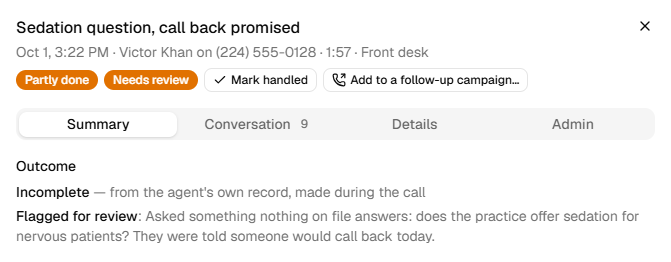
- Outcome: how the call ended, and how HiloVoice knows: from the agent's own record, made during the call (a fact the agent wrote down), from what happened to the call itself, or from a reading of the transcript (an interpretation). A flagged call adds Flagged for review and the reason.
- Caller, when your records know them: the record they matched, and whether they proved it: confirmed by name, by a code sent by text or email, or recognised from their number, not confirmed.
- Information collected: every answer, and any appointment booked, moved or cancelled. recorded beside a value means the agent wrote it down itself; point at it to see why.
- After the call: every text, email, lead, webhook or CRM update, as Done, Pending, Retrying, Skipped or Failed. Click one for the reason.
- Files the caller sent, to download, and In short: the call in a few lines.
Details holds the numbers, the times, why the call ended and what decided its outcome. A forwarded call shows the number the caller Dialled. Owners and Admins also have an Admin tab, with the call's rule checks and details for support.
Deal with a call that needs review
Click the Needs review tab.
Click a call. Under Outcome, Flagged for review says why.
Do what the call needs: ring the caller back, say, or pass it to the right person.
Click Mark handled, beside Needs review at the top of the call.
A call is flagged when the agent flags it, such as for a situation listed under Flag for review on its Call Transfers step; when it breaks one of the rules HiloVoice checks every finished call for; or when the caller texts, emails or fills in a form after hanging up.
Have a campaign call them back
A call that made or joined a lead has Add to a follow-up campaign… at the top.
Click Add to a follow-up campaign….
Under Campaign, choose a campaign. Only campaigns that can still call someone are offered.
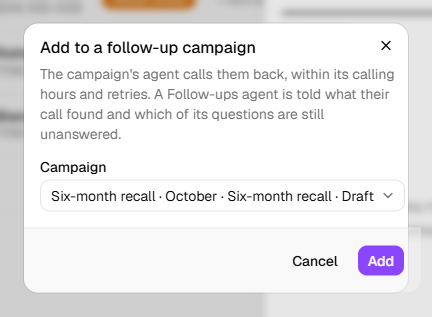
Click Add.
The campaign's agent calls them within its calling hours. A Follow-ups agent is told what this call found, and which of the Receptionist's questions are still unanswered.
Important: On a running campaign, they can be called within minutes. Choose a Draft campaign to check its list before anyone is called.
What happens next
- A handled call leaves Needs review and the count on Usage, and its notifications are marked read. Handled by <name> shows under the outcome; Reopen puts it back. A text or email from the caller afterwards puts it back too.
- The list fetches new calls every minute. Check for new calls looks at once, and says Nothing new or how many it found.
- Drag a column heading to move it, or its edge to resize it. Your browser remembers the layout; Reset columns puts it back.
- While a call is open, the page's address opens it: copy it to send a teammate straight to the call.
Warning: A call holds what someone told your agent, sometimes about their health or money, and the recording is their voice. Share calls only with people who need them. Whether you may record calls, and what callers must be told, depends on where you and they are, and you're responsible for it. See Your responsibilities on calls.
If it does not work
| You see | Why | What to do |
|---|---|---|
| A call you expect isn't listed | It's a test call, or it hasn't arrived yet | Switch on Show test calls, or click Check for new calls. |
| No Play recording on a call | Record calls is off on the agent's Conversation Style step | Read Conversation: the transcript is kept either way. |
| This call is still in progress. The transcript and summary arrive once it ends. | The call is going on now | Look again once it has ended. |
| Nothing was recorded for this call. | Nothing was said or taken down, as on a call that never connected | Nothing to fix. |
| The recording is no longer available. | The recording isn't kept any more | Read Conversation instead. |
| We couldn't fetch the recording right now. Please try again in a moment. | The recording didn't load | Click Play recording again in a minute. |
| No calls match | Nothing fits your search and filters | Click Clear filters. |
| No open campaign to add them to. | No campaign can take them | Start one on Campaigns, with a Follow-ups agent. |
| This number is already on the campaign. | They're on that campaign already | Nothing to do. |
| Your role here is Analyst: you can look at everything, but not change it. An owner or admin can make you a builder. | Analysts can't add people to campaigns | Ask an Owner or Admin. |
Read next
- Calls, leads and contacts — how calls relate to leads and contacts
- Follow up your leads — the people your calls turned into leads
- Hand calls to a person — Flag for review, and transfers
- Send messages after a call — what the After the call list runs