
Follow-up dispositions
For BuildersChecked against the app on October 1, 2026
At the end of every call, a Follow-ups agent records how it went in one word, its disposition, with a sentence or two on what happened, the next step and anything in the way. HiloVoice decides what happens next from the disposition alone, never from how friendly the call was: a good call that didn't reach the goal is progress, and the next call picks up from it.
You see the disposition in four places:
- On See every attempt, in a person's … menu on the campaign, as Attempt 2 · Moved forward.
- On Calls, under Outcome in the call's Summary, as Partial progress.
- In a campaign's Export, in the Last outcome column, as Moved forward.
- In What happened on the person's row, while their next call is under way or after Call again. At other times the row gives the last call's summary.
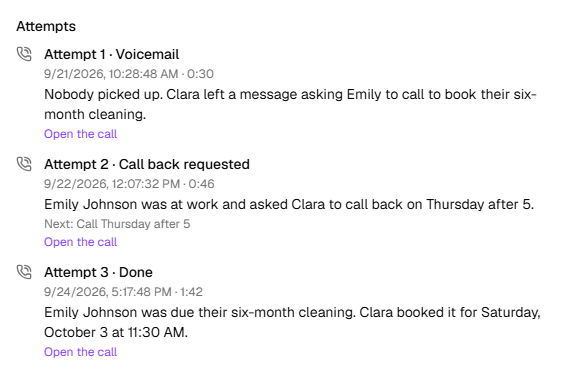
The dispositions
| On the attempt | Under Outcome | In an export | The agent records it when | What happens next |
|---|---|---|---|---|
| Done | Goal completed | goal_completed | The test under How HiloVoice knows it succeeded, on the Goal step, was met on this call. | The person is Done, and isn't called again unless you reopen them. |
| Moved forward | Partial progress | partial_progress | The job moved but isn't finished. Also when someone else answered and gave no time to call back, or a business's phone menu led nowhere. | Called again on the schedule, while attempts remain. |
| Call back requested | Callback requested | callback_requested | They asked to be called at a particular time, or someone else answered and said when to try. | The next call is at that time if it's inside the calling window, otherwise as soon after as it can be. It's one of their attempts. |
| Needs more time | Needs more time | needs_more_time | They need longer before anything can happen. | Called again on the schedule, while attempts remain. |
| Blocked | Blocked | blocked | Something outside their control is in the way. The agent says what, shown as In the way:. | Called again on the schedule, while attempts remain. |
| Not interested | Not interested | not_interested | They said they don't want to go ahead. | Not completed, Not called again: they said they are not interested. |
| No longer applies | Disqualified | disqualified | They no longer qualify, or the job no longer applies. | Not completed, Not called again: they no longer qualify. |
| Wrong number | Wrong number | wrong_number | Whoever answered said nobody by that name can be reached on the number, or, calling a business, that it isn't that business. | Not completed, Not called again: the number reached the wrong person. |
| Asked not to be called | Do not call | do_not_call | They asked not to be called again. | Not completed, Not called again: they asked not to be called again. The number goes on Blocked numbers, so no agent calls it again. |
| Voicemail | Voicemail | voicemail | A machine answered. The agent leaves your message first, or hangs up, as the Goal step says. | Called again on the schedule, while attempts remain. It's one of their attempts. |
A call that ends before the agent records anything, such as when the person hangs up during the opening, is treated as Moved forward too: the person's note says The call ended before the agent recorded a result., and they're called again on the schedule.
On the Calls page, How it went follows the disposition: Done reads Went well; Moved forward, Call back requested, Needs more time and Blocked read Partly done; the rest read Didn't go well.
When attempts run out
Each campaign sets Attempts per person, four unless you change it. Moved forward, Call back requested, Needs more time, Blocked and Voicemail each use one. When the last attempt ends in one of them, the person is Not completed, with Not completed after 4 attempts., or No answer after 4 attempts. after a voicemail. A callback asked for on the last attempt isn't made. To keep going, use Call again on the person's row: see Call a recipient again.
When a person should take over
Separately from the disposition, the agent can hand the job to your team: when the situation under When a team member takes over, on the Goal step, comes up, and always for a complaint, someone upset, or a mention of legal action. The person is then Needs a person, the note ends Needs a person: and the agent's reason, and the call is listed under Needs review on Calls. Nobody calls them again until someone deals with it: see Work the Needs a person queue.
If the same call also reached the goal, the person is Done all the same, and the call is still flagged for a look.
Calls that never got through
A call that doesn't reach anyone records no disposition. The attempt shows how the line went instead:
| On the attempt | In an export | What happened | What happens next |
|---|---|---|---|
| No answer | no_answer, or busy for a busy line | Nobody picked up, or the line was busy. | Called again on the schedule, while attempts remain. |
| Call failed to connect | failed | The line dropped, or the call never connected. | Tried again after the shortest wait, up to twice, without counting as an attempt, while A call that fails on the line is retried without counting as an attempt is ticked, as it is to start. A third failure ends the person's part: Not completed, The call failed on the line 3 times. Unticked, a failed call counts as one of their attempts. |
| Didn't connect | The call never connected, and no result came back. | As No answer. |
Which ones call again
Each campaign's Settings list the endings that are tried again, under Try again after. A new Follow-ups campaign starts with them all ticked:
| Under Try again after | Covers |
|---|---|
| No answer | no_answer |
| Line busy | busy |
| Call failed to connect | failed |
| Voicemail | voicemail |
| Someone else answered | not_reached |
| Moved forward, not done | partial_progress |
| Asked to be called back | callback_requested |
| Needs more time | needs_more_time |
| Something in the way | blocked |
Untick one and that ending finishes the person's part: they're Not completed, with Not called again: the policy does not retry and the ending. Not interested, No longer applies, Wrong number and Asked not to be called are never tried again, whatever is ticked.
Telling your other tools
Slack and Zapier can be told about a Follow-ups agent's calls: A follow-up is done (Done), A follow-up needs a person, and A follow-up ended without the goal (Not interested, No longer applies, Wrong number or Asked not to be called). A call that only moved the job along sends nothing. Tick them under Post when (Slack) or Send when (Zapier), on Settings → Integrations.
Related
- Set a follow-up's goal — the test for Done, and when the agent hands over
- Read a follow-up's progress — the notes behind each disposition
- Recipient statuses — where each disposition leaves the person
- Set a campaign's calling hours and retries — attempts, spacing and Try again after