
Start a new agent from one you have
For BuildersChecked against the app on October 1, 2026
A copy of one of your agents is a quick start for another like it: a second location's receptionist, or a Feedback agent for a different service. The copy is a new agent of the same kind, with the setup you choose to bring along. It's a draft until you publish it, and nothing it does affects the agent it came from.
Before you start
- You're an Owner, Admin or Builder.
- The agent you copy isn't archived.
- Copying a Follow-ups agent needs a plan that includes follow-ups.
Steps
Start the copy, either way:
- On Agents, click New agent, then Copy one of your agents at the top.
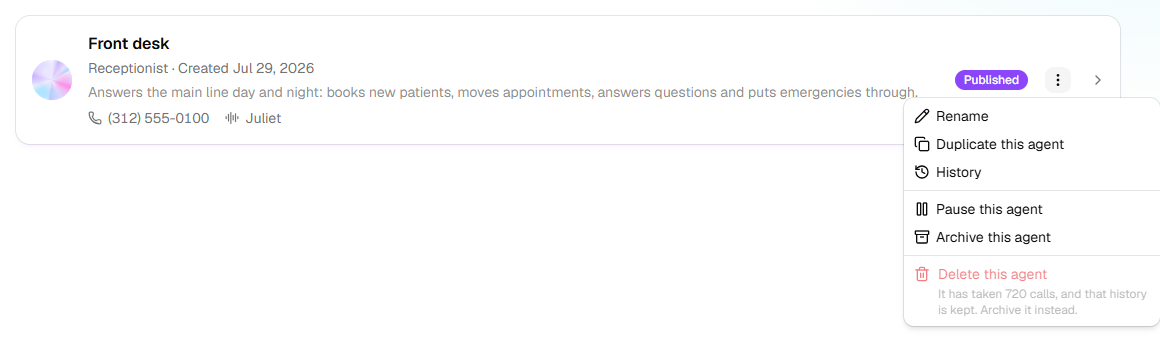
- Open an agent's menu, ⋮ at the end of its row on Agents or … beside its name in the builder, and click Duplicate this agent.
Under Copy which agent, choose the agent to start from. The line under it names its kind: the copy is the same kind of agent, and can't be changed to another.
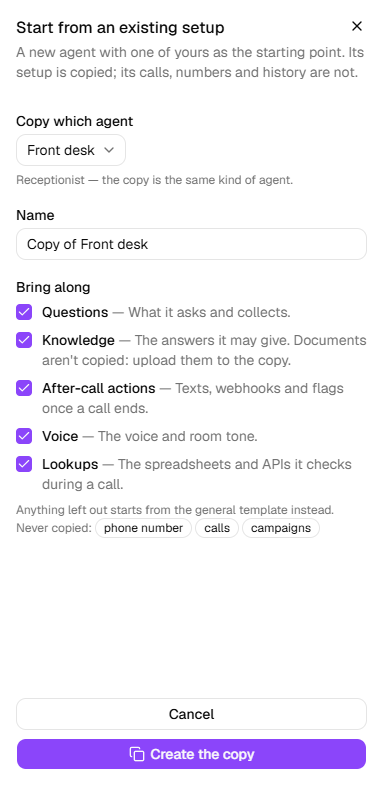
Change the Name. It starts as Copy of and the agent's name.
Under Bring along, untick anything you'd rather start fresh. Each part left out starts from that kind of agent's general starting point instead.
Part What comes along Questions What it asks and collects. Knowledge The answers it may give, and what it says when callers hesitate. Documents don't come along: upload them to the copy. After-call actions The texts, emails, webhooks and flags once a call ends. Voice The voice and the background sound. Lookups The spreadsheets and systems it checks during a call. Click Create the copy. The copy opens in the builder, with <name> is ready to edit.
What happens next
- The copy is a draft. Change what differs, such as the business details, hours and transfers, then publish it on Review & Go Live.
- It copies what the agent you started from had at that moment, unpublished changes included.
- Never copied: its phone number, its calls and its campaigns. Give the copy its own number on its Phone Number step, or a caller ID on an outbound agent's Caller ID step.
- A draft doesn't count toward your plan's active agents until it goes live.
If it does not work
| You see | Why | What to do |
|---|---|---|
| Create the copy is greyed out | No agent is chosen, or the name is empty | Choose an agent and give the copy a name. |
| The agent you want isn't under Copy which agent | It's archived | Click Restore this agent in its menu first: ⋮ on its row on Agents, with Show archived switched on, or … beside its name in the builder. |
| Follow-up agents are on <plan> and up. | Your plan doesn't include follow-ups | Change plan under Settings → Billing, or copy another kind. |
| Your role here is Analyst: you can look at everything, but not change it. | Analysts can't create agents | Ask an owner or admin to make you a builder. |
| Couldn't copy that agent. | The copy couldn't be made this time | Try again in a minute. |
Related
- How the builder works — the steps the copy opens on
- Review and go live — publishing the copy
- The five kinds of agent — why a copy is the same kind