
Set a campaign's calling hours and retries
For BuildersChecked against the app on October 1, 2026
A campaign calls only inside its calling window, and when an attempt doesn't settle a person, it tries again on the rules you set. A new campaign copies its agent's Calling Hours and retries, then keeps its own: change one campaign here and the agent and its other campaigns stay as they are.
Before you start
- You're an Owner, Admin or Builder.
- The campaign is a draft, scheduled or paused. A running campaign's settings are read-only: pause it, change them, then resume.
Steps
Open the campaign and click Settings.
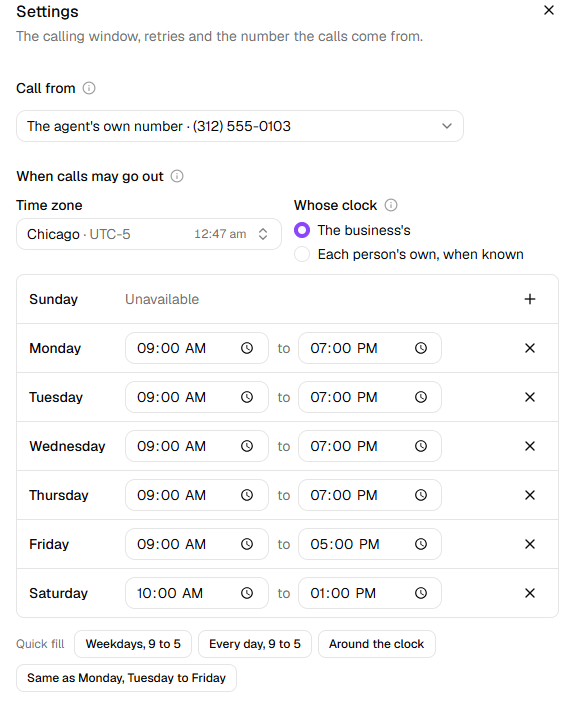
Under When calls may go out, choose the Time zone the hours are read in.
Under Whose clock, choose The business's, or Each person's own, when known to call each person by the time zone in their row of the list. Anyone without one is called by the time zone above.
Set the days and hours. Click + beside a day to give it hours, or X to make it Unavailable again. A Quick fill sets several days at once: Weekdays, 9 to 5 replaces the whole week, and Same as Monday, Tuesday to Friday copies Monday's hours to the four days after it.
Warning: Calling outside reasonable hours is restricted in many places. You're responsible for keeping the window inside what's allowed where the people you call are.
Under Trying again, set Attempts per person, from 1 to 10, and how long to wait between them: Wait between attempts, or Between attempts on a Follow-ups campaign.
Under Try again after, tick each outcome that's worth another call.
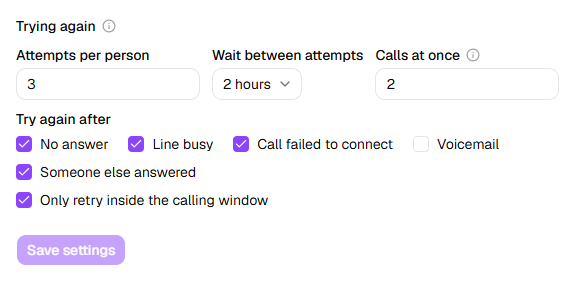
Click Save settings. The message says Settings saved.
What a campaign starts with
| Setting | Confirmations, Detail checks, Feedback | Follow-ups |
|---|---|---|
| When calls may go out | The agent's Calling Hours; with none set, weekdays from 9 AM to 6 PM | The same |
| Attempts per person | 3 | 4, or what the agent's Goal step says |
| The wait | 2 hours, each time | A day, then two, then three, or the Goal step's spacing |
| Try again after | No answer, Line busy, Call failed to connect and Someone else answered | Those, plus Voicemail, Moved forward, not done, Asked to be called back, Needs more time and Something in the way |
| A call that fails on the line | An attempt like any other | Tried again without counting, up to twice |
| Calls at once | 2 | 2 |
Only Follow-ups campaigns start with Voicemail ticked. On the other kinds, a person whose call goes to voicemail isn't called again: their row ends Not called again: the policy does not retry 'voicemail'. If many of the people you call let calls go to voicemail, tick it.
How long it waits
- Wait between attempts is the same wait every time: from 30 minutes to Two days.
- Between attempts is a schedule. A day, then two, then three waits a day before the second call, two days before the third, and three days before each one after that. Every day, Every two days, Every week and A few hours apart (four hours) keep one wait.
- A call never goes out while the window is shut. A retry that falls due at night is made when the window next opens, on the clock the campaign calls by.
- On a Follow-ups campaign, someone who asks to be called back at a particular time is called then, ahead of the schedule, if it's inside the window. If it isn't, they're called when the window next opens, and their row says so.
What counts as an attempt
An attempt is a call HiloVoice placed to the person, whatever happened: they answered, it went to voicemail, it rang out, or the line was busy. When a person's attempts run out, they're Not completed, and the row ends No answer after 3 attempts., or Not completed after 4 attempts. when the last call moved the job along. Tries, on the People tab, counts every call placed to the person, technical retries (below) included.
These are not attempts:
- A call that never started, because every line the campaign may use was busy or the call couldn't be placed at that moment. The person stays Waiting and is tried again within a minute or so.
- The person calling back. If they ring the number the campaign calls from and a Receptionist answers it, the Receptionist is told what the campaign called about, and can settle the person's row. That call shows in their history as They called back.
- A technical retry, on a Follow-ups campaign. A call that fails on the line (it dropped, or failed to connect) is tried again two hours later, inside the window, and the row says Not counted against the attempts; trying again. After two technical retries, a third failure ends it: The call failed on the line 3 times., and the person is Not completed.
On the other kinds, a call that fails to connect is an attempt like any other, tried again if Call failed to connect is ticked. A call made at the time a person asked for is an attempt too: asking for a callback changes when they're called, not how many calls they get.
Tip: On a Follow-ups campaign, leave A call that fails on the line is retried without counting as an attempt ticked. Untick it, and a call that fails on the line isn't tried again: the person is Not completed at once.
What's never tried again
Whatever you tick, HiloVoice doesn't call again someone who said no, asked not to be called, isn't interested or no longer qualifies; a wrong number; a number that can't be called; or a job that's finished. The row says why, after Not called again:. Someone who asks not to be called is also added to your block list, under Settings → Blocked numbers.
What happens next
- Saved settings apply from here on. A retry already set for a time keeps it, but anyone waiting only for the old window to open is checked against the new one straight away.
- The agent's own Calling Hours don't change. New campaigns for the agent still start from them, and so does the agent's answer when someone asks when they can call back.
- Retries always fall inside the calling window: a retry due while it's shut is set for when it next opens.
- To stop one person being called, click Skip this person in their row's … menu. To put someone back on the list, see Call a recipient again.
If it does not work
| You see | Why | What to do |
|---|---|---|
| The settings are greyed out: The calling window, retries and the number the calls come from — as they are. Pause the campaign to change them. (once it has ended: … They can't be changed once the campaign has ended.) | The campaign is running, or over | Pause a running campaign, change the settings, then Resume. A completed or cancelled campaign can't change. |
| Pick at least one day on which calls may be placed. | No day has hours | Give at least one day hours. |
| Closing time has to be later than opening time. under a day | The day closes before it opens. A day's hours can't run past midnight. | Set a later closing time. |
| Attempts must be between 1 and 10. or Calls at once must be between 1 and 50. | A number is out of range | Change it to one inside the range. |
| People stay Waiting, with Outside calling hours; next window opens … | The window is shut for them now. The time it gives is in your own time zone. | Nothing: they're called when it opens. To call sooner, widen the window. |
| Calls go out at the wrong hour for the people you call | The Time zone isn't theirs | Choose their zone, or Each person's own, when known with a time zone column in the list. |
Read next
- Monitor a running campaign — what each person's row says
- Set when an outbound agent may call — the window new campaigns start from
- Set a follow-up's goal — a Follow-ups agent's attempts and spacing
- Campaigns and recipients — attempts and retries, in short