
Call statuses and outcomes
For OperatorsChecked against the app on October 1, 2026
Every call on Calls has a badge under How it went, and some have badges beside the caller too. Open a call and its Summary gives the outcome in a word or two, After the call says what HiloVoice did once it ended, and Details gives the call's status as the phone line saw it. This topic lists every value each of them can show. For finding and reading calls, see Review your calls.
How it went
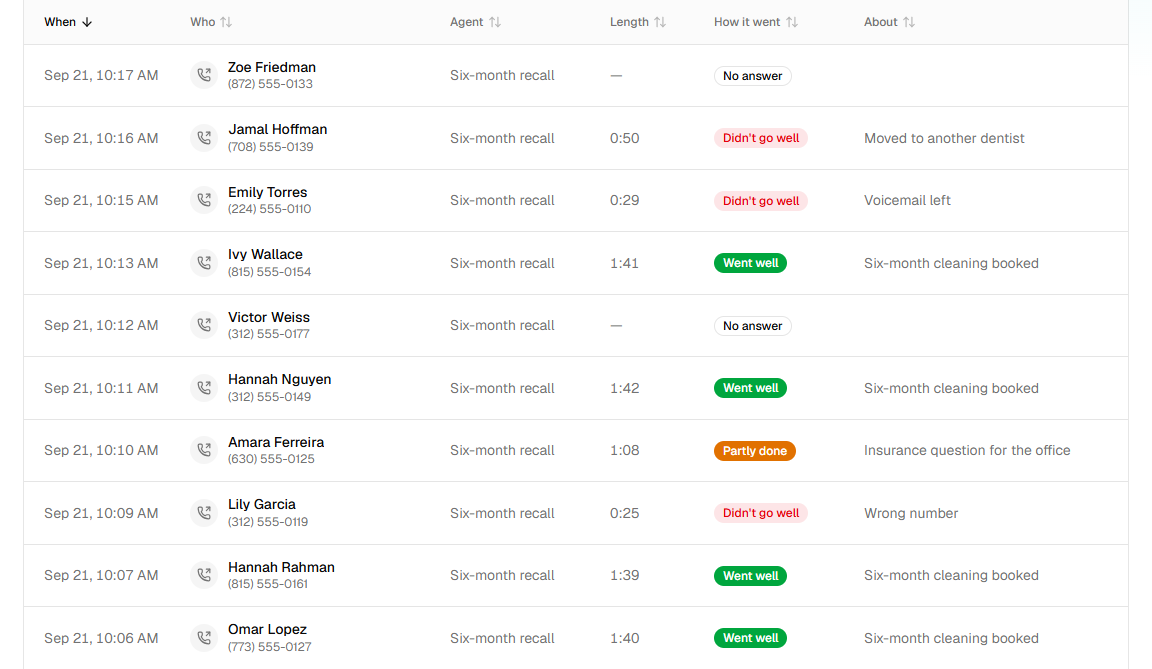
| Badge | What it means | What to do |
|---|---|---|
| Went well | The call did what it was for: a caller's details taken, an appointment confirmed, a detail checked, every question answered, a follow-up's goal reached. | Nothing. |
| Partly done | The call got some of the way: questions left unanswered, a confirmation the person wants to move, a feedback call with some answers, a follow-up that moved forward. | Read Summary to see what's missing. On a campaign, the person may be called again. |
| Didn't go well | The call ended without what it was for: they declined, couldn't confirm, it was the wrong person, a voicemail answered. | Read Summary. Calls like these are often marked Needs review as well. |
| Failed | The call itself failed: it couldn't be connected, or dropped. | If it keeps happening on one number, check the number on Phone numbers. |
| Handed off | The agent put the caller through to a person, or the caller is on your transfer list and went straight through. | Nothing: someone on your team took it. |
| In progress | Ringing or under way now. | Wait. This call is still in progress. The transcript and summary arrive once it ends. |
| No answer | Nobody picked up. | Nothing. A campaign tries again on its schedule. |
| Busy | The line was busy. | Nothing. A campaign tries again on its schedule. |
| Cancelled | The call was called off before it connected. | Nothing. |
| Ended | The call finished, but HiloVoice can't tell how it went: the agent recorded no result, and the transcript didn't say. | Read the Conversation to see what happened. |
Filters, then How it went, narrows the list to one of these. It also offers Someone spoke, for every call where someone talked to the agent, and Didn't connect, for No answer, Busy and Cancelled together. Sorted by How it went, the list starts with the worst: Didn't go well and Failed, then Partly done, Didn't connect, In progress, Handed off, Ended and Went well.
Badges beside the caller
| Badge | What it means | What to do |
|---|---|---|
| Needs review | The call is flagged for someone to look at (see below). It's also listed on the Needs review tab. | Open it, deal with it, and click Mark handled. |
| Test | A test call from Try it. Test calls are hidden until you switch on Show test calls. | Nothing. |
| Blocked | The number is on your block list. The agent said I'm sorry, we're not able to take this call. Goodbye. and ended the call. | If it shouldn't be blocked, remove it under Settings → Blocked numbers. |
| Over call limit | The number had called more often than your call limits allow. The caller heard We've had several calls from this number recently, so we can't take another one right now. Please try again later. Goodbye. | Nothing, or change the limits under Call limits, on Settings → Blocked numbers. |
| Straight to and a name | The caller is on your Transfer list, so they were put straight through to that person. | Nothing. |
| Agent paused | The agent was paused, so the line wasn't taking calls. The caller heard I'm sorry, this line isn't taking calls right now. Please try again later. Goodbye. | Resume the agent from its … menu. |
| Trial over, No plan yet, Payment overdue or Plan ended | Billing had stopped the organization's calls. The caller heard This line isn't taking calls right now. Please try again later. | An owner puts it right under Settings → Billing. |
| Calls paused by HiloVoice | HiloVoice paused the organization's calls. | Contact HiloVoice support. |
Needs review
A call is flagged when something about it needs a person. Summary then says Flagged for review: and the reason. Once someone clicks Mark handled (Marked handled), it leaves the Needs review tab, and the call says Handled by who and when, with Reopen (Needs a look again) to flag it again. Anyone on the team can mark a call handled, Analysts included.
| The reason | Why the call was flagged |
|---|---|
| The agent's own words | Something you asked to be flagged happened: a situation under Flag the call if…, a transfer or sensitive topic with Also flag the call for review, a promised callback, or a lookup that failed with Flag for review. A Follow-ups agent flags a job that needs a person to take over. |
| The call did not complete; the agent's failure rule asks for a person to look at it. | The call went Partly done or Didn't go well, and the agent is set to flag calls like that. |
| Broke a rule: and the rule | After the call, HiloVoice found the agent did something it must never do, such as say a booking went through when it didn't. |
| After the call, the caller filled in the form they were sent — see the call's answers. | The caller handed in the form after hanging up, so the answers came in after the call. |
Outcome
Under Outcome, Summary names how the call ended, followed by where HiloVoice got it from: the agent's own record, made during the call, what happened to the call itself, or a reading of the transcript. No clear outcome means none of them could say.
| Agent | Outcomes | How it went |
|---|---|---|
| Receptionist | Qualified, Unqualified | Went well |
| Incomplete | Partly done | |
| Appointment booked, Appointment moved, Appointment cancelled (a call that did only that) | Went well | |
| The Short name in reports of a Caller Screening rule, when it turned the caller away | Went well | |
| Confirmations | Confirmed, Cancelled | Went well |
| Needs reschedule | Partly done | |
| Unable to confirm, Not reached (someone else answered), Wrong party (nobody by that name on the number) | Didn't go well | |
| Detail checks | Verified, Verified with changes | Went well |
| Unable to verify, Not reached, Wrong party, Refused | Didn't go well | |
| Feedback | Completed | Went well |
| Partial | Partly done | |
| Declined, Not reached | Didn't go well | |
| Follow-ups | Goal completed, Partial progress, Callback requested, Needs more time, Blocked, Not interested, Disqualified, Wrong number, Do not call, Voicemail | See Follow-up dispositions |
| Any | No answer (nobody picked up, or the line was busy) | No answer, or Busy |
| Failed (the call couldn't be connected) | Failed | |
| Voicemail (a machine answered) | Didn't go well | |
| Blocked (the caller is on the block list) | Didn't go well | |
| Escalated (put through to a person) | Handed off |
A Receptionist with a starting point written for your business may record outcomes of its own as well.
After the call
After the call, beside Information collected, lists everything HiloVoice did once the call ended, such as Added to Leads or Texted the caller, each with its status:
| Status | What it means |
|---|---|
| Done | It went out. |
| Pending | It's about to go out. |
| Retrying | It failed for a reason that may pass, and is being tried again. |
| Skipped | It didn't apply to this call, such as a text on a test call. The reason is under it. |
| Failed | It failed for good. The reason is under it, and Owners, Admins and Builders hear about it. |
Open a line to see Because: and which list it came from, such as the call completed. To fix one, see Send messages after a call.
Who was on the line
When an agent recognised the caller from your records, Summary has a Caller line: the record that matched, then how far it was checked.
| It says | What it means |
|---|---|
| confirmed by name | The caller confirmed the name on the record. |
| confirmed by a code sent by text, by email, or by text and email | The caller read back a code sent to the phone or email on the record. |
| recognised from their number, not confirmed | The number matched a record, but the caller wasn't checked. |
| identity check failed | The caller didn't pass the check, so nothing on the record was discussed. |
Status, on the Details tab
Details gives the call's Status, as the phone line saw it:
| Status | What it means |
|---|---|
| Starting | The call is being set up. |
| Ringing | The phone is ringing. |
| In progress | Someone is on the line. |
| Completed | The call connected and ended. |
| Failed | The call couldn't be connected, or dropped. |
| No answer | Nobody picked up. |
| Busy | The line was busy. |
| Cancelled | The call was called off before it connected. |
Direction says Incoming for a call the agent answered and Outgoing for one it made, as the tabs on Calls do. Outcome decided by names where the outcome came from, as under Outcome in Summary.
Related
- Review your calls — finding a call, its transcript and recording
- Calls, leads and contacts — what a call is, and how it relates to leads
- Follow-up dispositions — how a Follow-ups agent records each call
- Hand calls to a person — transfers, and flagging calls for review