
How a campaign runs
For BuildersChecked against the app on October 1, 2026
A campaign gives an outbound agent a list of people to call. You make it, add the people, check when and how often it may call, and launch it. HiloVoice then works through the list inside the hours you set and shows you how each person got on. Campaigns and recipients explains the parts of a campaign; this topic is about the pages you run one from, and what you can do at each stage.
Owners, Admins and Builders can make and run campaigns. An Analyst can open every campaign, but can't change anything on it.
The Campaigns page
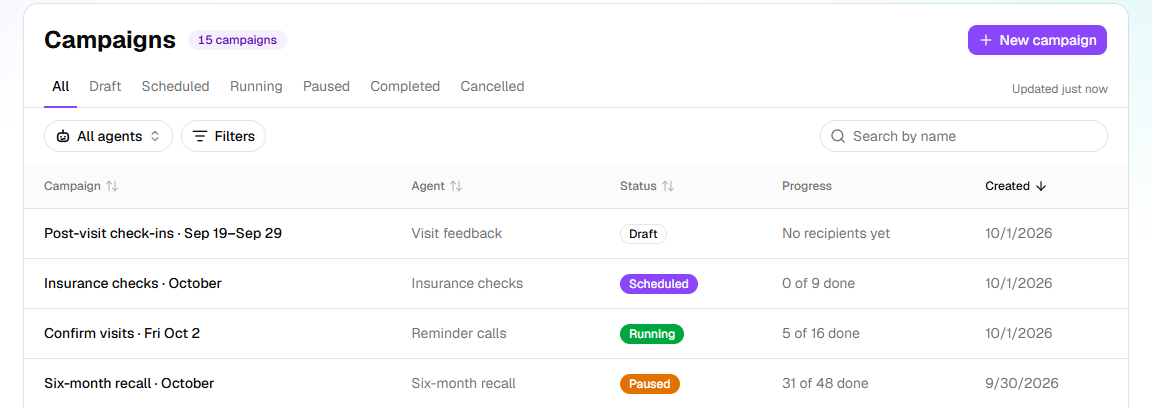
Campaigns, in the menu, lists your organization's campaigns, newest first. The tabs along the top are the statuses: All, Draft, Scheduled, Running, Paused, Completed and Cancelled. All agents narrows the list to one agent's campaigns, Filters to when they were created, and Search by name finds a campaign. Progress says how far each one has got, such as 12 of 40 done; one with nobody on it yet says No recipients yet. The list keeps itself up to date.
New campaign starts one: see Create a campaign. If it's greyed out with a lock beside it, campaigns aren't on your plan, and the lock names the plan they start on. An owner can change the plan under Settings → Billing.
A campaign's page
Click a campaign to open it. One page holds its whole life:
- The header gives the campaign's name and status, the agent, and the number it calls from. A scheduled campaign also says when it starts. Beside them are Settings and, depending on the status, Launch, Pause, Hold or Resume.
- Settings opens the number calls come from, the hours they may go out in, and the retries.
- … holds Rename, Cancel the campaign once it has launched, and Delete once it's over. A draft is deleted with the bin beside …, Delete this draft.
- The progress line, once the campaign has launched, counts the people done, on a call now and waiting, over a bar that fills as it goes.
- The tabs: People, everyone on the list and where each one stands; Data, what the list told the agent about each person and what their last call found out; Add people, while people can still be added; and Launch, while it's a draft.

What each status lets you do
| Status | How it gets there | What you can do |
|---|---|---|
| Draft | New campaign, then Create. | Add people, change the settings, and launch. Nobody is called. |
| Scheduled | Launched with Start later. | Add people and change the settings. Change the start…, in the … menu, moves it later or sooner, or starts it now. Hold stops it starting. At its start time it becomes Running. |
| Running | Launched with Start now, its start time came, or you resumed it. | Watch it, pause or cancel it, and put people back on the list or skip them. The settings are read-only and no people can be added: pause it first. |
| Paused | You clicked Pause or Hold, or HiloVoice paused it because it couldn't carry on. A banner then says why. | Change the settings, add people, Resume, or cancel it. Calls already under way finish; nobody else is called. |
| Completed | Everyone on the list is settled, counting anyone left waiting under Needs a person. | Read and export the results, and close a person with Mark as done. Nobody is called again. |
| Cancelled | Cancel the campaign. | The same as Completed. People who were still waiting are Cancelled, never called. |
A few things hold whatever the status:
- Rename works at any time. Nobody being called sees the name.
- Delete is there only for a draft or a campaign that's over. The calls it made stay on Calls; the list and its file go.
- A completed or cancelled campaign never runs again. To call the same people, start a new one.
- A paused campaign never completes, even once everyone on it is settled. It completes after you resume it. Resuming one whose start time is still to come puts it back to Scheduled.
Important: Launching or resuming a campaign starts real calls to the people on its list as soon as its calling window is open.
Hearing about it
When HiloVoice pauses a campaign because it can't carry on, Owners, Admins and Builders hear about it on the bell and by email; one paused along with its agent is the exception. Needs attention, on the Usage page, lists every paused campaign, with the reason when HiloVoice paused it. When a campaign finishes, the bell says so, with how many people are waiting for a person. To change what you hear about, and how, open Notifications and click Choose what you hear about.
In this chapter
- Create a campaign — from New campaign to launch
- Import a campaign's recipients — the spreadsheet, and the rows it turns away
- Set a campaign's calling hours and retries — when it calls, and when it tries again
- Monitor a running campaign — each person's row, and why a campaign pauses itself
- Work the Needs a person queue — the people a Follow-ups agent hands to your team
- Call a recipient again — Call again, and Reopen and call again
- Read a follow-up's progress — what a Follow-ups agent knows about each person
Related
- Campaigns and recipients — the parts of a campaign, and a recipient's statuses
- Campaign statuses — every status, and every reason a campaign stops, in one table
- The five kinds of agent — the four kinds that make calls
- Roles and permissions — who on your team can run a campaign