
Manage your phone numbers
For OwnersChecked against the app on October 1, 2026
The Phone numbers page lists every number your organization has: numbers HiloVoice got for you, forwarding numbers for the lines you already had, and numbers connected through your phone provider. From it you buy numbers, choose which Receptionist answers each one, and release the ones you no longer need. Phone numbers and caller ID explains the two jobs a number does.
Before you start
- Buying, assigning and releasing numbers need the Owner or Admin role. Everyone else can look.
- A Builder can still give a Receptionist a number the organization already has, on the agent's Phone Number step.
- Every number HiloVoice gets for you counts towards the phone numbers your plan includes, forwarding numbers too.
Read the list
Open Phone numbers in the menu. Each row is one number:
| Column | What it shows |
|---|---|
| Number | The number, with its name under it, or Forwarding number for <your business number> |
| Voice | Live: calls reach the agent named under it. Assigned, not live: the agent isn't live yet. No agent: nobody answers it yet. |
| Texting | Whether agents can text from it. Via HiloVoice means texts go out from HiloVoice's own number, with nothing for you to do. Point at a status to read more. |
| Kind | Local, Toll-free or Mobile, and the country |
| Added | When it was added |
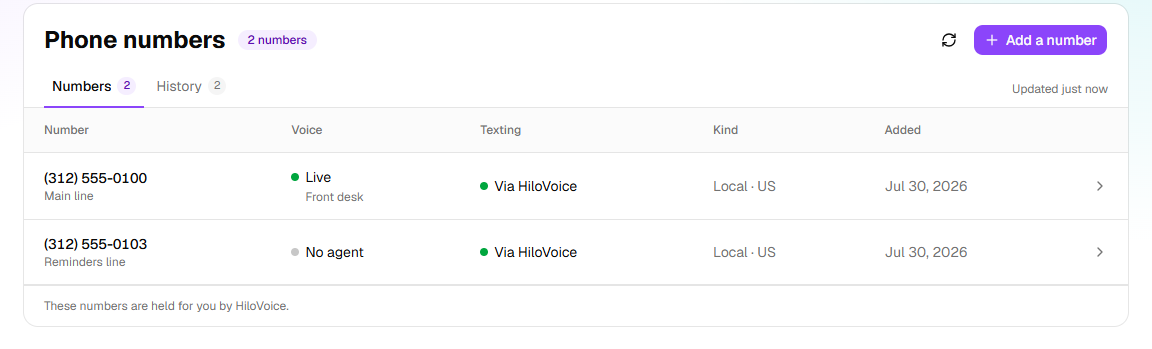
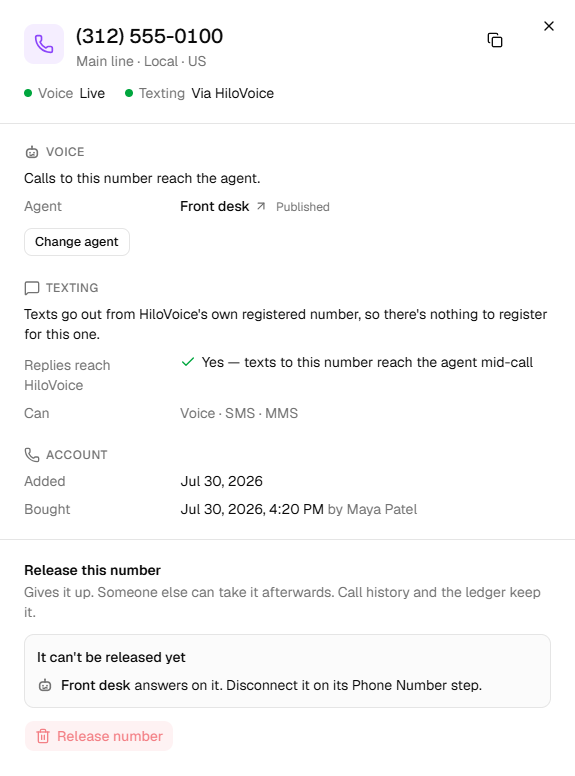
Click a number to open it: who answers it, its texting, who bought it and when, and Release this number. The History tab lists every number bought or released, with who did it and when.
Steps
Buy a number
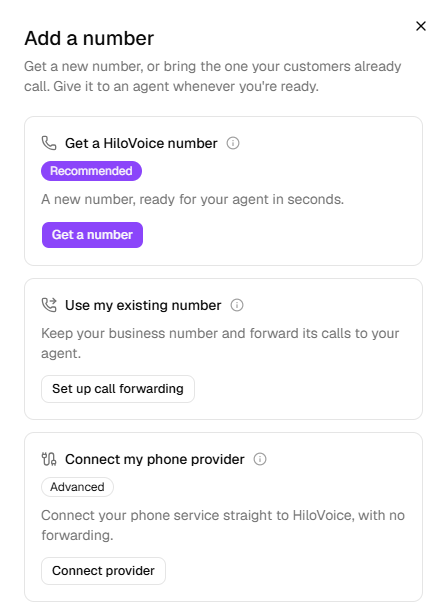
Click Add a number, then Get a number under Get a new number.
Choose the Country, and the Kind: Local, Toll-free or Mobile.
Type an Area code, or a State or province (a Region outside the US and Canada) and a City. Under Digits it should contain, you can ask for digits such as
555.Click Search, then Buy beside the number you want.
Under Name (optional), give it a name such as
Main line, shown next to the number wherever it's listed.Click Buy number. A message says <number> is yours.
Important: The number is yours as soon as you confirm it, and it counts towards the phone numbers your plan includes.
Choose who answers
- Click the number in the list.
- Click Assign to an agent, or Change agent if a Receptionist answers it already.
- Choose the Receptionist, and click Assign, or Move.
Only Receptionists without a number are offered. Moving a number from one to another asks first: Calls to it will reach <new agent> instead of <old agent>. Once it's done, Calls to <number> now reach <agent>. If the Receptionist isn't live yet, the number answers once you publish it.
Outbound agents never hold a number. They call from one, chosen on their own Caller ID step, and this page doesn't list them.
Keep your existing number
Click Add a number, then Set up call forwarding under Use my existing number. The steps are in Keep your number and forward it to your agent. Set up from this page, the forwarding number has no agent yet: HiloVoice answers the test call itself. Assign the number to a Receptionist afterwards.
To connect a business phone service straight to HiloVoice instead, with no forwarding, choose Connect provider under Connect my phone provider. Not every plan includes it.
Release a number
- Click the number in the list.
- Under Release this number, click Release number.
- Read Release <number>?, then click Release number. A message says <number> released.
Important: Releasing gives the number up, and someone else may take it. It can't be undone from here. Calls and texts to it stop reaching you. For a forwarding number, turn off forwarding at your phone company first, or calls to your business number go nowhere.
What stops a release
While something still uses the number, Release number is greyed out, and It can't be released yet says what:
| It says | Why | What to do |
|---|---|---|
| <agent> answers on it. Disconnect it on its Phone Number step. | A Receptionist answers it. | Click Disconnect on the Receptionist's Phone Number step. |
| <agent> calls from it. Choose Stop using on its Caller ID step. | An outbound agent calls from it. | Click Stop using on the agent's Caller ID step. |
| <campaign> would call from it once launched. Choose another number under Call from in its settings, or delete the draft. | A draft campaign is set to call from it. | Choose another number under Call from in its Settings, or delete the draft. |
| <campaign> is calling from it. Pause it and choose another number under Call from in its settings, or cancel it. (or calls from it (<status>) for a paused or scheduled one) | A campaign that hasn't finished calls from it. | Pause it and choose another number under Call from, or cancel it. |
A paused agent still holds its number. A number connected through your phone provider has no release: click Disconnect on the agent's Phone Number step instead.
Note: If your organization connected its own Twilio account under Settings → Integrations, the page lists every number in that account, and numbers you buy are added to it. A number bought on this page shows what it costs a month; one bought in Twilio itself doesn't. A number HiloVoice doesn't use yet says Not in HiloVoice: click it, then Add to HiloVoice. These numbers don't count towards your plan.
If it does not work
| You see | Why | What to do |
|---|---|---|
| Add a number is greyed out, with Only an owner or admin can add numbers | Your role is Builder or Analyst | Ask an owner or admin. |
| Your plan includes <n> phone numbers, and they're all in use. Release one, or choose a bigger plan under Settings → Billing. | Every number your plan includes is taken | Release a number you don't use, or ask an owner to change the plan. |
| Your plan moves to <plan> when this period ends, and it includes <n> phone numbers. To add more, keep your plan under Settings → Billing. | A move to a smaller plan is waiting | Keep your plan on Settings → Billing first. |
| Nothing for sale that fits | No number matches the search | Drop the digits, try a neighbouring area code, or another kind of number. |
| That number was just taken. Search again and pick another. | Someone else bought it first | Search again. |
| Numbers in this country aren't available through HiloVoice yet. Pick another country. | HiloVoice can't get numbers there yet | Choose another country, or forward your existing number. |
| Every agent that answers calls already has a number. Disconnect one on its Phone Number step to free it. | No Receptionist is free to take the number | Disconnect a number on a Receptionist's Phone Number step, or create a Receptionist. |
| We couldn't disconnect this number from calling just now, so it was not released. Try again in a moment. | The release didn't go through | Try again in a moment. |
| The number reads No longer held | HiloVoice no longer holds it, so nothing rings it | Click Remove from HiloVoice. |
Read next
- Phone numbers and caller ID — the two jobs a number does
- Give a Receptionist its number — the same choices, from the agent
- Give an outbound agent a caller ID — the number it calls from
- Plans, minutes and limits — how many numbers your plan includes