
Plans, minutes and limits
For OwnersChecked against the app on October 1, 2026
Every organization is on a plan, or on the free trial. The plan sets how many agents can be live at once, how many phone numbers HiloVoice gets for you, how many minutes each period includes, and which features you have. Settings → Billing shows where you stand. Owners and Admins see it; Builders and Analysts don't.
The Billing page
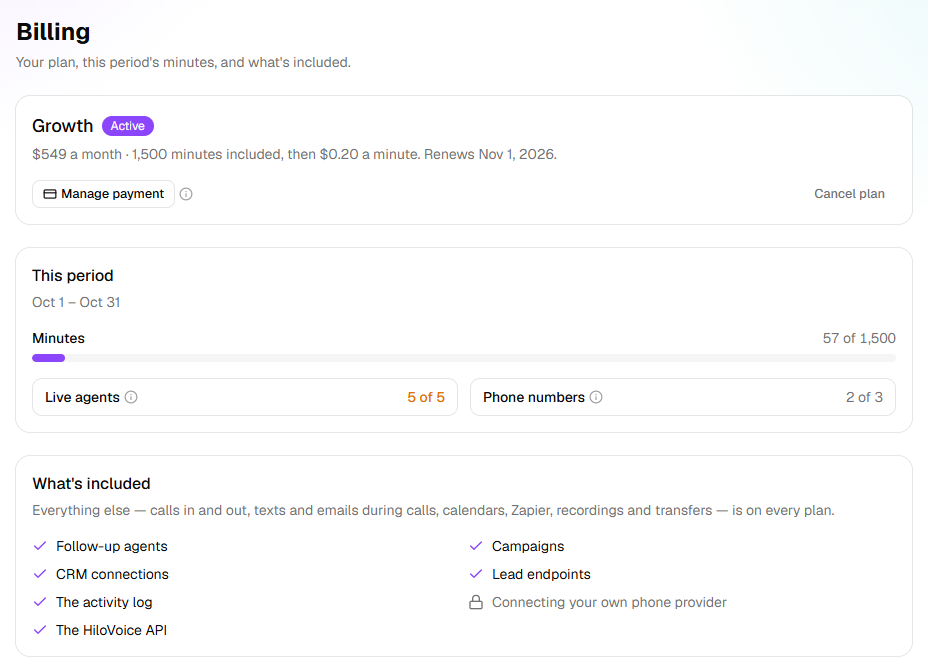
Billing shows, top to bottom:
- The plan: its name and where it stands, such as Active, Free trial or Trial over, with the price, the minutes it includes and what each extra minute costs. Manage payment opens a secure page for the card, the billing address and past invoices.
- This period: its dates, the Minutes used out of the plan's, and the Live agents and Phone numbers in use out of the plan's. The minutes bar turns amber at 75% and red at 100%.
- What's included: the features that differ by plan, each ticked or locked with the plan that has it, such as Growth and up: Follow-up agents, Campaigns, CRM connections, Lead endpoints, The activity log, Connecting your own phone provider and The HiloVoice API. Calls in and out, texts and emails during calls, calendars, Zapier, recordings and transfers are on every plan.
- Plans: each plan, with its price and what it includes. Yours says Your plan.
- Invoices: each invoice's Date, Number, Amount and Status, with View and PDF.
| The plan says | What it means |
|---|---|
| Free trial | The trial is on. It says how many days and minutes are left. |
| Trial over | The trial ran out. Calls are paused until you choose a plan. |
| No plan yet | There's no plan. Calls are paused until you choose one. |
| Active | A paid plan, renewing on the date shown. |
| Payment failed | The last payment didn't go through. Calls carry on while it's tried again: update the card. |
| Unpaid | Payments stopped going through. Calls are paused until the invoice is paid. |
| Ended | The plan has ended. Calls are paused until you choose a plan. |
| Comped | Free and unlimited: HiloVoice looks after this organization's plan. |
Minutes
Minutes are the time your agents spend on calls, counted over each period: a paid plan's billing period, the trial's days, or otherwise the calendar month.
- Voicemails count. Test calls from Try it count on the trial, and are free on a paid plan.
- A call that was turned away never counts: a blocked number, a caller over a call limit, or a call that came in while calls were paused.
- The time a caller spends with your staff after a transfer doesn't count.
- Past a paid plan's minutes, calls keep running. Each extra minute is billed on your next invoice, and This period shows the extra minutes so far and what they cost.
- On a paid plan, owners and admins are told at 75%, 90% and 100% of the minutes: 75% of this period's minutes are used, and so on, then This period's minutes are used.
The free trial
A new organization starts on the free trial, with no card. The plan on Billing says how many days and minutes are left, and a banner says the same on every page: Free trial: <days> and <minutes> left. What's included shows what the trial has.
- The trial ends when its days or its minutes run out, whichever comes first. A call already under way finishes.
- Owners and admins are told Your free trial ends soon, then Your free trial is over.
- Once it's over, calls are paused until you choose a plan. Choosing one ends the trial at once.
- Numbers HiloVoice got for you are kept for 30 days after a trial or plan ends, then released. A released number can't be got back.
- Each person gets one trial. A second organization you create starts with no plan.
What happens at each limit
| Limit | Checked when | What you see |
|---|---|---|
| Live agents | An agent goes live for the first time, or is resumed. Drafts and paused agents don't count. | Your plan includes <n> live agents, and they're all in use. Pause one, or choose a bigger plan under Settings → Billing. A restored agent comes back paused. |
| Phone numbers | A number is bought, forwarding numbers included | Your plan includes <n> phone numbers, and they're all in use. Release one, or choose a bigger plan under Settings → Billing. |
| A feature your plan doesn't have | You try to use it | A lock with the plan that has it, such as Growth and up, and Campaigns are on Growth and up. An owner can change the plan under Settings → Billing. |
| Contacts in one upload | A campaign's file is uploaded | Your plan takes up to <n> contacts in one upload, and this file has <m>. Split it into smaller files, or choose a bigger plan under Settings → Billing. |
| Try it minutes | A test call starts, on a plan that limits them | Try it has <n> minutes a month on your plan, and this month's are used. They're back on the 1st. |
| Minutes | Never | Calls carry on, and extra minutes are billed. |
A connection you already made keeps working: HubSpot or a lead endpoint connected before a move to a smaller plan stays connected. The activity log keeps recording, so it's all there when you move up.
When calls are paused
When the trial is over, there's no plan, the plan has ended or payments have stopped, your organization's calls pause. HiloVoice can also pause them itself. While they're paused:
- callers hear that the line isn't taking calls right now, and the call ends;
- running campaigns pause, and carry on by themselves once calls are back on;
- Try it, Call me, and launching or resuming a campaign are refused, with the reason;
- a red banner on every page says Calls are paused. and why. Owners and admins get Choose a plan.
| Why | The banner says | On Calls, a turned-away call says |
|---|---|---|
| The trial is over | The free trial is over. Choose a plan to carry on taking and placing calls. | Trial over |
| There's no plan | Choose a plan to start taking and placing calls. | No plan yet |
| The plan ended | The plan has ended. Choose a plan to carry on taking and placing calls. | Plan ended |
| Payments stopped | The last payment didn't go through. Update the card under Settings → Billing to carry on taking and placing calls. | Payment overdue |
| HiloVoice paused them | HiloVoice has paused this organization's calls. Contact HiloVoice support. | Calls paused by HiloVoice |
Owners and admins are told A caller was turned away, at most once an hour, and Calls are back on when calling starts again.
Changing your plan
Owners choose and change the plan, and the card it's paid with. Admins see the plan and the invoices; they change the plan only where HiloVoice allows it.
- Choose <plan>, from the trial or with no plan, takes you to a secure page to pay. The plan starts once the payment is confirmed.
- Upgrade to <plan> starts the bigger plan today. The dialog shows today's charge, the difference for the rest of this period, before you click Pay <amount> and upgrade.
- Move to <plan> waits until this period ends. If the smaller plan has fewer live agents, you choose which stay live; the others pause on the day and keep everything. If you have more numbers than it includes, release some first. Running campaigns pause if it has none.
- Cancel plan keeps everything working until the period ends. After that, calls pause. Agents, calls and recordings are kept, and numbers for 30 days. Reactivate undoes it until then.
Important: An upgrade charges the card on file straight away.
Related
- Manage your phone numbers — releasing numbers your plan no longer includes
- Review and go live — the live-agents limit when an agent goes live
- Manage members and roles — who can see and change billing