
Campaigns and recipients
For BuildersChecked against the app on October 1, 2026
An outbound agent does nothing on its own. It is given work through a campaign: a list of people, the agent that will call them, and the rules for when and how often. HiloVoice works the list for you and shows you where each person got to.
The parts of a campaign
| Part | What it is |
|---|---|
| Agent | One published outbound agent (Confirmations, Detail checks, Feedback or Follow-ups). |
| Recipients | The people to call, imported from a CSV, or added from Leads with Add to a follow-up campaign…. Each row carries the details the agent needs — the appointment time, the record to check, the quote reference. |
| Schedule | When the campaign starts, and the hours it may call in: the agent's Calling Hours, on your business's clock, or on each person's own where the list gives their time zone. |
| Retry policy | What to do when an attempt does not settle the person. |
| Caller ID | The number to call from — normally the agent's own caller ID, which the campaign takes as its default. |
A campaign's life
Draft ──▶ Scheduled ──▶ Running ──▶ Completed
                          ▲  │
                          └──┘ Paused          Cancelled (from anywhere)
- Draft — being set up. Nothing is called.
- Scheduled — started, but the start time is in the future.
- Running — calling inside the window.
- Paused — stopped. Either you paused it, or HiloVoice did because it could not continue. The campaign shows why: The agent is not published, The agent has no caller ID to call from, The number chosen to call from is no longer connected, The agent is archived. Fix the cause and resume.
- Completed — every recipient is settled.
- Cancelled — stopped for good. Recipients not yet called stay uncalled.
Settings can be changed while a campaign is Draft, Scheduled or Paused. Once it is Running, pause it first.
A recipient's life
Each person on the list moves through their own statuses:
| Status | Meaning |
|---|---|
| Waiting | Waiting to be called, or waiting for the next retry. |
| On a call | A call is in progress right now. |
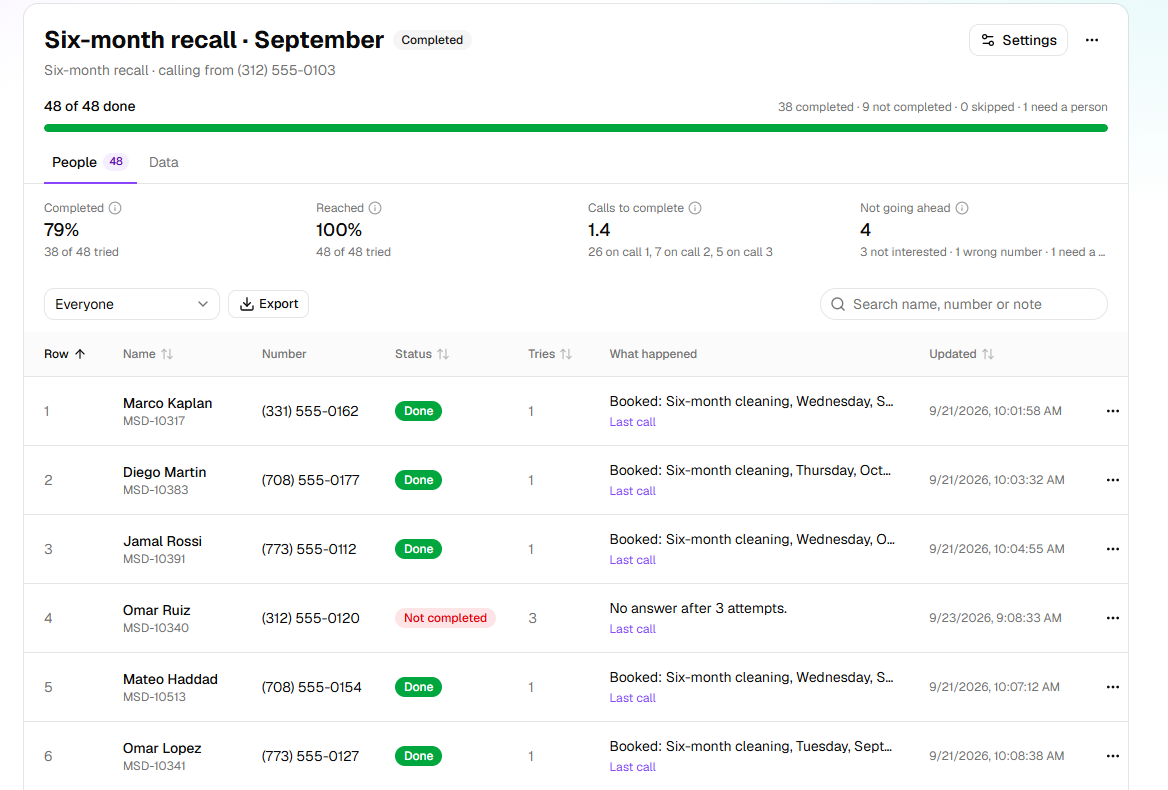
| Done | The agent finished the job with this person. What "finished" means depends on the agent kind — confirmed or cancelled for Confirmations, every detail checked for Detail checks, the goal reached for Follow-ups. |
| Needs a person | The agent decided a person should take over. Nobody is called again until someone deals with it. |
| Not completed | The job was not done: the attempts ran out, the number could not be called, or (for Follow-ups) the person said no or it was the wrong number. |
| Skipped | Not called: the number is on the block list, or someone chose Skip this person. (A row with a bad number never becomes a recipient; the import's report lists it.) |
| Cancelled | The campaign was cancelled before this person was settled. |
A campaign's page shows how far it got, and what happened with each person. For a Follow-ups campaign it also shows how many were reached, how many calls a finished job took, and why the rest are not going ahead:
Attempts and retries
An attempt is a real try to reach the person: the phone rang and someone answered, or it went to voicemail, or nobody picked up. If the attempt does not settle the person, the retry policy decides what happens.
By default a campaign makes 3 attempts, at least 2 hours apart, retrying after no answer, a busy line, a failed connection, or someone else answering when the person wasn't there. A Follow-ups campaign starts from a different default because its job is longer: 4 attempts, one day apart, then two, then three, and it also retries after a call that made progress but did not finish, after a requested callback, and after the person asked for more time.
When the person asks to be called back at a particular time, the next attempt is made then, even sooner than the usual wait, as long as it's inside the calling window. It counts as an attempt like any other. A person who rings back on their own isn't an attempt at all.
On a Follow-ups campaign, a call that fails on the line, because it dropped or never connected, isn't counted as one of the person's goes. HiloVoice tries again two hours later, up to two times by default, before it counts anything.
Some outcomes end the person's part of the campaign at once, whatever the policy says: they opted out, said do not call, it was the wrong number, or (for Follow-ups) they were not interested or turned out not to qualify. A do not call puts the number on the block list.
Calling someone again, or closing them by hand
Each person's row has a menu. While the campaign is still going:
- Call again puts a person back on the list when their last attempt did not finish: a Not completed, Skipped or Needs a person row goes back to Waiting. It will not touch a Done row.
- Reopen and call again is for a Done row you want called again — the customer rang to say they changed their mind, or the goal turned out not to be done after all. It is deliberate and separate so that a campaign never re-calls someone it has finished with by accident.
At any time, Mark as done closes a person by hand: the job was done some other way, such as a person on your team calling them back and sorting it out.
What a Follow-ups campaign remembers
A Follow-ups agent reads the person's progress before every call: the facts established so far, the blocker it hit last time, the agreed next step, and one line per previous attempt. The same is shown on the recipient in the campaign, so you can see at a glance where each open task stands and why the agent is waiting.
Related
- The five kinds of agent — the four outbound kinds
- Phone numbers and caller ID — what the campaign calls from
- Import a campaign's recipients — the spreadsheet and its columns
- Set a campaign's calling hours and retries — changing the defaults
- Work the Needs a person queue — the people waiting for one of your team