
Recipient statuses
For BuildersChecked against the app on October 1, 2026
Each person on a campaign's list is a recipient, with a status of their own. It shows in the Status column on the campaign's People tab, beside Tries and What happened. Choose a status in the list that says Everyone to see only the people in it. For what each person's row means while a campaign runs, see Monitor a running campaign.
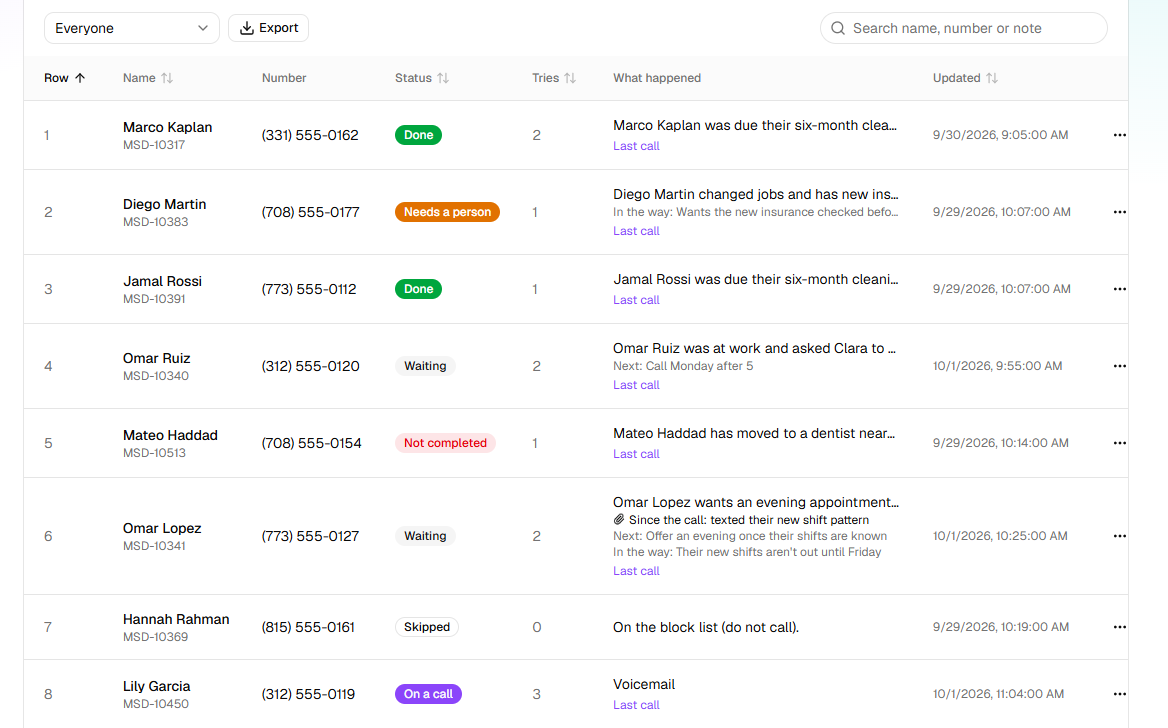
The statuses
| Status | What it means | What to do |
|---|---|---|
| Waiting | In the queue: not called yet, or called and due again. What happened says why they're waiting, or Due and the time of the next try. | Nothing: they're called in the order of the list, inside the calling window. |
| On a call | A call to them is under way, or being placed. | Nothing until it ends. The row then moves on by itself. |
| Done | The agent finished the job with them, or someone marked it done by hand. What "done" means depends on the agent: confirmed or cancelled for Confirmations, checked for Detail checks, every question answered for Feedback, the goal reached for Follow-ups. | Nothing. They're never called again unless you reopen them. |
| Needs a person | A Follow-ups agent asked for someone on your team to take over: the person wanted a person, or the situation was outside its brief. Nobody calls them again meanwhile. | Deal with it, then Call again or Mark as done. See Work the Needs a person queue. |
| Not completed | Over, with the job not done: the attempts ran out, or the call ended in a way that's never tried again (they said no, asked not to be called, a wrong number, a number that can't be called). What happened says which. | If it's worth another go, Call again. |
| Skipped | Never called: the number is on your block list, or someone skipped them by hand. | Take the number off Blocked numbers if it shouldn't be there, then Call again. |
| Cancelled | The campaign was cancelled, or ended, before they were reached. | To call them, start a new campaign. |
A row in an import file that can't be used (no phone number, not a phone number, a duplicate) never becomes a recipient at all. It's listed in the import's report instead: see CSV columns.
What you can do with a person
Each row's … menu offers what fits the person's status and the campaign's. A campaign that is Completed or Cancelled has ended: nobody on it can be put back in the queue.
| Menu item | Offered when | It does | The app says |
|---|---|---|---|
| See every attempt | Always | Opens every call to them, oldest first, and where the job stands. | |
| Open the last call | They've been called | Opens their last call on Calls. | |
| Call again | Not completed, Skipped, Cancelled or Needs a person, on a campaign that's Scheduled, Running or Paused | Puts them back to Waiting. Their attempts so far are kept, so someone whose attempts had run out gets one more call. | Back in the queue |
| Skip this person | Waiting, on a campaign that's Scheduled, Running or Paused | Makes them Skipped, so they're never called. | Skipped |
| Mark as done | Any status but On a call and Done | Makes them Done, with Marked complete by hand. | Marked as done |
| Reopen and call again | Done, on a campaign that's Scheduled, Running or Paused | Puts a finished job back to Waiting, with Reopened by hand. | Reopened — back in the queue |
Call again refuses a Done row on purpose, so a campaign never calls someone it has finished with by accident: use Reopen and call again. See Call a recipient again.
What the "What happened" column says
What happened gives the latest note on the person. Most notes start with what happened on the last call, such as No answer., The line was busy., the agent's summary of the call, or Outcome: and the result in a word, then say what HiloVoice does next.
| The row says | Status | What it means |
|---|---|---|
| Due and a date and time | Waiting | Called before; the next try is then. |
| Outside calling hours; next window opens and a time | Waiting | Due, but the calling window is shut. They're called when it opens. |
| This campaign has as many calls up as it is allowed at once. | Waiting | Every line the campaign may use is busy (Calls at once, in Settings). They're tried again within a minute. |
| This agent has as many calls up as it is allowed at once., Your organization has as many calls up as it is allowed at once., Every outbound line is in use right now. or Waiting for a free line. | Waiting | No line was free. They're tried again within a minute. |
| The call couldn't be placed just now; will try again shortly. | Waiting | HiloVoice couldn't place the call. It isn't counted as an attempt. |
| They called back — on the line now | Waiting | They rang the campaign's number back and a Receptionist has them. Nobody calls them for half an hour. |
| They called back; that call did not settle it | Waiting | That call didn't settle the job, so the schedule stands. |
| … Trying again (2 of 3 so far). | Waiting | An attempt that didn't settle it. The next one follows after the wait in Settings. |
| … Not counted against the attempts; trying again. | Waiting | The call failed on the line. It's tried again without using up one of their attempts. |
| … Calling back when they asked (2 of 4 attempts so far). | Waiting | They asked to be called at a particular time, inside the calling window. |
| … They asked for 2:00 pm; the next call is 9:00 am on Monday (2 of 4 attempts so far). | Waiting | The time they asked for was outside the calling window, or too soon, so the call is at the next time it can be. |
| Reopened by hand. | Waiting | Someone used Reopen and call again. |
| Outcome: confirmed., or the agent's summary | Done | The call did what it was for. |
| Marked complete by hand. | Done | Someone used Mark as done. |
| No answer after 3 attempts. | Not completed | Every attempt went unanswered. |
| … Not completed after 4 attempts. | Not completed | A Follow-ups job still in progress used its last attempt. |
| … The call failed on the line 3 times. | Not completed | The line kept failing, past the retries allowed. |
| … Not called again: and why | Not completed | An ending that's never retried: they asked not to be called again, the number reached the wrong person, the number could not be dialled, they said they are not interested, they no longer qualify, they declined. |
| … Not called again: the policy does not retry and the outcome | Not completed | That ending isn't ticked under Try again after, in Settings. |
| … Needs a person: and the agent's reason | Needs a person | The agent handed the job to your team. |
| On the block list (do not call). | Skipped | The number is on Blocked numbers, at import or when its turn came. |
| Skipped by hand. | Skipped | Someone used Skip this person. |
On a Follow-ups campaign, rows can also show Next:, In the way: and Since the call:: see Read a follow-up's progress. The words a Follow-ups agent records are in Follow-up dispositions.
The counts at the top
Once a campaign has launched, the line under its name counts people: 12 of 40 done · 2 on a call now · 26 waiting. Here done means settled, whatever the status: Done, Not completed, Skipped, Cancelled and Needs a person all count. The line beside it splits them: reached is Done, not reached is Not completed (on a Follow-ups campaign, completed and not completed), then skipped, need a person and cancelled.
In an export
Export, on People, downloads the list as a CSV. Its Status column uses short names:
| In the export | In the app |
|---|---|
pending | Waiting |
calling | On a call |
completed | Done |
needshuman | Needs a person |
failed | Not completed |
skipped | Skipped |
cancelled | Cancelled |
Related
- Campaign statuses — what the campaign as a whole is doing
- Follow-up dispositions — how a Follow-ups agent records each call
- Work the Needs a person queue — the people waiting for your team
- Campaigns and recipients — attempts, retries and what ends a person's part