
Give an outbound agent a caller ID
For BuildersChecked against the app on October 1, 2026
An outbound agent (Confirmations, Detail checks, Feedback or Follow-ups) shows a caller ID on the phone of everyone it calls. Until it has one, a campaign using the agent pauses with the reason The agent has no caller ID to call from.
Before you start
- The agent exists and is any kind except Receptionist.
- Your organization has at least one phone number, or you have the Owner or Admin role to buy one.
- The number can already answer calls for a Receptionist. That does not matter; both can use it.
Steps
Open Agents and click the agent.
In the step rail, click Caller ID.
Find the number you want in the list. A number that already answers for a Receptionist says Answers calls for <name> — <name> takes callbacks to this number underneath; that is information, not a warning.
Click Call from this on that row.
The row now reads Calls from this agent show this number, and the Caller ID step is marked complete in the rail.
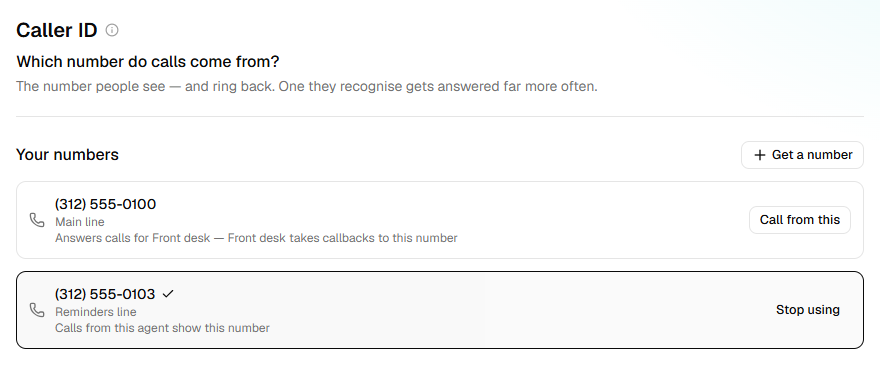
If you have no suitable number, click Get a number on this step instead and buy one. The number you buy becomes the agent's caller ID straight away.
What happens next
- The agent's next call shows the number. There's nothing to publish.
- Campaigns that use this agent take the caller ID as their default call from number.
- A campaign that had paused for no caller ID can be resumed.
- While the agent calls from the number, or a campaign still going does, the number can't be released: its page under Phone numbers says what's using it.
To stop using a number
On the Caller ID step, click Stop using on the current number. The agent has no caller ID again until you choose another; running campaigns will pause.
If it does not work
| You see | Why | What to do |
|---|---|---|
| Not ready to call from yet, with Retry | HiloVoice could not get the number ready to call from | Click Retry. If it fails again, wait a few minutes and try once more, then contact support with the number. |
| No numbers yet. An owner or admin can get one. | Your role is Builder or Analyst | Ask an Owner or Admin to get a number; you can then choose it here. |
| The step is not in the list of steps | The agent is a Receptionist | A Receptionist answers a number rather than calling from one; see Phone numbers and caller ID. |
Related
- Phone numbers and caller ID — why a Receptionist holds a number and an outbound agent only calls from one
- Monitor a running campaign — the other reasons a campaign pauses itself