
Phone numbers and caller ID
For BuildersChecked against the app on October 1, 2026
A phone number in HiloVoice can do two different jobs, and the difference explains most of what the Phone numbers page shows you.
Two jobs, one number
Answering calls for a Receptionist. When someone rings the number, this is the agent that picks up. A number answers calls for at most one Receptionist, and a Receptionist needs a number of its own to be reachable. This is set on the Receptionist's Phone Number step, and the Phone numbers page names the agent beside the number.
Being the caller ID for outbound agents. When an outbound agent calls someone, this is the number they see on their phone and the number they get if they ring back. It is set on the outbound agent's Caller ID step, where the chosen number reads Calls from this agent show this number. Any number of outbound agents can call from the same number.
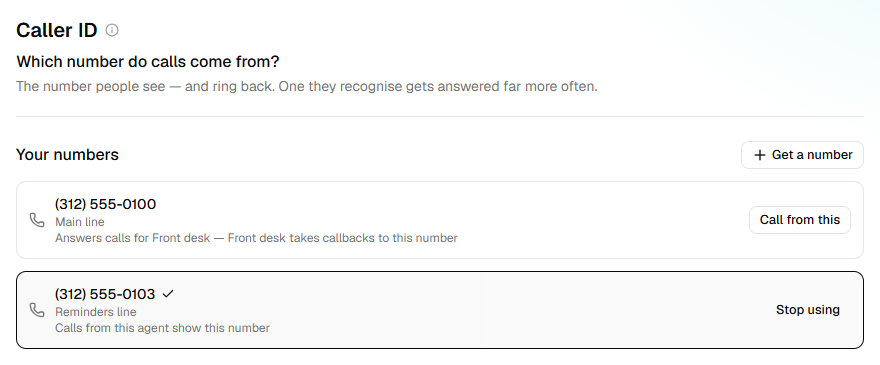
The two jobs do not conflict. The usual setup for a small business is one number: the Receptionist answers it, and every outbound agent calls from it. A customer who misses a confirmation call and rings back reaches the Receptionist, which is exactly what you want.
   (323) 555-0142
   ├── answers calls for: Riley (Receptionist)
   └── caller ID for:     Appointment confirmations, Follow-ups
Note: Outbound agents do not own numbers. If you try to give one a number the way you would a Receptionist, HiloVoice refuses; use the Caller ID step instead. This is why the outbound builder never offers to move a number away from your Receptionist.
When you need more than one number
- Two Receptionists. Each needs its own number — a sales line and a support line, say.
- A different caller ID for a different audience. A follow-up campaign to trade customers might call from a number that rings a different desk. Buy a second number and pick it on that agent's Caller ID step.
- Local presence. Calling people in another area code from a number they recognise.
Buying a number
Numbers are bought inside HiloVoice, under Phone numbers or directly from an agent's Phone Number / Caller ID step. A number bought from an agent's step is attached to that agent straight away. Buying a number needs the Owner or Admin role.
Important: A number costs money every month from the moment it is bought. Release numbers you no longer use.
Releasing a number
Releasing gives the number back and cannot be undone — you will not get the same number again. HiloVoice will not release a number that is still in use, and tells you what is using it:
- a Receptionist answers calls on it, or
- an outbound agent calls from it, or
- a campaign that hasn't finished calls from it, a draft included.
Free it first, the lightest way: disconnect it from the Receptionist, stop using it as the outbound agent's caller ID, or give the campaign another number to call from. Then release.
What "Retry" means on the Caller ID step
Before a number can be shown as caller ID, HiloVoice gets it ready to call from. If that failed — usually a passing problem — the number's row on the Caller ID step reads Not ready to call from yet, with a Retry button, and campaigns using the agent pause with the reason The agent has no caller ID to call from. Click Retry; if it keeps failing, contact support with the number.

Related
- The five kinds of agent — which kinds answer and which kinds call
- Give a Receptionist its number — the number it answers
- Give an outbound agent a caller ID — choosing what an outbound agent calls from
- Manage your phone numbers — buying, release, and who may do it