
What HiloVoice does
For EveryoneChecked against the app on September 19, 2026
HiloVoice puts a phone agent on your business line. The agent talks the way a good member of staff does — it listens, asks, answers, books, and knows when to hand over to a person — and it does it on every call, at any hour, without being trained twice.
There are two directions it works in.
Answering calls. A Receptionist picks up a number you own. It finds out who is calling and what they want, answers the questions you have given it answers to, books an appointment in your calendar, takes the caller's details as a lead, and puts the caller through to a person when the situation calls for one.
Making calls. An outbound agent works through a list of people you give it — a campaign — and does one job with each: confirms an appointment, checks the details you hold, asks for feedback after a visit, or follows up on something unfinished until it is done. It calls inside the hours you set, retries on the schedule you set, and tells you which conversations need a person.
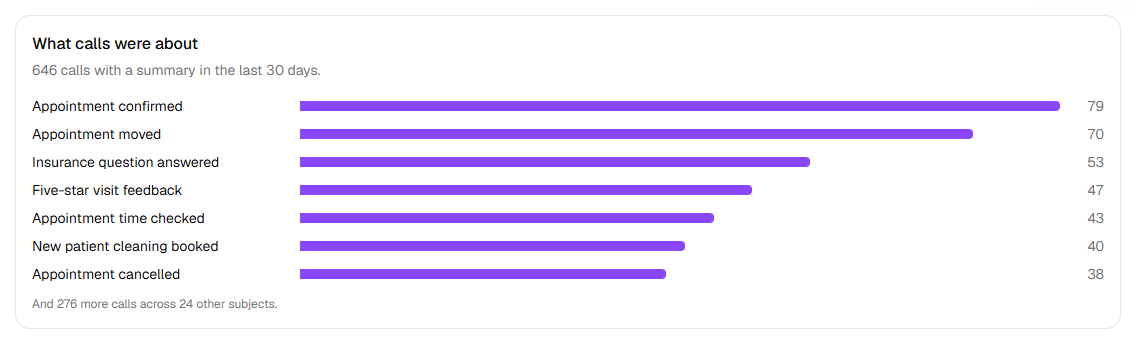
A business that uses both sees the mix on its Usage page. This is a month at a family dental practice, where one agent answers the phone and four call patients:
How the pieces fit
   Organization
   ├── Members (Owner, Admin, Builder, Analyst)
   ├── Phone numbers ──── answer calls for ──▶ a Receptionist
   │                  └── caller ID for ───▶ outbound agents
   ├── Agents
   │   ├── Receptionist (answers)          ─▶ Calls, Leads
   │   └── Confirmations / Detail checks /
   │       Feedback / Follow-ups (call)    ─▶ Campaigns ─▶ Recipients ─▶ Calls
   ├── Contacts (everyone you have imported)
   ├── Integrations (calendar, CRM, Slack, email, Zapier, your own system)
   └── Settings: Lookups, Transfer destinations, Transfer list, Blocked numbers
Everything belongs to an organization — your company's account. An agent is built once in the agent builder, tested from your browser, then published. A Receptionist goes live the moment it is published on a number. An outbound agent goes live when a campaign that uses it starts.
What you see day to day
The left-hand menu is the whole product:
| Page | What it is for |
|---|---|
| Usage | The home page: how your agents are doing and what has been used |
| Calls | Every call, with its transcript, recording and outcome |
| Leads | The people a Receptionist decided you should follow up |
| Campaigns | Outbound work: lists, schedules, progress, the ones that need a person |
| Contacts | Your address book — everyone you have imported |
| Agents | Build, test, publish, pause, duplicate and archive agents |
| Phone numbers | Buy numbers, see who answers them and who calls from them |
| Settings | Organization, members, integrations, lookups, transfer lines, the block list |
What HiloVoice is not
- It is not a call centre with people in it. If a call needs a person, the agent hands it to one of yours, takes a message, or reads out a number to call instead.
- It is not a CRM. It creates leads and contacts and sends them where you already work (HubSpot, Slack, Zapier, your own system).
- It is not a marketing dialer. Outbound agents call people who already have a relationship with you — an appointment, a record, a visit, an open task — and stop the moment someone says stop.
Related
- The five kinds of agent — which one you want
- Phone numbers and caller ID — how a number relates to an agent
- Campaigns and recipients — how outbound work is organised
- Roles and permissions — who on your team can do what