
Give a Receptionist its number
For BuildersChecked against the app on October 1, 2026
A Receptionist answers calls on one number, set on its Phone Number step: a number your organization already has, a new HiloVoice number, or your existing business number. Without one, you can talk to the agent in Try it, but nobody can ring it. Outbound agents have a Caller ID step instead: see Give an outbound agent a caller ID.
Before you start
- The agent is a Receptionist.
- Getting a new number, setting up call forwarding and connecting your phone provider need the Owner or Admin role. With the Builder role, you can use a number the organization already has.
- A Receptionist answers on one number at a time, and a number answers for one Receptionist.
Steps
Use a number your organization already has
- Open Agents and click the agent.
- In the step rail, click Phone Number.
- Open Or use a number you already have. Each number says whether another agent has it.
- Click Use this on the number you want. If another agent has it, the button reads Move here, and that agent stops answering on it. If the number is in use, a dialog says what changes; click Move here to confirm.
Get a new number
On the Phone Number step, under Get a new number, click Get a number.
Choose the country and the kind of number, type an area code or a city, and click Search.
Click Buy next to the number you want, then Buy number.
Important: A number is yours as soon as you confirm it, and it counts towards the numbers your plan includes.
The number becomes the agent's at once. Your agent is ready for calls confirms it, or Your number is ready if the agent isn't live yet.
Keep your existing number
Under Use my existing number, click Set up call forwarding. HiloVoice gives you a forwarding number, and you forward your business line to it at your phone company. Keep your number and forward it to your agent walks you through it, test call included.
Connect your phone provider
This is for a business phone service that can send its calls straight to HiloVoice, with no forwarding. Not every plan includes it; where yours doesn't, the tile shows the plan that does.
- Under Connect my phone provider, click Connect provider.
- Under Who provides your business phone service?, choose your provider or type its name. HiloVoice says whether it can connect directly, or asks you. I'm not sure gives you the question to ask your provider. If it can't connect directly, Set up call forwarding takes you to forwarding instead.
- Click Continue, enter the number the agent should answer, choose how your provider proves its calls are from it, and click Set up the connection.
- Under HiloVoice is ready, give your provider the details: Copy connection details or Download instructions. Once they've set it up, click I've configured my provider and call your number from another phone.
What happens next
The step shows the number, what kind it is, and whether calls reach the agent. A forwarded number, or one through your phone provider, shows as your own number, with the provider you named.
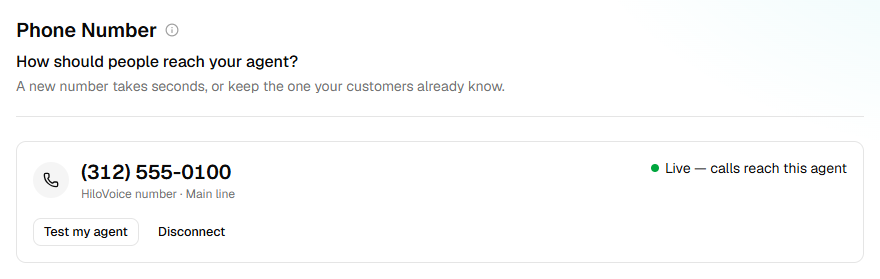
A number given to a live agent takes calls at once: Live — calls reach this agent. On an agent that isn't live yet, it reads Goes live when you publish.
The step is ticked in the rail once the agent has a number. You can go live without one; the agent starts answering once it has a number.
Outbound agents can call from the same number, and this agent keeps answering it.
To stop, click Disconnect. A HiloVoice number stays in your account. For a forwarded number, turn forwarding off at your phone company too, or callers hear nothing.
If it does not work
| You see | Why | What to do |
|---|---|---|
| An owner or admin can get a number or set up forwarding. | Your role is Builder | Use a number under Or use a number you already have, or ask an Owner or Admin. |
| Only an owner or admin can connect a phone provider. | Your role is Builder | Ask an Owner or Admin to connect it. |
| Not taking calls yet, with Retry | Connecting the number didn't finish | Click Retry in a moment. |
| Disconnect <number> first, beside another number | The agent already has a number | Click Disconnect on its number, then Use this. |
| Your plan includes <n> phone numbers, and they're all in use. | Every number your plan includes is taken | Release one, or choose a bigger plan under Settings → Billing. |
| No call reached HiloVoice after a test call | Your provider isn't sending the number's calls yet | Check the details you gave it; a new route can take a few minutes. Then click Try again. |
Related
- Keep your number and forward it to your agent — keep the number your customers know
- Phone numbers and caller ID — how a number relates to an agent
- Roles and permissions — who can buy and connect numbers
- Review and go live — what going live does to the number