
Send leads to your own system
For OwnersChecked against the app on October 1, 2026
The Lead endpoint posts leads to a web address you own: your CRM's inbound webhook, a Make or Zapier hook, or a route on your own server. Every lead gets Push to endpoint, and each lead can also go on its own once its call is scored. With a signing secret, your system can check each delivery came from HiloVoice.
Before you start
- You're an Owner, Admin or Builder.
- Lead endpoints are on Growth and up. On a smaller plan, the row on Integrations shows Growth and up. The free trial includes it.
- You have an HTTPS address that takes a POST with a JSON body and answers with a 2xx status. For a Zap, Connect Zapier instead: it sends every call as well.
Steps
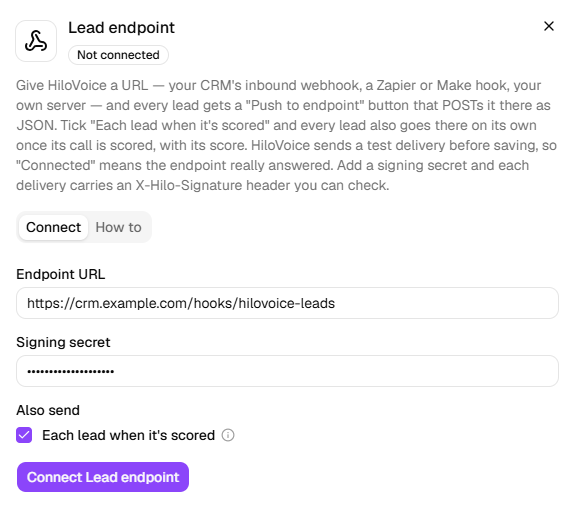
- Open Settings → Integrations and click Lead endpoint.
- Paste your address under Endpoint URL.
- To have deliveries signed, type a secret your system also knows under Signing secret. It's optional.
- To send each lead once its call is scored (on agents with Lead scoring on), tick Each lead when it's scored under Also send.
- Click Connect Lead endpoint. HiloVoice sends a test delivery first (event
lead.ping), and Connected means your endpoint answered it.
To change Also send later, click Lead endpoint: the box shows what's ticked now. Change it and click Save; the address and secret aren't asked for again.
 6. On Leads, open a lead, click Actions, then Push to endpoint.
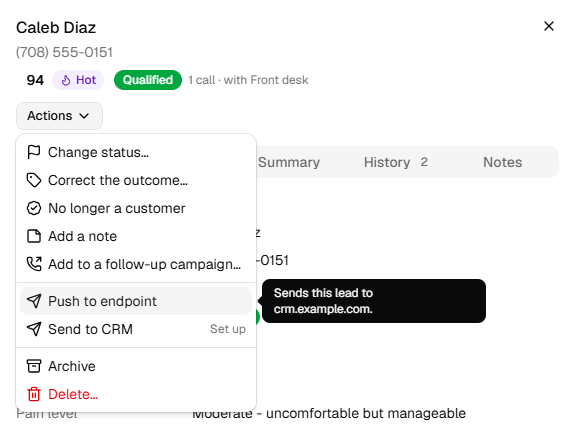
A message says Pushed to your endpoint (Sent to <host>.), or The endpoint didn't take it with what it answered. The lead's History records each push.
What a delivery looks like
POST <your URL>
Content-Type: application/json
X-HiloVoice-Event: lead.pushed       lead.scored for a scored lead, lead.ping for the test
X-HiloVoice-Delivery-Id: 6f1c2e0a-…  unique to the delivery; safe to deduplicate on
X-HiloVoice-Signature: t=…,v1=…      only with a signing secret
Before 2026-10-02 these were named X-Hilo-Event, X-Hilo-Delivery-Id and X-Hilo-Signature. An
endpoint that checks those names needs the new ones.
The body, for a lead pushed by hand:
{
  "event": "lead.pushed",
  "deliveryId": "6f1c2e0a-9b3d-4c8e-8f21-0d5b7a1e9c44",
  "sentAt": "2026-10-01T15:04:05+00:00",
  "sentBy": "Maya Patel",
  "lead": {
    "id": "4bbc9fe3-34e5-4aea-9f4b-62a507a781bb",
    "organizationId": "e2bd54e4-47e2-4277-83ca-c4cc236f6245",
    "fullName": "Jordan Ellis",
    "phone": "+13125550142",
    "email": "[email protected]",
    "status": "Qualified",
    "qualification": "qualified",
    "outcome": "appointment_scheduled",
    "agentOutcome": "qualified",
    "outcomeCorrectedBy": "Maya Patel",
    "summary": "New patient asking for a cleaning, evenings preferred.",
    "fields": {
      "reason_for_visit": "routine_cleaning",
      "preferred_appointment_time": "evening"
    },
    "labels": {
      "reason_for_visit": "Reason for visit",
      "preferred_appointment_time": "Preferred appointment time"
    },
    "agentId": "9b7e6f11-2c6d-4d8a-a4e2-1a3f0c6b5d90",
    "firstCallId": "0c2a9c1e-7d4b-4f7e-b0c3-2e9a8d7f6b51",
    "lastCallId": "8cd80186-baf3-429e-ad06-62972d1f581b",
    "callCount": 2,
    "lastActivityAt": "2026-10-01T14:26:00+00:00",
    "createdAt": "2026-09-30T11:02:00+00:00",
    "score": 83,
    "scoreStatus": "scored",
    "scoreBand": { "key": "hot", "label": "Hot" },
    "scoreSignals": [
      { "name": "Wants an appointment this week", "points": 30 },
      { "name": "Only asking about prices", "points": -10 }
    ],
    "scoredAt": "2026-10-01T14:28:00+00:00"
  }
}
fieldsholds whatever the agent captured on the calls, keyed by question, andlabelsnames each key. A question the lead has no answer for is left out.outcomeis the lead's outcome as HiloVoice shows it: a person's correction when there is one, else the agent's.agentOutcomeis always the agent's.statusisOpen,Qualified,DisqualifiedorClosed.- The score fields are the lead's Score tab:
scoreStatusisscored,pending,insufficient,not_applicableorfailed. A lead never scored has none of them. - The test delivery's body is only
event(lead.ping) andsentAt.
What HiloVoice sends, on the Lead endpoint's How to tab, shows the same example, built by the code that builds a real delivery.
Check the signature
With a Signing secret, each delivery carries X-HiloVoice-Signature: t=<unix seconds>,v1=<hex>. To
check it on your side:
- Read
tandv1from the header. - Work out the HMAC-SHA256 of
t, a full stop, then the body exactly as it arrived, keyed with your secret, as lowercase hex. - Refuse the delivery if that differs from
v1, or iftis more than a few minutes old.
In Node.js, for example:
const crypto = require("crypto");

// header: the X-HiloVoice-Signature value. rawBody: the body as it arrived, before any parsing.
function cameFromHiloVoice(header, rawBody, secret) {
  const parts = Object.fromEntries(header.split(",").map((part) => part.trim().split("=")));
  if (!parts.t || !parts.v1) return false;
  if (Math.abs(Date.now() / 1000 - Number(parts.t)) > 300) return false;
  const expected = crypto.createHmac("sha256", secret).update(`${parts.t}.${rawBody}`).digest("hex");
  return expected.length === parts.v1.length && crypto.timingSafeEqual(Buffer.from(expected), Buffer.from(parts.v1));
}
To send each call rather than each lead, give an agent a Call a webhook action: it posts a
call.completed event, signed the same way with its own Signing secret, and its body is the one
Zapier gets. See Send messages after a call.
What happens next
- Push to endpoint sends once, when you click it.
- A scored lead is one of its call's after-call actions. The call's After the call tab shows
Sent the scored lead to your lead endpoint. It's tried again if your endpoint can't be reached or
answers with a 5xx, keeping the same
X-HiloVoice-Delivery-Id. It's never sent for a call from Try it, or for a call with too little to score. - If a scored lead can't be sent at all, owners, admins and builders get a notification.
- HiloVoice sends
lead.pingagain every few hours. If your endpoint stops answering, the row says Needs attention.
If it does not work
| You see | Why | What to do |
|---|---|---|
| Lead endpoints are on Growth and up. An owner can change the plan under Settings → Billing. | Your plan doesn't include the Lead endpoint | Ask an owner to change the plan. |
| The endpoint must be a full http(s) URL. | What's pasted isn't a whole web address | Paste the full address, starting https://. |
| The endpoint answered <code> to a test delivery. | Your endpoint turned down the lead.ping | Make it answer 2xx to any POST, the test included. |
| Could not reach the endpoint: … | Nothing answered at that address | Check the address, and that your server is up. |
| Push to endpoint says Set up | No endpoint is connected, or it needs attention | Connect it, or put it right, on Settings → Integrations. |
| The endpoint didn't take it, with <host> answered <code>. | Your endpoint refused the lead | Check your endpoint's log for the delivery id, then push again. |
| Your signature check fails | The body was parsed and written out again before checking, or the secrets differ | Check against the raw body, with the same secret on both sides. |
Read next
- Connect Zapier — every call, and scored leads, to a Zap
- Turn callers into leads — which callers become leads, and how they're scored
- Calls, leads and contacts — what a lead is