
Block a number
For OperatorsChecked against the app on October 1, 2026
The block list holds the numbers your agents won't call, won't text, or won't take calls from. HiloVoice checks it before every outbound call and the moment an inbound call rings, so a change counts from the next call, with nothing to publish. People who ask your agents to stop are added for you. It's Blocked numbers, in Settings.
Before you start
- You're an Owner, Admin or Builder. An Analyst can see the list but not change it.
- Each entry blocks one thing. To stop calls to a number, texts to it and calls from it, add it three times, once for each.
Steps
Click your name at the foot of the left-hand menu, then Settings.
Under Calls, click Blocked numbers.
Under Block a number, type the Number, such as
(312) 555-0163.Under What to block, choose one:
Choice What happens Don't call this number No agent calls it. A campaign skips the person, even one already on its list. Don't text this number No text goes to it, during a call or after one. Don't take calls from it When it rings, the agent says I'm sorry, we're not able to take this call. Goodbye. and ends the call. Under Why (optional), say why, such as
Asked us to stop calling.Click Add to the list.
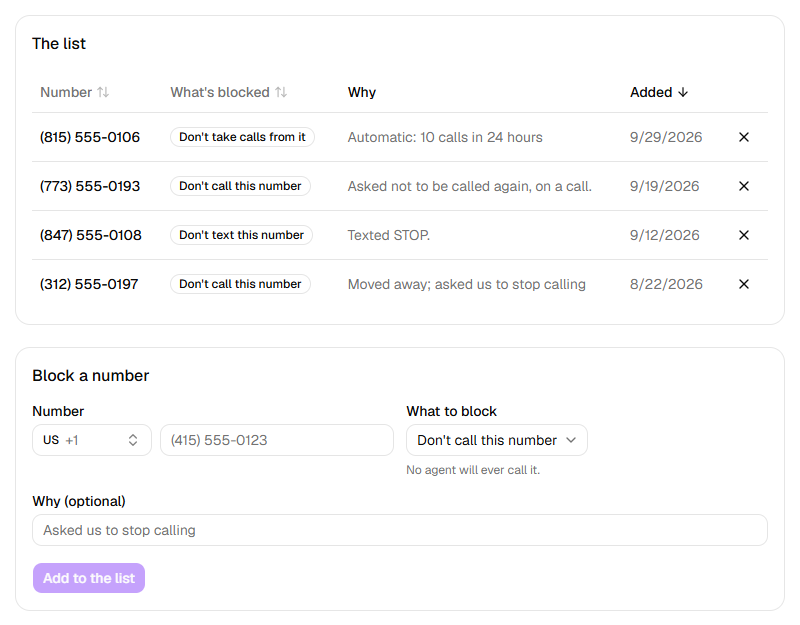
To unblock a number, click the X at the end of its row.
Who's added for you
These show in the list like any other entry, with HiloVoice's reason under Why:
| Why | Added when | What's blocked |
|---|---|---|
| Asked not to be called again, on a call. | Someone told an agent not to call them again, on a call outside a campaign | Don't call this number |
| Asked not to be called again, on a call for the campaign "<name>". | The same, on a campaign's call | Don't call this number |
| Texted STOP. | Someone texted STOP, STOPALL, UNSUBSCRIBE, CANCEL, END, QUIT, REVOKE or OPTOUT, on its own, to one of your numbers. Texting START or UNSTOP takes this entry off again | Don't text this number |
| Automatic: <n> calls in 24 hours | The number reached your daily call limit, with Block numbers that reach the daily limit on | Don't take calls from it |
A test call in the browser, from Try it, never adds anyone, whatever is said on it.
Warning: The block list is your organization's own list. HiloVoice doesn't check national do-not-call registries for you, and taking off someone who asked not to be contacted may break the rules where they live. You're responsible for honouring these requests and for the calling rules that apply to you. See Your responsibilities on calls.
Call limits
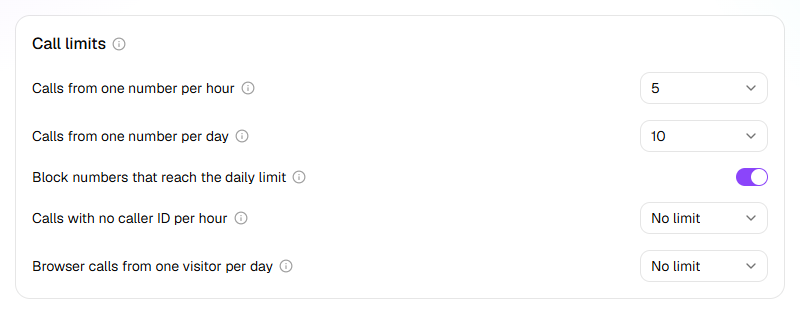
Call limits, at the top of the page, set how often one number may call you before its next call is turned away. Only an Owner or Admin can change them; see Change your organization's settings. With Block numbers that reach the daily limit on, a number that reaches its daily limit lands on this list as Don't take calls from it: remove it if it turns out to be a real customer.
What happens next
- A person blocked with Don't call this number is marked Skipped on a campaign, with On the block list (do not call).
- A text after a call to a number marked Don't text this number is Skipped on the call's After the call tab: <number> is on the do-not-text list.
- A call turned away is still on Calls, marked Blocked, or Over call limit for one over your call limits.
- Adding a number that's already blocked the same way changes nothing.
If it does not work
| You see | Why | What to do |
|---|---|---|
| This number is on your transfer list (calls from it go straight through). Remove it from the Transfer list first. | The number is set to go straight to a person | Remove it under Settings → Transfer list, then block it. |
| This number is on your do-not-call list., after Call me in Try it | The number you typed is marked Don't call this number | Use another number, or remove the entry if it's yours. |
| Only an owner or admin can change these., under Call limits | Your role can't change call limits | Ask an Owner or Admin. |
| That entry is no longer on the list. | Someone else removed it first | Nothing to do. |
| Your role here is Analyst: you can look at everything, but not change it. An owner or admin can make you a builder. | Analysts can't change the list | Ask an Owner or Admin. |
Read next
- Put callers straight through to a person — the opposite list
- Campaigns and recipients — why a blocked person is Skipped
- Review your calls — finding a blocked call
- Change your organization's settings — the call limits
- Your responsibilities on calls — consent, recording and do-not-call