
Pause, archive or delete an agent
For BuildersChecked against the app on October 5, 2026
Every agent has a menu of the things you do to the agent as a whole, rather than to one of its steps: rename it, copy it, look back over its versions, and stop it. There are three ways to stop an agent. Pause stops it for now and keeps everything connected. Archive stops it for good but keeps everything, and can be undone. Delete removes it, and is only for an agent that has never taken a real call.
Before you start
- You're an Owner, Admin or Builder. An Analyst can open the menu and read History, but nothing they choose is saved.
- Only a live agent can be paused. A draft has nothing to pause.
- Resuming an agent, or restoring a live one from the archive, counts towards the live agents your plan includes. See Plans, minutes and limits.
Steps
Open the agent's menu, either way:
- In the builder, click … next to the agent's name.
- On Agents, click ⋮ at the end of the agent's row. An archived agent is listed only with Show archived switched on.
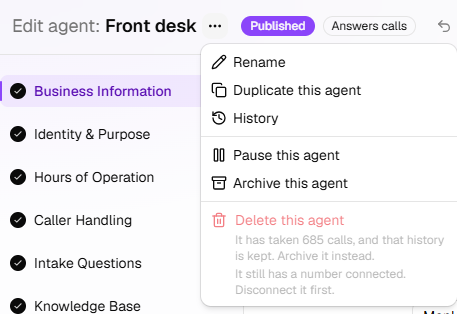
Choose what to do:
Menu item Offered when It does Rename Always Changes the name in your list of agents. Duplicate this agent The agent isn't archived Starts a new agent from this one. See Start a new agent from one you have. History Always Lists every version of the agent. Pause this agent The agent is live Stops it taking and placing calls for now. Resume this agent The agent is paused Puts it back on calls. Archive this agent The agent isn't archived Stops it for good, and keeps everything. Restore this agent The agent is archived Brings it back from the archive. Delete this agent Always shown; it can be chosen only when nothing is behind the agent Removes the agent. Confirm in the box that opens: Pause, Archive or Delete. Resume this agent and Restore this agent happen as soon as you click them.
Rename an agent
Rename opens Rename <name>. Type the new Name and click Rename. The app says Renamed to <name>.
The name is the one you see across HiloVoice. It isn't what the agent calls itself on the phone: that's the name on its Voice & Purpose step.
Look back with History
History opens a panel with every version of the agent, newest first: the draft you're editing, marked Draft, then each version that went live. The one callers get now is marked Live. Each version says:
- who published it and when, and how long it was live, such as live for 3 days, or live now;
- the calls it took, such as 12 calls · 9 completed · 2 handed to a person. Click the number of calls to see them on Calls, with a Version <n> filter;
- What changed from version <n>: click it to see the changes, step by step.
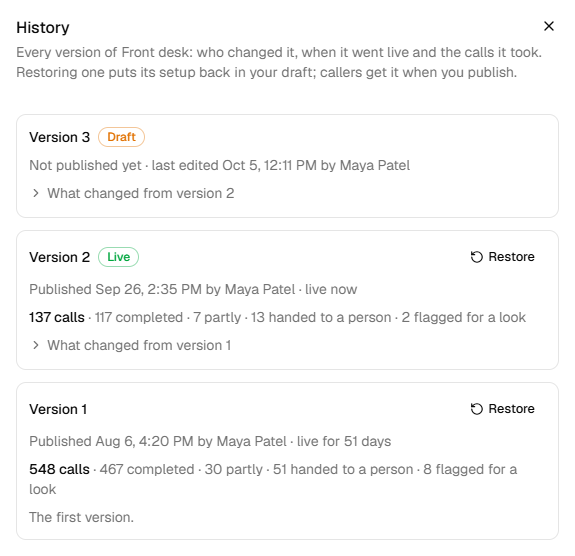
A version that says An update: the same setup, put live on HiloVoice's latest. changed nothing you set up. The draft says Not published yet and when it was last edited.
To go back to an earlier version:
- Click Restore on the version.
- Read Restore version <n>? and click Restore. The app says Version <n>'s setup is in your draft. Publish to give it to callers.
- Publish the agent on Review & Go Live.
Restoring replaces your draft, including changes you haven't published. Restoring the live version throws your draft away, the same as Discard changes. Callers keep the live version until you publish.
Note: An archived agent's History can be read, but no version can be restored.
Pause and resume
Pause this agent asks Pause <name>? Click Pause, or Keep it running to leave it. The app says <name> is paused. Resume it from this menu to take calls again.
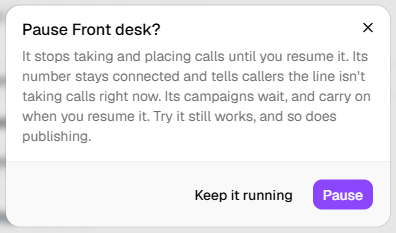
While an agent is paused:
- its number stays connected. Callers hear that the line isn't taking calls right now, and the call ends. On Calls, the call says Agent paused;
- it places no calls. Its running campaigns pause, with The agent is paused.;
- its Speed to lead turns away new leads. Leads already waiting are called once it's resumed;
- Try it still works, and so does publishing. What you publish reaches callers once it's resumed;
- it doesn't count towards your plan's live agents.
To resume, click Resume this agent in the menu, or Resume on the builder's banner. The app says <name> is taking calls again. Campaigns its pause stopped carry on by themselves. A campaign you paused yourself stays paused.
Important: Resuming puts the agent back on real calls at once, and counts towards your plan's live agents. If they're all in use, the app says Your plan includes <n> live agents, and they're all in use. Pause one, or choose a bigger plan under Settings → Billing.
Archive and restore
Archive this agent asks Archive <name>? Click Archive, or Keep it. The app says <name> is archived. It won't take calls until you restore it.
Archiving:
- disconnects the agent's numbers. They stay in your account, ready for another agent;
- takes away an outbound agent's caller ID;
- ends its Speed to lead, and cancels the leads still waiting there;
- keeps its calls, transcripts and every version;
- hides it from Agents until you switch on Show archived.
An archived agent's setup can't be changed, and it can't be tried, published or copied. Its builder opens read-only. You can still rename it.
You can't archive an agent while one of its campaigns hasn't finished, a draft campaign included. Cancel the campaign first, or delete it if it's a draft.
Restore this agent brings it back as it was: live if it had ever gone live, otherwise a draft.
An agent that was never published comes back a draft, and the app says <name> is restored as a draft.
An agent that had gone live comes back live. The app says <name> is back., and what to give it again:
- a Receptionist: Give it a number on the Phone Number step to take calls again. See Give a Receptionist its number.
- an outbound agent: Give it a caller ID on the Caller ID step to place calls again. See Give an outbound agent a caller ID.
If your plan's live agents are all in use, the agent comes back paused: <name> is back, but paused: your plan's live agents are all in use. Pause another agent, or choose a bigger plan, then resume this one.
Delete an agent
Delete this agent can be chosen only when nothing is behind the agent: no real calls, no number connected, and no campaign that hasn't finished. Otherwise the menu item is greyed out, and the lines under it say every reason, one to a line:
| A line under it says | What to do |
|---|---|
| It has taken a call, and that history is kept. Archive it instead. (or It has taken <n> calls…) | Archive it. An agent that has taken real calls is never deleted. |
| It still has a number connected. Disconnect it first. (or It still has numbers connected. Disconnect them first.) | Click Disconnect on its Phone Number step, then delete it. |
| It has a campaign that has not finished. Cancel it first. (or It has <n> campaigns that have not finished. Cancel them first.) | Cancel the campaign, or delete it if it's a draft, then delete the agent. |
When the calls line is there, it comes first. Fixing the other lines won't make the agent one you can delete, so archive it instead.
Test calls from Try it don't count as calls here. A Speed to lead queue doesn't stop a delete either.
Choosing Delete this agent asks Delete <name>? Click Delete, or Keep it. The app says <name> was deleted. and takes you to Agents.
Important: Deleting can't be undone. It removes the agent, everything set up on it, its versions, its uploaded documents and its test calls.
What callers get
| The agent is | A Receptionist's callers | An outbound agent |
|---|---|---|
| Published | The agent answers. | Places calls for its campaigns and Speed to lead. |
| Paused | Hear that the line isn't taking calls right now. The call ends. | Places no calls. Its campaigns pause and wait. |
| Archived | The number is disconnected, so the agent doesn't answer it. | Places no calls, and has no caller ID. |
| Draft | The agent doesn't answer yet. | Places no calls. |
The builder's banners
A banner across the top of the builder says where the agent stands:
| The banner says | It means |
|---|---|
| This agent is archived: it isn't taking calls, and its setup can't be changed. Restore it from the menu next to its name to pick up where it left off. | Nothing on its steps can be changed until you click Restore this agent. You can still rename it. |
| Paused: callers hear the line isn't taking calls, and it places none. What you publish reaches callers once it's resumed. | Click Resume to put it back on calls. |
| Paused: callers hear the line isn't taking calls, and it places none. Unpublished changes — when you resume, callers hear the published version until you publish. | Your edits are saved as a draft. Publish them, or click Discard changes. Click Resume to put it back on calls. |
| Live. Changes you make here don't reach callers until you publish. | Nothing is waiting to be published. |
| Unpublished changes — callers still hear the published version. | Your edits are saved as a draft. Publish them, or click Discard changes. |
| An update is ready. Publish it to give callers the latest. | HiloVoice would set the agent up differently now. Nothing you set up changes. Click Publish update. |
Discard changes asks Discard your changes? Click Discard changes to throw away everything since you last published. The agent returns to exactly what you last published, and the app says Changes discarded — back to the live version.
Important: Discarding changes can't be undone.
What happens next
- Every pause, resume, archive, restore, rename and delete is recorded under Settings → Activity, with who did it. See Check who did what in the activity log.
- A paused or archived agent's past calls stay on Calls.
- A number freed by archiving shows No agent on Phone numbers until you give it to another agent.
If it does not work
| You see | Why | What to do |
|---|---|---|
| This agent has a campaign that has not finished. Cancel it before archiving the agent. | A campaign that isn't over uses the agent | Cancel the campaign, or delete it if it's still a draft, then archive. |
| Your plan includes <n> live agents, and they're all in use. Pause one, or choose a bigger plan under Settings → Billing. | Resuming would take you past your plan | Pause an agent you don't need, or ask an owner to change the plan. |
| We couldn't disconnect this agent's number just now, so it hasn't been archived. Please try again. | The number couldn't be disconnected this time | Try again in a minute. |
| We couldn't remove this agent just now, so nothing has been deleted. Please try again. | The delete didn't go through | Try again in a minute. |
| Pause this agent isn't in the menu | The agent isn't live: it's a draft, already paused or archived | Publish a draft first. Nothing to do for the others. |
| Your role here is Analyst: you can look at everything, but not change it. An owner or admin can make you a builder. | Analysts can't change agents | Ask an owner or admin to do it, or to change your role. |
Related
- How the builder works — drafts, publishing and saving
- Review and go live — publishing a restored version
- Start a new agent from one you have — Duplicate this agent
- Plans, minutes and limits — live agents on your plan
- Monitor a running campaign — a campaign paused with its agent