
Call new leads within seconds
For BuildersChecked against the app on October 5, 2026
Speed to lead has an outbound agent ring a new lead the moment your form, ad or CRM sends them to HiloVoice, while they're still thinking about you. You switch it on once, give its address to whatever collects your leads, and every lead sent there is called within seconds. A lead who doesn't pick up is tried again, inside the agent's calling hours.
Before you start
- You're an Owner, Admin or Builder. Making the API key your form needs takes an Owner or Admin.
- The agent places calls: a Confirmations, Detail checks, Feedback or Follow-ups agent. A Receptionist doesn't have Speed to lead.
- The agent is live, and has a caller ID. See Review and go live and Give an outbound agent a caller ID.
- Its Calling Hours are right: leads are called only inside them. See Set when an outbound agent may call.
- Your plan includes Campaigns and The HiloVoice API.
Steps
Open the agent in the builder and click Speed to lead at the top of the page.
Switch on Call new leads. The app says Speed to lead is on.
Under If they don't pick up, choose how many more times to try, from Don't try again to Try 5 more times, and the wait before each in minutes: First retry after, then Then after. Click Save. A new agent starts on Try 2 more times, after 2 minutes, then 15.
Under Where to send leads, click Copy to copy the address.
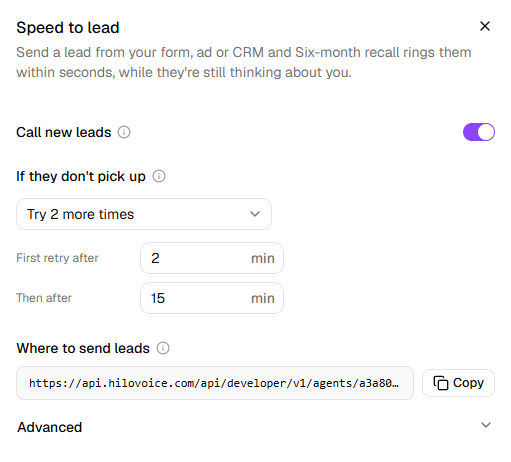
Make an API key under Settings → API keys, or ask an owner or admin to. Each lead is sent with it. The info icon next to Where to send leads says so too, with Open API keys for an owner or admin. See Make and revoke API keys.
Give the address and the key to whoever sets up your form, ad platform or CRM. Zapier, Make and most CRMs can send a lead to an address like this. Advanced shows an example lead, and Every field, and the answers you get back opens the full reference.
Send yourself a test lead. It shows under Leads in the same panel within seconds, with where its call stands.
Warning: Each lead must say it agreed to be called by an automated agent, as your form asks them:
consentis required. HiloVoice doesn't call a lead sent without it. Make sure your form really asks.
What a lead carries
Advanced lists what to send. Only phone, in international format such as +15551234567, and
consent are required. Your form can also send the lead's first and last name, email, time zone,
the words they agreed to as consentText, and anything else the agent should know as variables,
such as service.
Send your own id for each lead as externalId. A lead sent twice with the same id is only ever
called once.
What happens next
- Each lead is called at once, if it's inside the agent's calling hours on the lead's own clock. Outside them, it's called as soon as they open.
- A missed call, a busy line or voicemail is tried again after the wait you set, inside calling hours. Someone who says they're not interested, or asks not to be called, is never called again.
- A number on your block list is never called.
- Each lead is added to Contacts, if they aren't there already.
- One agent takes up to 1,000 leads in 24 hours.
Note: A lead sent to Speed to lead isn't a lead on the Leads page. That page holds the leads your Receptionists find on calls. See Calls, leads and contacts.
The Leads list
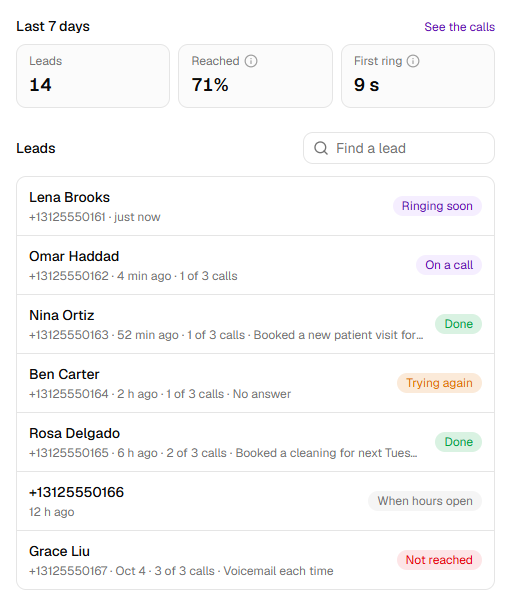
Leads, at the foot of the panel, shows every lead sent to the agent, newest first. Each row has the lead's name or number, when it came in, the calls so far, such as 1 of 3 calls, and the last note. Last call opens that call on Calls. With more than 10 leads, Find a lead searches by number, name or your id for the lead.
| Status | What it means |
|---|---|
| Ringing soon | Waiting for its call, which is due now. |
| When hours open | It came in outside the agent's calling hours. It's called when they open. |
| On a call | The agent is calling them now. |
| Trying again | They didn't pick up. The next try is after the wait you set. |
| Done | The agent finished the job with them. |
| Not reached | The tries ran out, or the call ended in a way that's never tried again. |
| Do not call | Never called: the number is on your block list. |
| Cancelled | Speed to lead ended before they were reached. |
| Needs a look | The agent asked for someone on your team to take over. |
How it's going
Once leads have come in, Last 7 days shows three numbers:
- Leads: how many were sent.
- Reached: the share who spoke with the agent.
- First ring: the usual wait from a lead arriving to their phone ringing. Leads that come in outside calling hours wait for them to open, so they make it longer.
See the calls opens Calls with only this agent's Speed to lead calls, and a Speed to lead filter at the top. Click the filter to see all the agent's calls again. In the list, each of these calls has a Speed to lead label.
Switch it off
Switch off Call new leads. The app says Speed to lead is off. New leads are turned away. Leads already waiting stay, and are called once you switch it back on.
Pausing the agent has the same effect until you resume it. Archiving the agent ends Speed to lead, and cancels the leads still waiting. See Pause, archive or delete an agent.
If it does not work
A box at the top of the panel says what stops leads being called now:
| The panel says | What to do |
|---|---|
| The agent isn't published yet. Publish it before sending leads. | Publish the agent on Review & Go Live. |
| The agent has no number to call from. Choose one on its Caller ID step. | Choose a number on the Caller ID step. |
| The agent is paused. Resume it, and leads are called again. | Click Resume this agent in the … menu next to the agent's name. |
| You see | Why | What to do |
|---|---|---|
| Campaigns are on <plan> and up. An owner can change the plan under Settings → Billing. | Your plan doesn't include campaigns, which Speed to lead runs on | Ask an owner to change the plan. |
| <plan> and up next to Where to send leads: The HiloVoice API is on <plan> and up. An owner can change the plan under Settings → Billing. | Your plan doesn't include the HiloVoice API, which leads are sent through | Ask an owner to change the plan. |
| Each wait is between 1 minute and 24 hours (1,440 minutes). | A wait is under 1 minute or over 1,440 | Change the wait, then click Save. |
| Couldn't save Speed to lead. | The change wasn't saved | Try again in a minute. |
| Your form is told Speed to lead is off for <name>. Switch it on in the agent's Speed to lead settings. | Call new leads is off | Switch it on. |
| Your form is told Send consent: true once the lead has agreed to be called by an automated agent, as your form asks them. HiloVoice doesn't place the call without it. | The lead was sent without consent | Have the form send it, once the lead has agreed. |
| Your form is told That number is on the do-not-call list, so it isn't called. | The number is on Blocked numbers | Nothing, unless it shouldn't be blocked. See Block a number. |
| Your form is told This agent has had 1000 leads in the last 24 hours, the most it takes. Contact HiloVoice support to raise it. | The daily limit is reached | Contact HiloVoice support. |
Related
- Set when an outbound agent may call — the hours leads are called in
- Give an outbound agent a caller ID — the number leads see
- Make and revoke API keys — the key your form sends
- Review your calls — the calls Speed to lead made
- Pause, archive or delete an agent — what pausing and archiving do to it