
Test an agent with Try it
For BuildersChecked against the app on October 1, 2026
Try it, at the top of every step in the builder, lets you talk to an agent from your browser exactly as it's set up right now, unpublished changes included. Nobody else hears the call, and nothing is texted or emailed from it. Once the agent is live, the same panel can also have the agent ring your own phone, for a real call from its number.
Before you start
- You're an Owner, Admin or Builder. An Analyst can open the panel, but can't start a call from it.
- Use a computer or phone with a microphone, and let your browser use it when it asks.
- Nothing can be stopping the agent going live. Until then, the panel lists what to fill in, each item a link to the step it's fixed on.
- On a free trial, test calls use the trial's minutes.
Steps
Open Agents and click the agent.
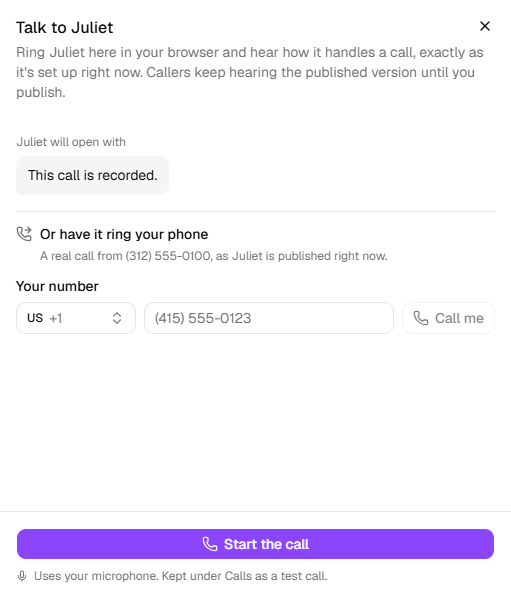
Click Try it at the top of the page. The panel shows the agent's first words under <name> will open with. An agent that waits for the caller says <name> waits for the caller to speak first, so once connected, say hello.
On an outbound agent, fill in the boxes under On a real call these come from your records. For this one, make them up. These stand in for a campaign's list: a first name, an appointment time.
Click Start the call on a Receptionist, or Have it call me on an outbound agent. Allow the microphone if your browser asks.
The panel says Getting <name> ready…, then Connecting to <name>…. Anything you were still typing is saved first, so you hear your latest change.
Talk the way a caller would. The pill at the top says Listening or <name> is speaking, with the call's length beside it.
Click Hang up when you're done. Closing the panel hangs up too.
Click Call again for another go.
Have it ring your phone
Once the agent is live, the panel also has Or have it ring your phone.
- Open Try it, and type your number under Your number. On an outbound agent, fill in the boxes below it too: the call uses them.
- Click Call me. A message says <name> is calling <number>, and your phone rings from the agent's number.
- Answer as a caller would. When the call ends, it shows up under Calls, with the recording.
Important: Call me is a real call, made by the published agent, not your draft. It counts like any other call, and any texts or emails it sends afterwards go out for real. It rings when you click, whatever the agent's calling hours.
Read the transcript
While you talk, each line appears in the panel once it's been said: the agent's on the left, yours on the right.
Every test call is also kept on the Calls page, out of the way of real ones:
Open Calls and switch on Show test calls. Test calls are marked Test, and Who says Browser. If yours isn't there yet, click Check for new calls.
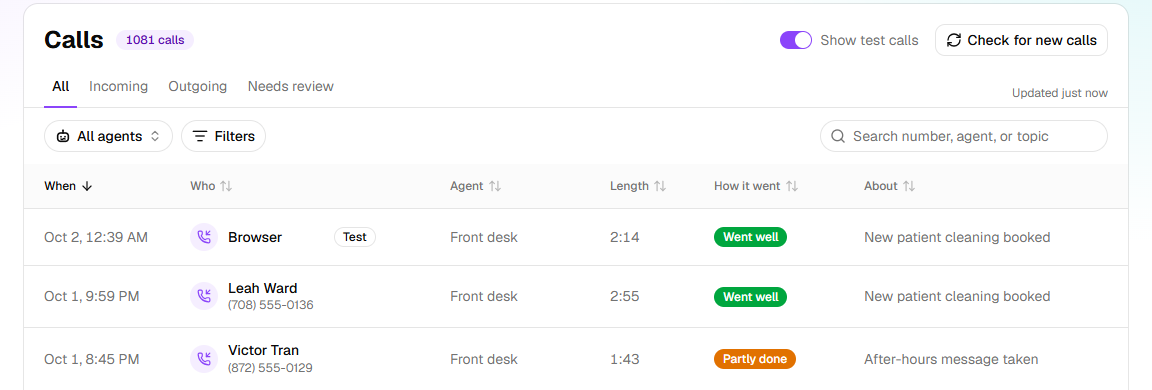
Click the call. Conversation has every line, with the time into the call it was said.
Open Summary. Information collected shows what the agent recorded, and After the call what HiloVoice did once it ended. In short sums the call up.
Check that the agent asked what it should, recorded the answers you gave, and ended the call the way you meant. Owners and Admins also have an Admin tab, which checks the call against the agent's setup: whether every required answer was collected, and its Rule checks.
What a test call does
- It uses your draft. Callers keep hearing the published version until you publish.
- The agent really looks things up: your records, and the free times in your calendar.
- Nothing is texted or emailed. On After the call, those actions say Test calls don't send texts. or Test calls don't send emails.
- A booking is kept on the call, but never reaches your real calendar, and no confirmation goes out. Moving or cancelling a real appointment on a test call changes nothing.
- Your team isn't notified about a test call, even one flagged for review.
- An agent that answers as more than one person picks one for each call. The panel says who: <name> is answering as <person> on this call.
If it does not work
| You see | Why | What to do |
|---|---|---|
| A few things need filling in before there's anything to talk to: | Something stops the agent going live | Click each item and fix it on its step. |
| HiloVoice needs your microphone for this. Allow it in your browser, then try again. | Your browser blocked the microphone | Allow it for HiloVoice in the browser's address bar, then click Try again. |
| Your latest changes couldn't be saved, so the call didn't start. | A change you made didn't save | Wait for the bar at the top to say Saved, or click Not saved — retry. Then try again. |
| Couldn't connect the call. Check your connection and try again. | Your browser couldn't open the call | Check your internet connection, then click Try again. |
| We couldn't start the test call just now — please try again. | HiloVoice couldn't get the agent ready | Try again in a minute. |
| The call dropped. Check your connection and call again. | The call ended before you hung up | Check your internet connection, then click Call again. |
| Start the call is greyed out, with Your role here is Analyst: you can look at this agent, but not call it. An owner or admin can make you a builder. | Analysts can't make test calls | Ask an owner or admin to change your role. |
| Try it has <n> minutes a month on your plan, and this month's are used. They're back on the 1st. | Your plan limits test calls | Wait for the 1st. On a live agent, Call me still works: it's a real call. |
| The free trial is over. Choose a plan to carry on taking and placing calls., or another sentence about calls being paused | Calls are paused for your organization | An owner sorts it out under Settings → Billing. The sentence says what's needed. |
| Once this agent has a number connected for calling, it can ring you for real. | The agent has no number to call you from | Click Connect a number. |
| Enter the number to call, including the country code. | Call me couldn't read your number | Type the whole number, with the country's code. |
| This number is on your do-not-call list. | Your number is on the block list | Remove it under Settings → Blocked numbers, or use another phone. |
| This agent is paused. Resume it to place calls. | The agent is paused | Click Resume this agent in the … menu next to its name. |
| Every outbound line is in use right now. Try again in a moment. | No line was free for Call me | Try again in a moment. |
| There's no Try it button | The agent is archived | Click Restore this agent in the … menu next to its name. |
Read next
- Check an agent before real calls reach it — what to try before callers get the number
- Review and go live — publish what you've tested
- Put a Receptionist on the web — a page anyone can talk to it from
- Review your calls — every call, its transcript and recording